

Selecting the best serial port to ethernet converter for legacy operational technology (OT) networks is rarely straightforward. Whether you are dealing with unexplained Modbus polling timeouts, ground loop interference on the factory floor, or struggling to make legacy supervisory software recognize an IP address, choosing the wrong converter will guarantee system downtime.
There is no universal “plug-and-play” device. The ideal hardware depends entirely on your specific automation topology—whether you need simple Virtual COM port mapping for a single RS232 CNC machine, or 3000V optical isolation to protect a multi-drop RS485 sensor network from lightning strikes.
📋 Table of Contents
- 1. What Makes an Industrial Serial to Ethernet Converter “The Best”?
- 2. Ensuring Compatibility: RS232, RS422, or RS485 Support?
- 3. Electrical Isolation and Surge Protection: Shielding Your Equipment
- 4. The Virtual COM Port Nightmare: Why Driver Stability is Crucial
- 5. Modbus RTU vs. Transparent Serial: Don’t Make This Costly Mistake
- 6. Data Latency: The “Storage Gateway” Advantage
- 7. Built-in Diagnostics: Why “Ping” Isn’t Enough
- 8. Network Switch & Cascading Architecture: Saving Control Panel Space
- 9. Network Security: Protecting Legacy Serial Data on IP Networks
- 10. Industrial Device Servers: 2026 Scenario Comparison
- 11. Extended Real-World Examples
Three Questions: Do You Actually Need a Converter?
Before diving into features, three questions tell you if you need a converter:
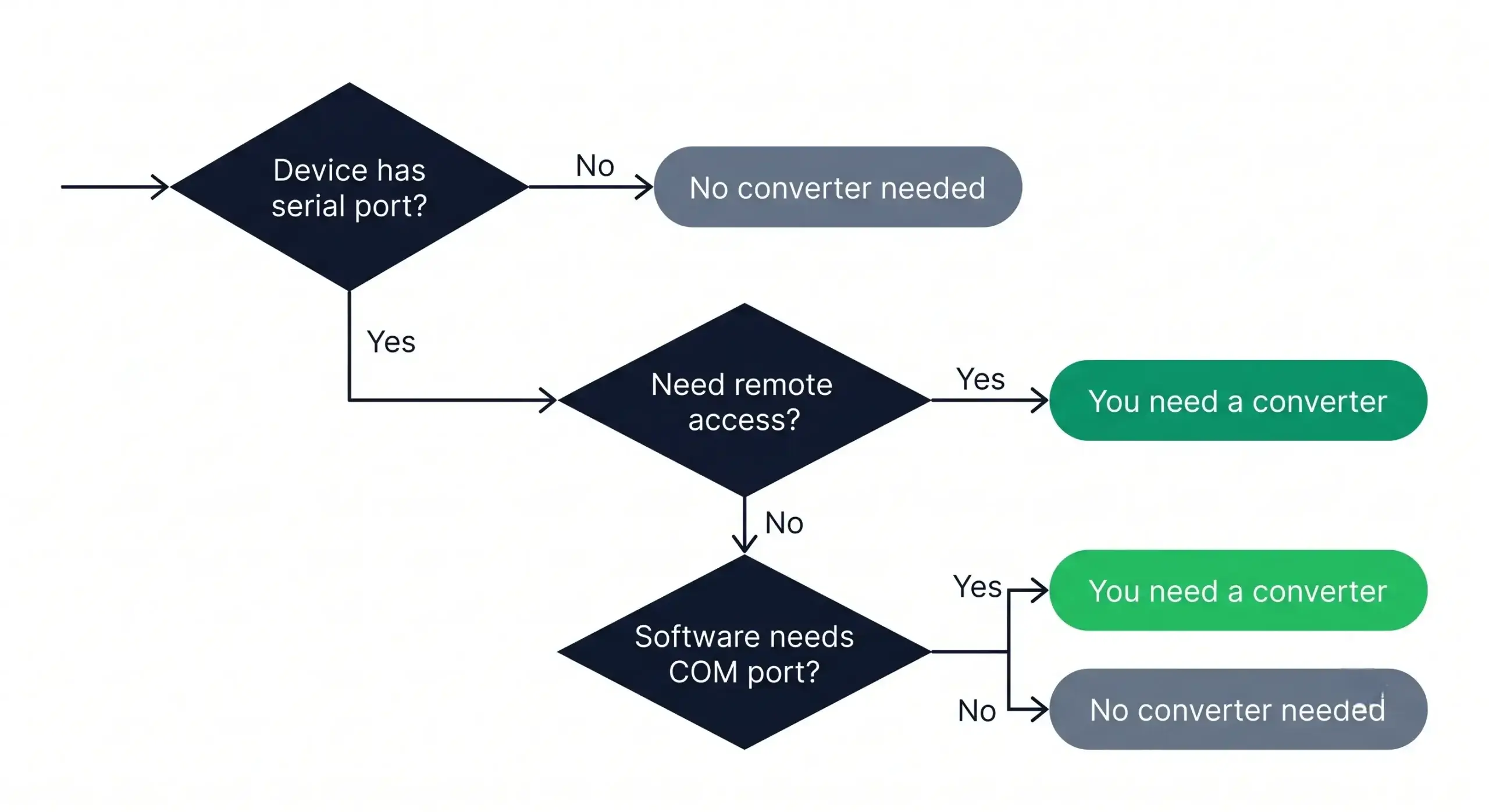
- Question 1: Does your device have a serial port? (RS232/RS485/RS422): If your device only has a USB port or an Ethernet port you do not need a converter. You can just use your device with the USB or Ethernet connection it has.
- Question 2: Do you need remote access? If the device is in another room, building, or city, and you need to see the data from elsewhere, then you will need to get a converter.
- Question 3: Does your software only work with COM ports? Old software usually looks for things like COM1, COM3, and COM5 to work, and does not understand what IP addresses are. This converter will help your software talk to the device even if it is not directly connected to your computer through a physical COM port.
1. What Makes an Industrial Serial to Ethernet Converter “The Best”?
The “best” converter is not the most expensive one but the one that couples the hardware to the harshness of your environment. A cheap commercial-grade converter is fine for a climate-controlled server room, but procurement teams often make the critical mistake of installing these fragile units on a vibrating, unheated factory floor, ensuring imminent failure.
“The the best” means unconditional survivability for real industrial applications. Temperature compensation algorithms guaranty stable operation of industrial-grade devices from –40°C to 85°C. Additionally, top-level industrial units incorporate DIN-rail mounting capabilities for secure locking into control cabinets and feature dual redundant 9-24V DC power inputs. optional PoE (Power over Ethernet) support using the RJ45 pins is highly recommended for modern OT upgrades, so that complex wiring can be avoided and a clean, single-cable installation can be achieved.
| Deployment Environment | Required Hardware Specification |
|---|---|
| Clean indoor control panel | Standard industrial (0°C to 60°C rated) |
| Outdoor telemetry cabinet / unheated space | Wide-temperature (–40°C to 85°C rated) |
| Climate-controlled server room | Commercial grade (0°C to 40°C) is acceptable |
The $20,000 Winter Freeze in Minnesota
A municipal water treatment facility installed standard commercial-grade serial converters inside unheated outdoor telemetry cabinets to poll remote RS485 flow meters. During a severe January cold snap, ambient temperatures dropped to –25°C (–13°F).
The Consequence: The temperature compensation oscillators in all eight commercial converters froze, causing complete packet loss and triggering emergency SCADA alarms. Replacing them in blizzard conditions incurred $12,000 in emergency contractor site visits and $8,000 in hardware rush-orders.
2. Ensuring Compatibility: RS232, RS422, or RS485 Support?
You likely have a mix of older equipment on your floor—perhaps an RS232 barcode scanner on an assembly line and several RS485 digital power meters in the electrical room. You definitely do not want to buy separate, incompatible converters for each protocol, creating unnecessary complexity.
| Interface | Characteristics | Best For |
|---|---|---|
| RS-232 | 15m max distance, point-to-point | Older equipment, debug ports, CNCs |
| RS-485 | 1,200m max distance, multidrop | PLC networks, sensors, meters |
| RS-422 | 1,200m, point-to-point, full duplex | Long-distance single devices |
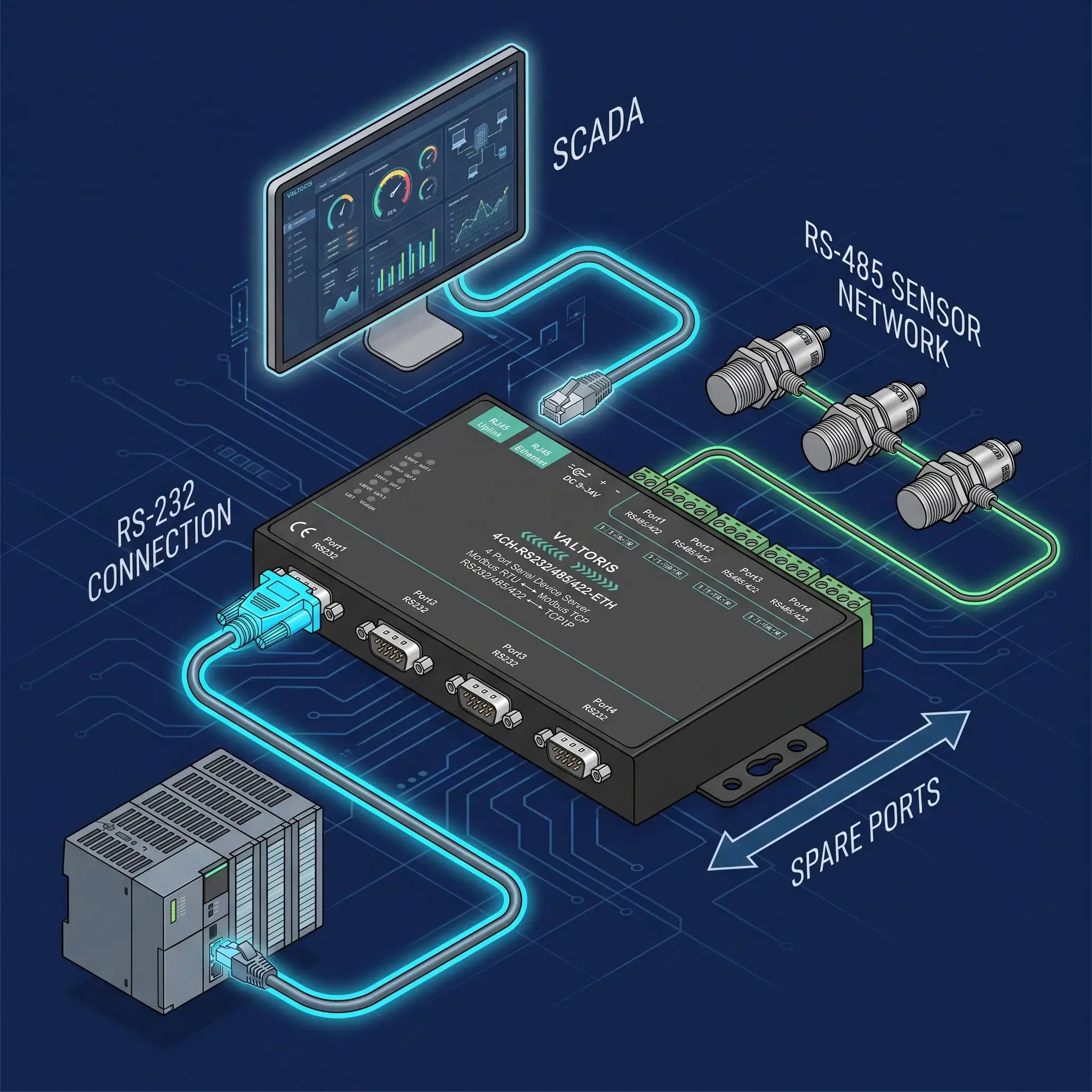
Integrating network equipment can be a nightmare, especially when you’re running a mix of equipment in your facility. You may have an old RS-232 PLC on one side of a control panel and on the other side you need to poll a multi-drop network of RS-485 power meters.
Instead of purchasing separate, incompatible gateways and wasting valuable Ethernet switch ports, modern integrators deploy Mixed-Protocol Multi-Port Device Servers (such as the Valtoris 4CH-RS232/485/422-ETH). Featuring independent “3-in-1” serial ports, these units handle concurrent RS-232 and RS-485 traffic simultaneously. Furthermore, reserving spare ports allows for future sensor expansion without ripping and replacing hardware, while built-in dual RJ45 ports let you daisy-chain devices to save switch capacity.
3. Electrical Isolation and Surge Protection: Shielding Your Equipment
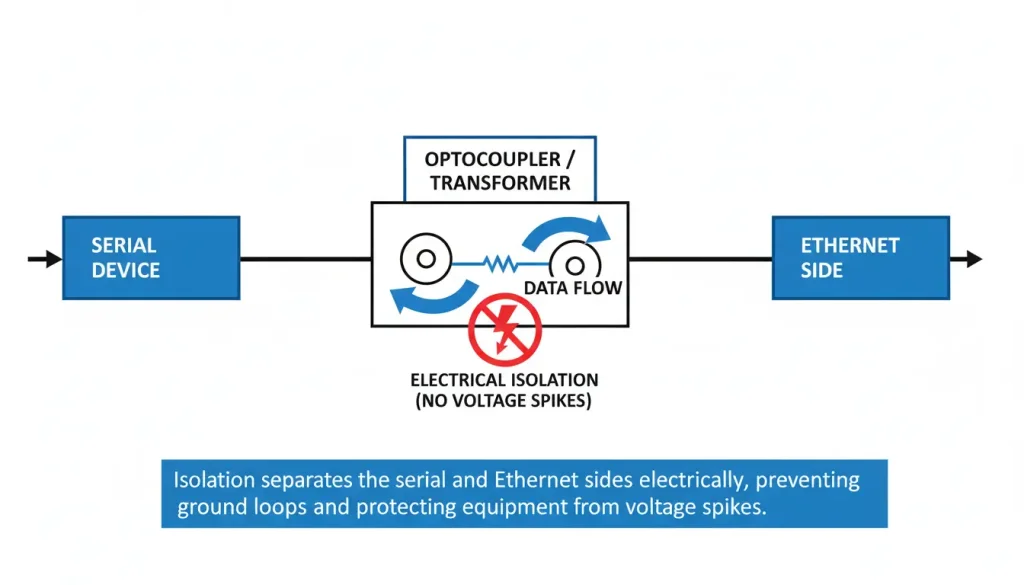
Factory floors are harsh electrical environments. Long cable runs between buildings? Nearby lightning risk? Motors or drives causing unexplained communication failures? In these environments, lacking isolation typically leads to transient voltage spikes that disrupt communication or travel right up the serial wire to damage expensive PLCs.
Isolation separates the serial side from the Ethernet side using optocouplers or transformers. It prevents ground loops, blocks voltage spikes, and allows devices with different ground potentials to communicate.
| Isolation Level | Typical Use Case |
|---|---|
| None | Clean indoor, short runs, same building |
| 1500V (basic) | Mixed environment, moderate risk |
| 3000V (enhanced) | High-risk, outdoor runs, industrial sites |
According to IEC 61000-4-2 and IEC 61000-4-4 standards, industrial equipment should withstand electrostatic discharge (±15kV) and fast transient bursts. Devices with isolation and proper EMC certification perform significantly better in harsh environments.
Free Download: The RS232/RS485 to Ethernet Survival Guide
Don’t fry your PLCs. Click below to instantly grab our 1-page PDF cheat sheet on selecting the correct isolation voltage (1500V vs 3000V) and wiring pinouts for your legacy serial devices.
4. The Virtual COM Port Nightmare: Why Driver Stability is Crucial
Hardware is only half the equation. If your existing legacy supervisory software expects a physical COM port, it cannot interface directly with an IP address without a Virtual COM (VCOM) software driver.
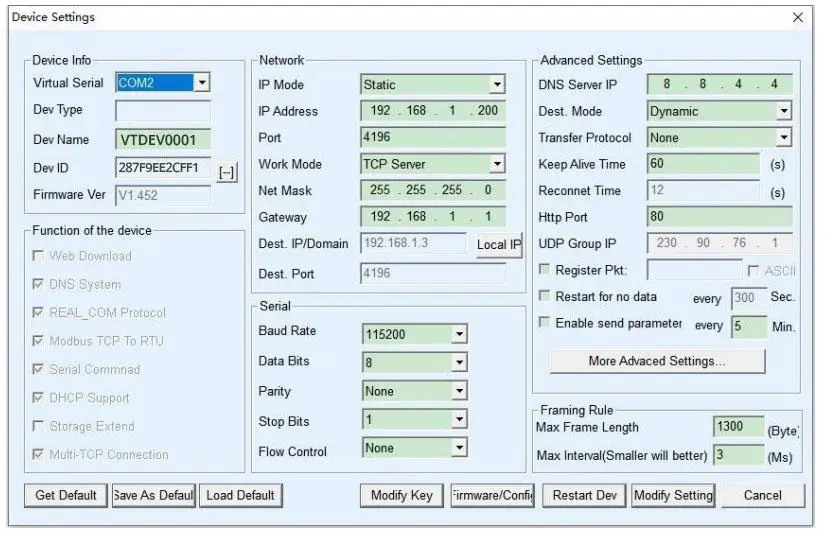
A frequent pitfall in industrial integration is discovering that cheap converters come with poorly coded drivers that lock up the host system the moment a network packet drops. The best industrial device servers provide actively maintained VCOM tools (like VirCom) that gracefully handle network latency and automatically reconnect without requiring a manual service restart.
5. Modbus RTU vs. Transparent Serial: Don’t Make This Costly Mistake
A frequent and costly mistake is buying a transparent serial server when you actually need a Modbus Gateway. A basic serial-to-Ethernet converter blindly packages raw serial bytes into TCP packets. However, Modbus RTU relies on strict timing (the 3.5 character silence rule). When raw RTU data is sent over a jittery Ethernet network, packets get fragmented, causing constant CRC errors and timeouts at the SCADA level.
The Solution: If your daisy-chained field devices rely on Modbus RTU over RS-485, you must specify an industrial-grade converter that functions as an active Modbus gateway. Instead of blindly forwarding bytes, it intelligently translates Modbus TCP requests from your network SCADA directly into Modbus RTU polling for the serial chain. This eliminates timing errors and requires zero modification to your existing PLC ladder logic.
Modern OT-to-IT bridging often bypasses local SCADA entirely. Advanced converters support native MQTT protocols, automatically structuring serial telemetry data into lightweight JSON payloads. This allows for direct, secure pushing of legacy machine data to AWS IoT, Azure, or private cloud dashboards. (To see exactly how this works, read our guide on how to convert RS232 to Ethernet).
6. Data Latency: The “Storage Gateway” Advantage
A hidden spec that separates the “best” converters from average ones is polling latency. Modbus TCP network communication is fast (often under 3ms), but RS485 Modbus RTU is constrained by physical baud rates (often taking >30ms per query).
If multiple SCADA host computers query a standard non-storage gateway simultaneously, the serial bus becomes congested like a single-lane bridge. Advanced industrial converters solve this using Storage Modbus Gateway technology. They autonomously poll the field devices and cache the register data in internal memory. When SCADA requests data, the gateway replies instantly from its cache (sub-3ms response), virtually eliminating network timeouts even with multiple concurrent master hosts.
Furthermore, when multiple SCADA hosts access the same serial device simultaneously, top-tier gateways feature hardware-level RS485 bus conflict detection. The gateway actively coordinates and schedules the traffic on the RS485 bus, preventing data collisions and garbled frames that frequently crash cheaper consumer-grade units.
7. Built-in Diagnostics: Why “Ping” Isn’t Enough
When communication fails on the factory floor, knowing that the IP address is “pingable” doesn’t help you fix the serial side. Top-tier converters provide comprehensive physical and software diagnostic tools.
Look for hardware with independent LED indicators for TCP Connection (LINK), Network-to-Serial activity (ACT), and Serial-to-Network responses (RXD). Furthermore, robust configuration tools (like VirCom) include built-in Data Monitors that allow you to capture and display raw Hexadecimal traffic flowing through the virtual port in real-time, saving you from needing an external serial sniffer to diagnose protocol mismatches.
8. Network Switch & Cascading Architecture: Saving Control Panel Space
Ethernet switch ports are costly and space limited in industrial control panels. A cabinet gets cluttered up in no time with multiple single port converters. Advanced industrial device servers integrate a dual-port network switch directly into the device to address this.
This dual port design allows daisy-chaining (cascading). For example, a 4-channel unit can easily cascade to support 16 ports, and an 8-channel unit can scale to 32 ports without the need for additional external switch capacity. The architecture reduces cable mess, saves space on the DIN-rail, and reduces overall deployment costs.
9. Network Security: Protecting Legacy Serial Data on IP Networks
Traditional serial communication is point-to-point and physically closed off. However, once you bridge that legacy data onto an Ethernet network—especially if it involves access control or sensitive manufacturing data—security becomes a valid operational concern.
To keep serial data safe modern converters use strong security measures. It is advisable to specify devices that support SSL/TLS encryption for data transmission, ensuring that packets cannot be sniffed on the public network. IP/MAC address filtering allows administrators to restrict access to authorized central servers only.
⚡ Interactive Serial Converter Specifier (10-Second Matcher)
Before reviewing the specific models below, click your deployment requirements to see which industrial serial-to-Ethernet architecture fits your topology best.
10. Industrial Device Servers: 2026 Scenario Comparison
Rather than arbitrary rankings, we evaluated leading industrial device servers across real-world testing parameters: Virtual COM driver stability, thermal resistance, and protocol translation performance.
Moxa NPort 5100 Series
Best for: Facilities heavily entrenched in the Moxa ecosystem with sufficient procurement budgets.
- Pros: Industry-standard reliability; exceptionally stable Windows VCOM drivers.
- Cons: High brand premium; single-protocol limitation per basic hardware unit.
Valtoris “3-in-1” Multi-Interface Series
Best for: System integrators needing a unified hardware ecosystem—from a single universal spare part up to complex mixed-protocol control panels.
- Pros: 40-50% lower unit cost than legacy brands; features software-configurable RS-232/485/422 ports and built-in switch cascading.
- Cons: PoE support is not standard and requires custom ordering; brand recognition in enterprise IT departments is lower than legacy Tier-1 giants.
Valtoris Isolated (VI) Series
Best for: Outdoor pumping stations, chemical plants, and long RS485 cable runs subject to ground loops.
- Pros: Full 3000V optical isolation per port; acts as an electrical firewall to protect expensive master PLCs from transient voltage spikes.
- Cons: Higher price point and slightly bulkier footprint than standard models; overkill for clean, indoor environments.
Advantech EKI Series
Best for: IT-heavy environments requiring advanced IPv6 and enterprise security features.
- Pros: State-of-the-art IT routing features and robust hardware.
- Cons: Interface and routing configuration can be complex for simple Modbus field polling.
USR-TCP232 Series
Best for: Non-critical, climate-controlled environments (e.g., indoor barcode scanner to office PC).
- Pros: Extremely low entry price; compact footprint.
- Cons: Commercial-grade specifications; lacks optical isolation for harsh factory floors.
| Engineering Parameter | Tier-1 Legacy Brand | Valtoris Industrial Series | Commercial Brand |
|---|---|---|---|
| Operating Temp. Range | 0°C to 55°C (Wide temp extra) | –40°C to 85°C (Standard) | -25°C to 75°C |
| Serial Protocols | Dedicated per model | 3-in-1 (RS232/485/422) | Single protocol |
| Surge & Isolation | 15kV ESD | 2KV Net Surge + 3000V Isolation (VI Series) | Basic / Unrated |
| Input Voltage | 12-48V DC | 9-24V DC / 18-36V DC (VI Series) | 5V DC (Wall Wart) |
11. Extended Real-World Examples
Example 1: Water plant with 8 flow meters
Eight flow meters in one pump house, all RS485. Data needs to go to the control room 200 meters away over Ethernet.
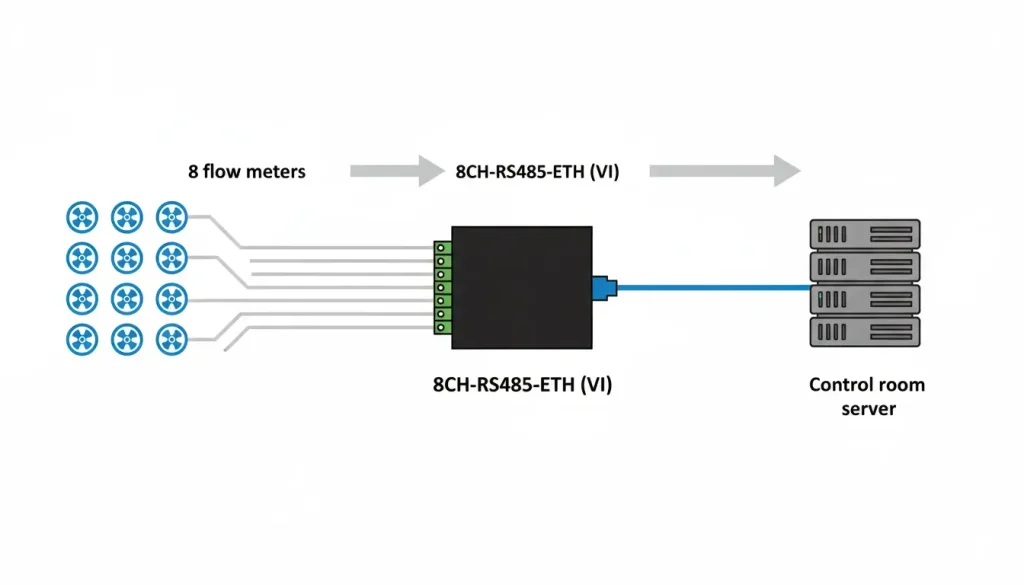
- 8 devices → 8CH-RS485-ETH (VI)
- Outdoors, lightning risk → (VI) with 3000 V isolation is required.
- Local SCADA only → Modbus gateway polling is sufficient.
Example 2: Old CNC machine with RS232
CNC machine has RS232. Control software runs on a PC in the office and strictly expects COM3.
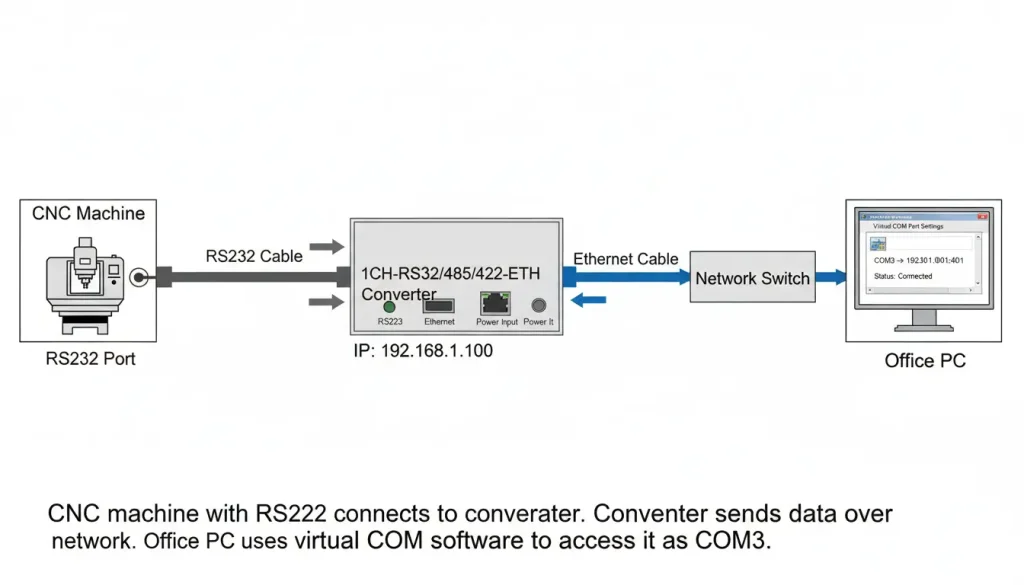
- One device → 1CH-RS232/485/422-ETH
- Clean environment → No optical isolation needed.
- Software needs COM port → Install WHQL Virtual COM software, map COM3 to the converter’s IP. The CNC never knows it is on the network.
🧰 RS232/RS485 Pinout & Troubleshooting Matrix
🔌 RS232 Null-Modem (Crossover) Wiring
When connecting two DTE devices (e.g., PC to CNC/Converter), pins 2 and 3 MUST be swapped. (Building your own cable? See our complete RS232 Pinout & RJ45 Wiring Guide).
DTE (Device)           Converter (DTE)

Pin 2 (RXD) <--------> Pin 3 (TXD)

Pin 3 (TXD) <--------> Pin 2 (RXD)

Pin 5 (GND) <--------> Pin 5 (GND)
⚡ RS485 (2-Wire Multidrop) Rules
Ensure all A(+) terminals connect to A(+), and B(-) to B(-). For cable runs > 200m, install 120Ω resistors.
Master Gateway          Slave Devices

Data A (+)  ---------+----- Data A (+)

Data B (-)  ---------+----- Data B (-)

[120Ω Resistor] <==========> [120Ω Resistor]
Frequently Asked Questions
Should I configure my converter to use TCP or UDP?
My RS232 device is connected, but no data is transmitting. Why?
Can multiple SCADA systems access the same serial device simultaneously?
Will VCOM software cause BSOD crashes on Windows 11?
How do I send OT data to the cloud if IT blocks inbound firewall ports?
Stop Guessing with Your Network Topology
Don’t risk system downtime with the wrong isolation voltage or VCOM mismatch. Tell our engineering team about your legacy equipment and SCADA setup below, and we will recommend the exact hardware to ensure zero polling timeouts.
