
Moxa’s NPort 5110 and 5150 have been the default baseline standard for serial to Ethernet connectivity for more than a decade. They successfully connected millions of RS-232 and RS-485 devices to the nascent industrial internet. But the Operational Technology (OT) landscape is going through a massive architectural shift.
Host systems are being forced onto Windows 11 and modern Server environments. Cybersecurity frameworks now mandate encrypted communications inside the factory perimeter. Furthermore, legacy “transparent forwarding” is proving inadequate for the strict timing demands of modern Modbus polling.
This guide provides an objective framework for navigating this transition. Using the Valtoris 1CH V-Series as a 2026 benchmark, we will dissect the underlying flaws of legacy architectures—but first, we must address the immediate commercial realities driving this shift.
Table of Contents
- 1. Why Engineers are Seeking Moxa NPort Alternatives in 2026
- 2. Surviving Windows 11: The Virtual COM Port Dilemma
- 3. Transparent Forwarding vs. Protocol Conversion: The Modbus Dilemma
- └ Physical Migration: DB9 to Terminal Block
- 4. Hardware Watchdogs and the End of Manual Reboots
- 5. Beyond Legacy: Built-in MQTT & JSON for the Cloud Era
- 6. Step-by-Step: How to Swap a Moxa 5150 Without Changing SCADA Code
- 7. SKU Consolidation and Total Cost of Ownership (TCO)
- Frequently Asked Questions
1. Why Engineers are Seeking Moxa NPort Alternatives in 2026
Today’s system integrators (SIs) and automation panel builders are in a brutally compressed margin environment. The fallout from the global chip shortages in recent years created a dangerous precedent for legacy manufacturers: exorbitant brand premiums, plus unpredictable multi-month lead times.
The reality on the shop floor is very pragmatic. Engineers don’t mind working with incumbent brands. What they mind is paying a huge premium for a fundamental technology—an RS-485 to Ethernet converter—that’s been commoditized. “When tomorrow’s telemetry upgrade for a critical wastewater pump station can’t wait 12 weeks for a particular SKU to emerge from backorder status, that’s not an option.
The quest for a “drop-in alternative” is fueled by the need to reclaim project budget and ensure immediate deployment availability, without sacrificing a single millisecond of polling stability.
2. Surviving Windows 11: The Virtual COM Port Dilemma
The most critical friction point in upgrading serial infrastructure is legacy software dependency. Facilities worldwide operate CNC monitoring tools, weighbridge systems, and older SCADA platforms that are strictly hardcoded to communicate via legacy physical ports (e.g., COM3, COM4).
IP communication engineers use Virtual COM mappers to allow IP communication. However, as enterprise IT departments mandate upgrades to Windows 11 and Windows Server 2022, the underlining OS kernel architecture changes significantly. Old or poorly maintained Virtual COM drivers (such as aging versions of NPort Administrator) can cause unpredictable port drops, or worse, kernel-level Blue Screen of Death (BSOD) crashes.
The Modern Engineering Requirement:
When evaluating any alternative, the stability of the Virtual COM driver under modern OS environments is paramount. The Valtoris 1CH-ETH addresses this through a dual-path architecture:
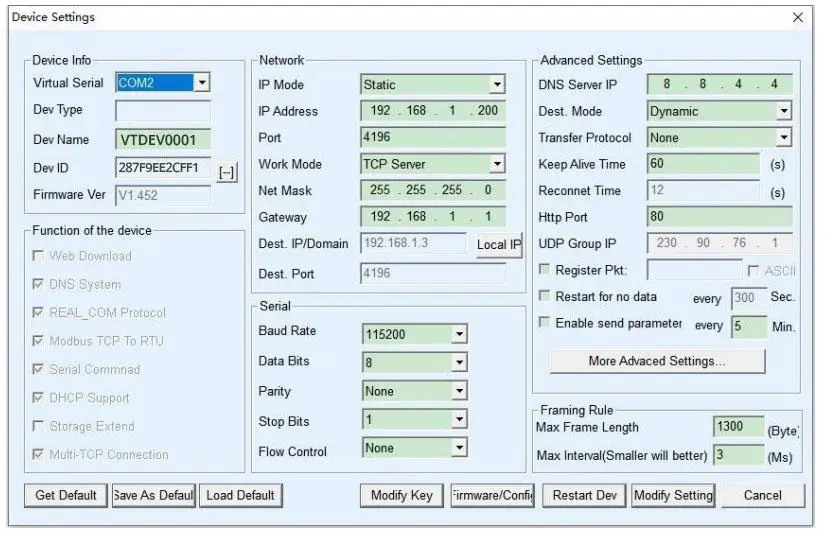
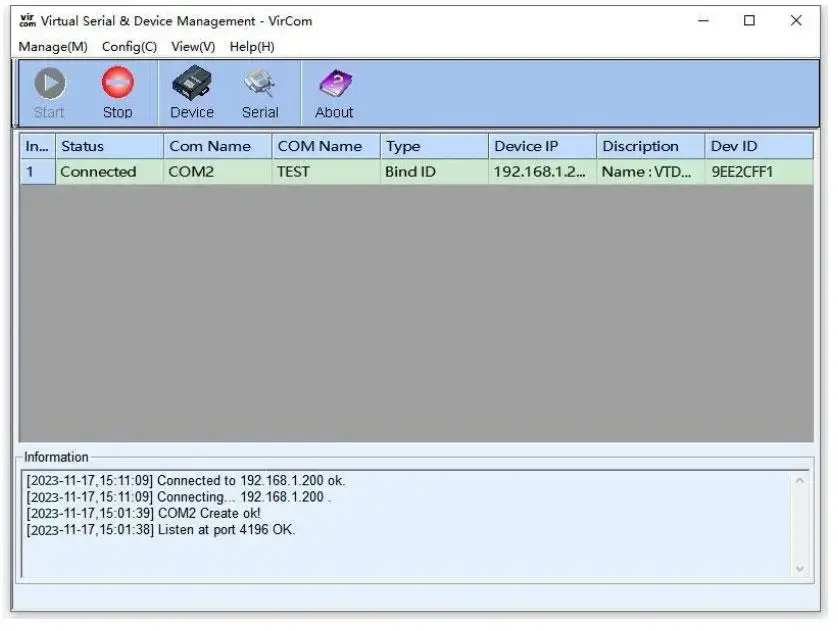
- WHQL-Compliant Virtual COM (VirCom): For systems that absolutely cannot be modified, Valtoris provides an actively maintained Virtual Serial utility optimized for Windows 10/11. It is engineered to handle OS-level sleep/wake cycles and network jitter natively. If a network drop occurs, the driver seamlessly buffers the connection without triggering a host-side kernel panic.
- Migration to Driverless Socket Operation: For forward-looking deployments, the hardware fully supports standard TCP Server, TCP Client, and UDP modes, bypassing the Windows COM stack entirely.
| Operating System | Legacy Driver Risk | Valtoris VirCom Engine |
|---|---|---|
| Windows 11 / Server 2022 | High (Kernel panics, BSOD on sleep) | Stable (WHQL native buffer) |
| Windows 7 / 32-bit SCADA | Deprecation warnings | Fully backward compatible |
3. Transparent Forwarding vs. Protocol Conversion: The Modbus Dilemma
A common troubleshooting scenario on automation forums is engineers replacing a direct serial cable with a standard device server and suffering massive Modbus polling timeouts and CRC errors.
The Physics of the Problem:
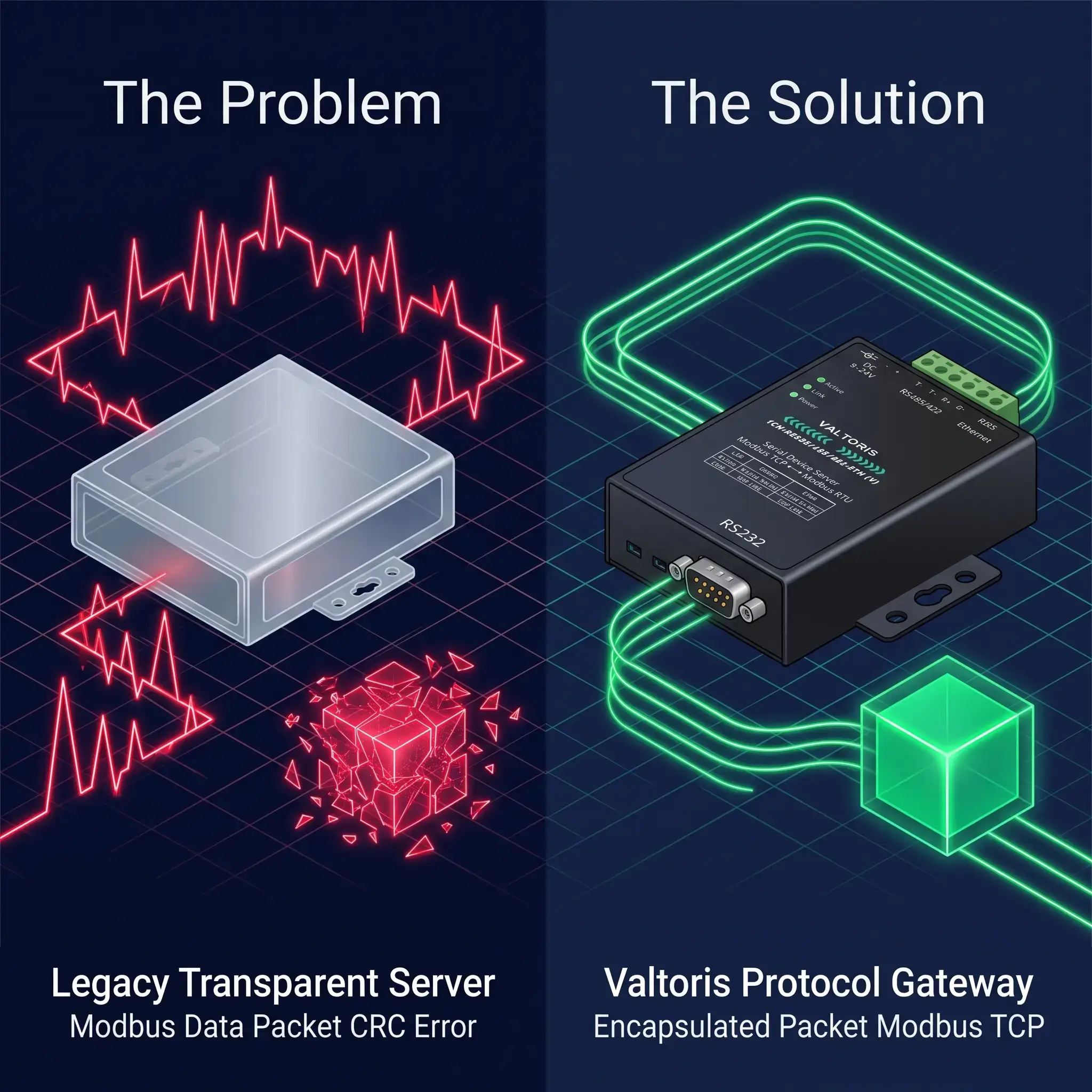
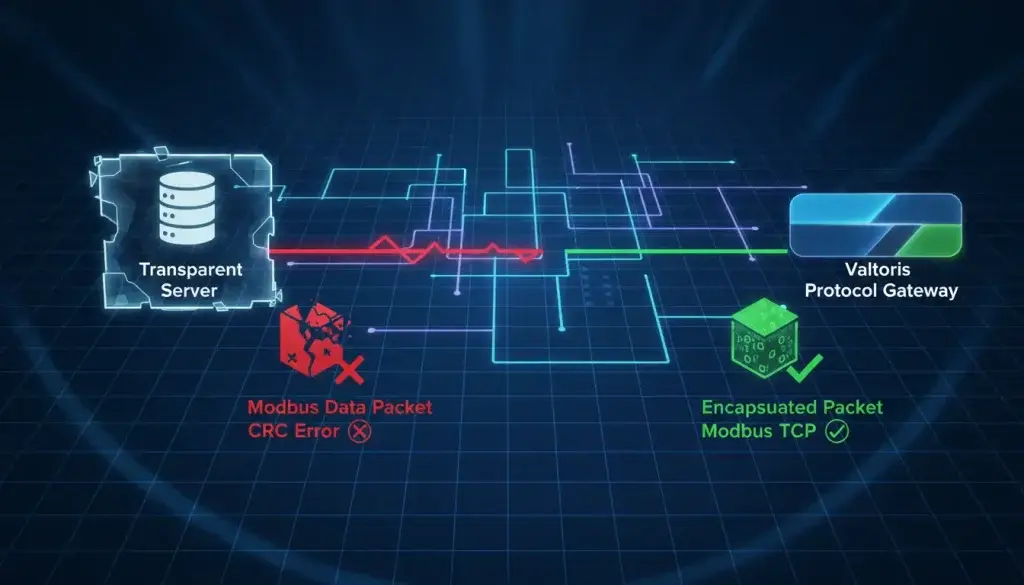
Standard devices such as the NPort 5110 are Transparent Device Servers. They take the continuous serial byte stream, break it up into TCP packets, and send it over the Ethernet network. However, the Modbus RTU protocol needs a strict 3.5 character time silence between data frames to mark the end of a message. Transparent TCP packets are subject to the natural Ethernet jitter that destroys this critical timing. The SCADA master gets fragmented frames, checksums fail and it disconnects.
The Protocol Gateway Requirement:
Raw TCP socket forwarding for time sensitive RTU polling is a fundamentally broken approach. Bridging these networks requires active protocol translation, according to the implementation guidelines of the Modbus Organization . This is one of the advantages of the Valtoris 1CH-ETH. This is not a simple transparent server, it includes a native Modbus RTU to Modbus TCP Gateway Engine.
- It actively receives and reassembles the complete Modbus RTU frame at the physical serial port level.
- It translates the payload and wraps it perfectly into a standard Modbus TCP packet (with an MBAP header).
- It utilizes onboard FIFO (First-In-First-Out) memory to queue simultaneous SCADA requests, eliminating data collisions on the half-duplex RS-485 bus.
| Ethernet State | Transparent Server Result | Valtoris Gateway Result |
|---|---|---|
| Stable (< 2ms ping) | Normal execution | Normal execution |
| Jitter Spike (> 5ms gap) | Fatal: Frame fractured, CRC Error | Safe: SRAM buffer rebuilds frame |
Physical Migration: DB9 to Terminal Block
Legacy device servers utilize a DB9 Male connector for RS-485, which forces technicians to solder custom pins or buy bulky DB9-to-Terminal adapters in the field.
The Valtoris 1CH-ETH features an industrial pluggable terminal block. Simply snip off the old DB9 connector, strip the wires, and screw them directly into the Valtoris module. Use this quick reference map for 2-wire RS-485 integration:
4. Hardware Watchdogs and the End of Manual Reboots
In continuous manufacturing and remote telemetry, a device that requires a manual reboot is a failed device.
A common issue with aging or cost-optimized serial servers is that, over months of continuous TCP streaming, they suffer from memory leaks or socket hangs. The Web UI becomes unresponsive, the data flow stops, and a technician is forced to physically pull the power plug to reset the unit.
The Hardware Watchdog (WDT) Standard:
Software self-healing is not enough by itself. A separate Hardware Watchdog Timer is required for modern industrial deployment.
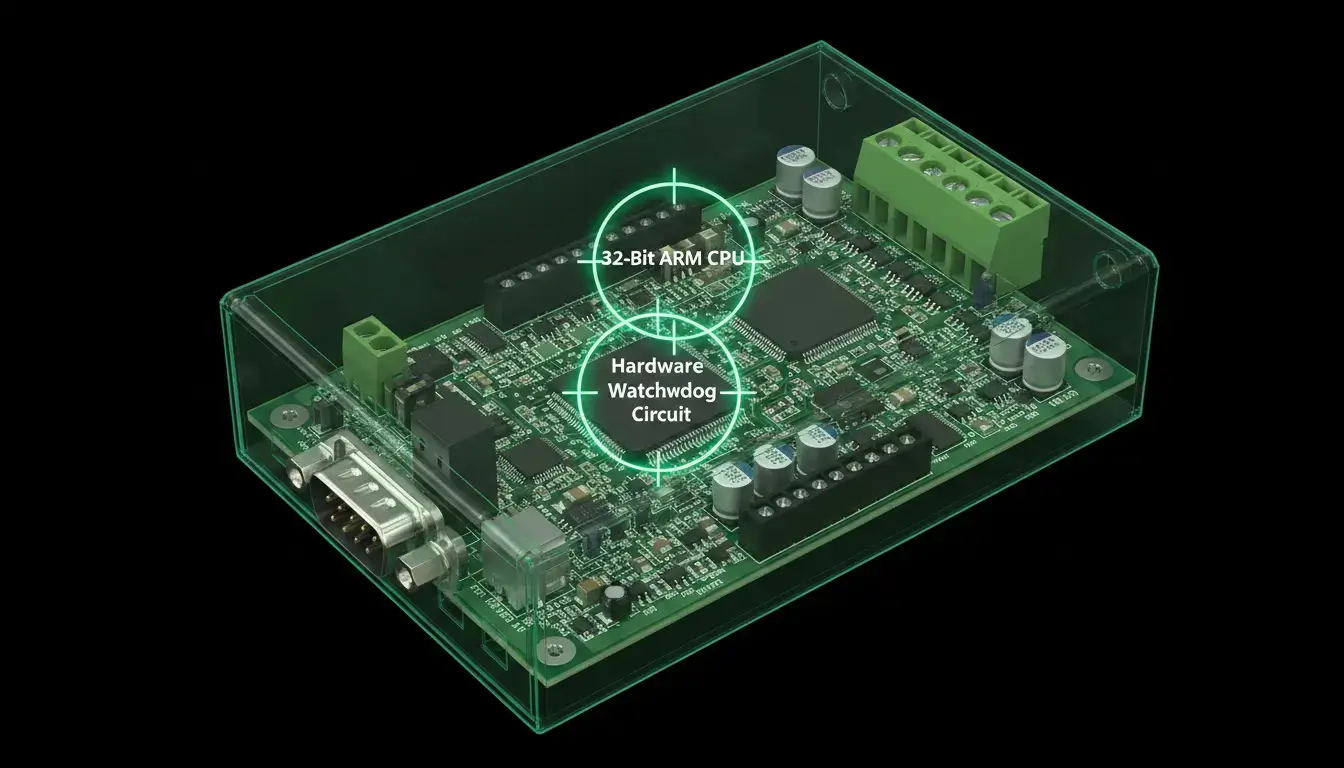
Valtoris 1CH-ETH has dedicated WDT circuit on the mother board. The hardware watchdog performs an automatic physical power cycle in the millisecond-level range in case the main CPU is in a logical deadlock or an upstream switch does not respond to keep-alive packets. The internal buffers are emptied in seconds and the TCP tunnel is reestablished. This allows for 24x7x365 operation autonomously with no human intervention.
5. Beyond Legacy: Built-in MQTT & JSON for the Cloud Era
Replacing an old Moxa 5150 with another simple transparent forwarder is a missed opportunity. Modern OT environments demand direct cloud integration without the need for expensive intermediate edge PCs.
Unlike legacy standard device servers, the Valtoris 1CH V-Series is a true IoT gateway. It natively supports parsing standard and non-standard serial payloads into structured JSON formats and publishing them directly to cloud platforms via MQTT, HTTP POST, or HTTP GET.
- Direct Cloud Publishing: Connect legacy RS-485 sensors directly to AWS, Azure, Alibaba Cloud, or Baidu Cloud MQTT brokers without intermediate middleware.
- Automated Data Collection: The gateway automatically polls Modbus RTU or 645 meter protocols and formats the data for modern IT ingestion.
- Custom Heartbeats & Registration: Ensure stable connections across cellular routers or complex public networks using custom MAC-based registration packets and keep-alive heartbeats.
6. Step-by-Step: How to Swap a Moxa 5150 Without Changing SCADA Code
The biggest challenge when upgrading automation hardware is the fear of breaking the software logic. It’s a pain for integrators to have to rewrite hundreds of lines of Modbus polling code, or to change established PLC register maps, when a simple hardware swap is involved.
The Valtoris platform is designed for “Drop-in Replacement. Replace an aging NPort 5150, with no changes to a single line of your SCADA application code The exact three step migration protocol is as follows:
Physical Pin-to-Pin Transfer
Disconnect the RS-485 data lines (Data+ and Data-) from your legacy device. The Valtoris terminal block utilizes the exact same A/B (or Tx/Rx) logic standard. Power the unit using your existing 12V or 24V DIN-rail cabinet power supply—no new power adapters are required.
Replicate Network Parameters
Access the Valtoris Web GUI. Set the IP address, Subnet Mask, and Gateway to identically match the old unit. Configure the serial baud rate (e.g., 9600, 8, N, 1) to mirror your existing field instruments.
Map the Virtual COM Port (If Required)
If your SCADA software (like Wonderware or Ignition) is configured to look for a specific COM port (COM5 in this example) open the Valtoris VirCom utility. Select the IP of the new device and bind to COM5. Your host software will immediately start polling the remote RTU devices as it always did.
| Migration Task | Legacy Upgrades | Valtoris Drop-in |
|---|---|---|
| SCADA Code Changes | Address remapping required | Zero lines of code changed |
| Power Supply Wiring | New AC adapters needed | Re-use 12V/24V terminal |
7. SKU Consolidation and Total Cost of Ownership (TCO)
Finally, engineering teams must evaluate the logistics of procurement. The traditional "brand tax" often forces companies to purchase highly specific models for specific tasks. Buying an RS-232 only model (like the NPort 5110) limits future flexibility. Upgrading to a multi-protocol model (like the NPort 5150) incurs a massive cost premium. This expands the Bill of Materials and complicates spare parts inventory.
The Consolidation Approach: The Valtoris Valtoris 1CH V-Series standardizes industrial deployment. It integrates RS-232, RS-485, and RS-422 into a single, aggressively priced SKU, achieved by eliminating the legacy brand tax and selling direct-to-engineer.
| Technical Parameter | Legacy Standard (e.g., NPort 5110) | Valtoris 1CH-ETH (V) Standard |
|---|---|---|
| Physical Interfaces | RS-232 Only | 3-in-1 (RS-232 / 485 / 422) |
| Modbus Handling | Transparent Device Server | Native Modbus RTU/TCP Gateway |
| System Stability | Software Watchdog | Independent Hardware Watchdog Timer |
| IoT Readiness | None | Built-in MQTT / JSON Conversion |
| ESD Protection | 15kV | 15kV |
Frequently Asked Questions
Can I continue using the Moxa NPort Administrator software to manage the Valtoris gateway?
Do I need to add external 120-ohm termination resistors on long RS-485 runs like I did with older device servers?
We have over 50 gateways. Do I configure them one by one?
Can I use UDP broadcast to send one serial weigh scale's data to multiple SCADA nodes?
Does the hardware watchdog reset clear the onboard SRAM buffer during a Modbus transaction?
Ready to Upgrade Your Serial Infrastructure?
Stop fighting with legacy driver BSODs and Modbus polling timeouts. Discover how the Valtoris gateway provides a seamless, drop-in replacement for your aging hardware at a fraction of the legacy brand cost.
