

In the early days of industrial IoT, data moved strictly within the walled gardens of local factory networks. Today, telemetry data from remote pump stations, solar inverters, and PLCs transverses the public internet to reach cloud platforms. If this operational technology (OT) data is not cryptographically secured, it can be intercepted, manipulated, or replicated by malicious actors.
This is where MQTT over TLS (MQTTS) becomes non-negotiable. It merges the lightweight messaging efficiency of the MQTT protocol with the impenetrable encryption of Transport Layer Security (TLS).
This technical guide deconstructs the architecture of MQTTS, explains the complexities of Mutual TLS (mTLS) for AWS/Azure integration, and provides a definitive troubleshooting matrix for the dreaded “TLS Handshake Failed” error.
📑 Table of Contents
🛠️ Interactive Diagnostics: What is blocking your secure connection?
Select the specific bottleneck your engineering team is facing right now to jump directly to the architectural solution.
Diagnosis: NTP Sync or SNI Extension Failure.
If the clock is wrong, certificates are marked “Not Yet Valid”. If SNI is missing, shared cloud endpoints drop the request.
Jump to Troubleshooting GuideDiagnosis: Mutual TLS (mTLS) Requirement.
Major clouds require 2-way verification. A simple username/password will be rejected. You must upload a Client Certificate and Private Key to your edge node.
Read the mTLS Gatekeeper GuideDiagnosis: Insufficient Cryptographic CPU.
Old PLCs cannot compute RSA/ECC handshakes. You must deploy an Industrial Edge Gateway to act as a secure translation proxy.
See Hardware Proxy Solution in FAQDiagnosis: Constant Handshake Overhead.
Each TLS handshake consumes 4KB-6KB. If your connection drops constantly, these handshakes drain data. Enable TLS Session Resumption.
View Data Cost FAQThe Danger of Port 1883: Why Plaintext MQTT Fails in IIoT
By default, MQTT brokers listen on Port 1883. Traffic on this port is transmitted in plaintext. This means that anyone with access to the network infrastructure—from a compromised Wi-Fi router to an ISP node—can use simple packet sniffing tools (like Wireshark) to read your entire payload.
In an industrial context, this is a catastrophic vulnerability. An attacker intercepting Port 1883 traffic can see raw temperature values, pressure thresholds, and, worst of all, the plaintext username and password the edge device uses to authenticate with the broker.
| Protocol Feature | Standard MQTT (Port 1883) | MQTTS / MQTT over TLS (Port 8883) |
|---|---|---|
| Data Payload | Plaintext (Readable) | Encrypted (Scrambled ciphertext) |
| Authentication | Plaintext Username/Password | Encrypted Auth + Certificate Validation |
| Data Integrity | Basic Checksums (Easily spoofed) | Cryptographic MACs (Tamper-proof) |
| Network Requirement | Low overhead, fast connection | Requires handshake overhead & certificates |
MQTT TLS Security: Meeting IEC 62443 Standards
Because of these risks, authoritative cybersecurity frameworks, such as the ISA/IEC 62443 standards for Industrial Automation and Control Systems, implicitly mandate network segmentation and encrypted data-in-transit for critical infrastructure connecting to external zones.
| IEC 62443 Security Level (SL) | Requirement for Data-in-Transit | MQTTS Applicability |
|---|---|---|
| SL 1 (Casual exposure) | Protection against eavesdropping | Basic TLS 1.2 Encrypted Tunnels |
| SL 2 (Intentional attack) | Authentication & Integrity verification | TLS 1.2 with strong Cipher Suites |
| SL 3 (Sophisticated hackers) | Hardware-backed encryption | mTLS + Hardware Secure Element (TPM) |
Interactive Demo: Packet Sniffing (Port 1883 vs 8883)
See what an attacker sees when intercepting your SCADA network.
MQTT Port 8883 Architecture: How TLS Encrypts Your Telemetry
Switching to Port 8883 adds the TLS layer between the TCP connection and the MQTT payload. The Internet Engineering Task Force (IETF) RFC 8446 describes how TLS 1.3 delivers major improvements in latency and security over previous versions of the protocol.

When an IoT gateway initiates a connection on Port 8883, it doesn’t immediately send the MQTT `CONNECT` packet. First, it performs a TLS Handshake. The broker presents its X.509 digital certificate. The edge device verifies this certificate against its local trust store (Root CA) to ensure it is talking to the genuine server, not a spoofed honeypot.
Because legacy PLCs and remote sensors lack the CPU power to perform asymmetric cryptography, the TLS handshake must be offloaded to an edge proxy. As shown in the diagram, this is typically handled by routing the raw RS485 data through a multi-port serial server (for hardwired Ethernet environments) or an industrial cellular gateway (for remote 4G sites). These devices act as the TLS terminator, securing the payload transparently before it ever reaches the public internet.
| Overhead Type | Plaintext MQTT | MQTTS (TLS 1.2 / 1.3) |
|---|---|---|
| Handshake Bandwidth | ~50 Bytes | ~4 KB to 6 KB (Certificate exchange) |
| CPU Utilization (Edge) | Negligible | High (Requires RSA/ECC asymmetric math) |
| Connection Latency | 1 Round Trip (TCP) | 3 Round Trips (TCP + TLS negotiation) |
Conquering mTLS: The Gatekeeper for AWS and Azure IoT
In normal web browsing (Server TLS) the browser is only proven of the identity of the server. But big cloud providers like AWS IoT Core and Azure IoT Hub use Mutual TLS (mTLS). With mTLS, the gateway authenticates the server, and the server authenticates the gateway as well.
This is a notoriously difficult architectural change for field technicians. That means you can’t just use a username and password any more. Each edge gateway must be flashed with a cryptographically signed client certificate and private key unique to that edge gateway.
| Feature | Standard Server TLS (1-Way) | Mutual TLS / mTLS (2-Way) |
|---|---|---|
| Who proves identity? | Only the Broker (Server) | Both Broker and Edge Device |
| Edge Device Requirement | Needs Root CA only | Needs Root CA + Client Cert + Private Key |
| Primary Use Case | Generic SCADA, local network security | AWS IoT Core, Azure IoT Hub, Google Cloud |
| Management Complexity | Low | High (Requires strict certificate rotation) |
Troubleshooting MQTTS: Fixing “Handshake Failed” Errors
Tired of cross-compiling OpenSSL for legacy devices?
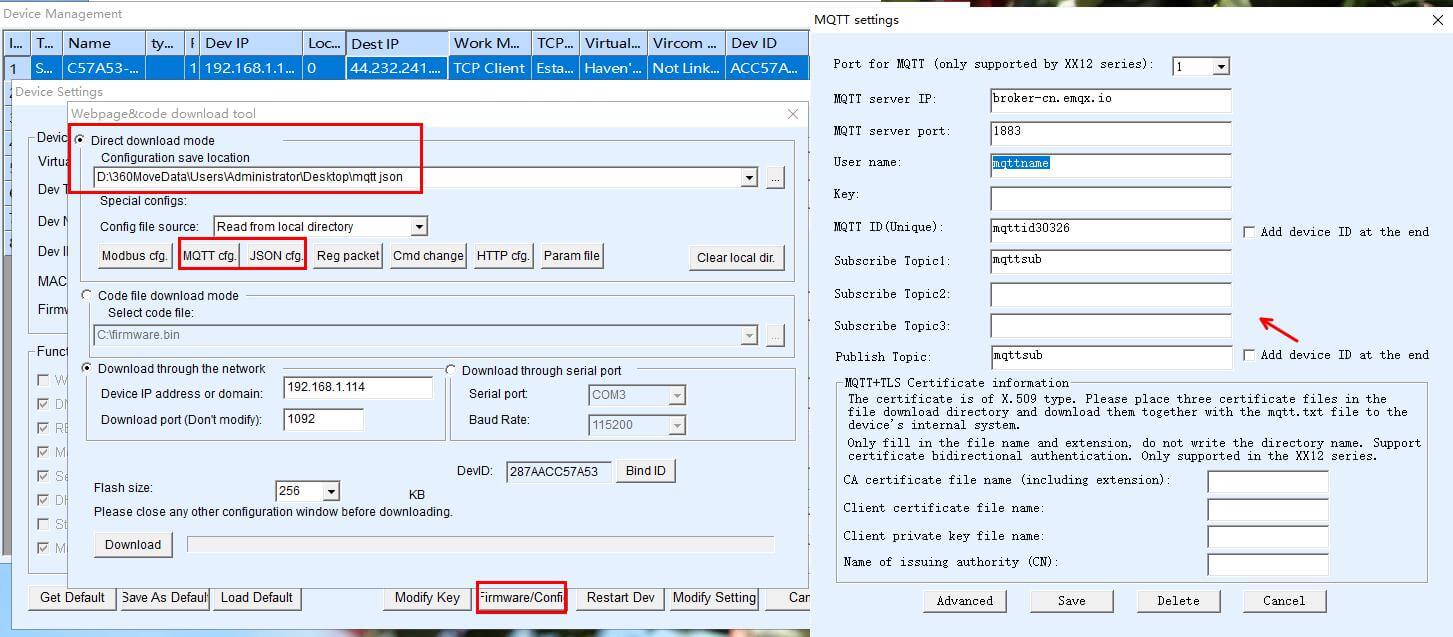
Skip the headaches. Valtoris Edge Gateways handle the entire mTLS handshake autonomously. Just upload your `.pem` files via Web GUI.
Troubleshooting MQTTS: Fixing “Handshake Failed” Errors
When migrating from Port 1883 to 8883, the most common frustration is the “Silent Drop.” The device attempts to connect, the TCP socket opens, but the connection immediately terminates with a vague TLS Handshake Failed error in the diagnostic logs. Here is how you fix the core causes.
1. The NTP (Network Time Protocol) Trap
This accounts for 60 percent of field failures. X.509 certificates have hard “Valid From” and “Valid To” timestamps. When an industrial router crashes and reboots, its internal clock can reset to the UNIX epoch, January 1, 1970. When it tries the TLS handshake it reads the broker’s certificate (valid 2024-2025) and instantly rejects it as “Not Yet Valid”.
The Fix: Make sure your edge gateway is connected to a reliable NTP server, and that it has successfully synchronized its system time before starting up the MQTT daemon.
2. Cipher Suite Mismatch & TLS 1.3 Conflicts
Older encryption methods are being phased out aggressively by brokers like AWS IoT. When your legacy gateway supports only TLS 1.1 or deprecated cipher suites (for example, those using SHA-1), the cloud broker drops the connection immediately during the ClientHello phase.
The Fix: Check the firmware on your device. Must support TLS 1.2 minimum and modern Elliptic Curve cipher suites (e.g. TLS_ECDHE_RSA_WITH_AES_256_GCM_SHA384).
3. The Missing SNI (Server Name Indication) Extension
90% of unexplainable Handshake Failed errors when connecting to major public clouds are due to a missing SNI header. AWS endpoints are on shared IP addresses. If your gateway sends a raw ClientHello without explicitly specifying the exact AWS ATS (Amazon Trust Services) endpoint URL in the SNI extension, AWS will drop the connection.
The Fix: Turn on SNI in the MQTT client settings for your gateway. Make sure the right Certificate Chain is loaded as well, you have to explicitly flash Amazon Root CA 1 (or DigiCert Baltimore Root for Azure) into the trusted store of the gateway.
4. MTU Fragmentation and Cellular Timeouts
As noted earlier, a full mTLS handshake requires transmitting 4KB to 6KB of certificate data. Over a standard 4G LTE connection, the Maximum Transmission Unit (MTU) is typically 1500 bytes. This means the TLS certificate chain must be fragmented into 3 or 4 separate packets. In weak signal areas, if a single fragment is dropped, the entire cryptographic handshake hangs and times out.
The Fix: Standard generic microcontrollers fail gracefully here. Industrial edge gateways circumvent this by employing optimized TCP sliding windows and hardware-level packet buffering to assemble fragmented TLS frames reliably, even on high-latency Cat-M1 or 4G networks.
5. The Cloud-Side Blindspot: AWS IoT Policies and Thing Attachment
Often, the TLS handshake succeeds at the cryptographic level, but the connection immediately drops. In AWS IoT Core, a valid certificate is not enough. The certificate must be actively attached to a “Thing” and have an “IoT Policy” granting iot:Connect and iot:Publish permissions for your specific Client ID.
The Fix: Go to the AWS IoT Console. Verify that your certificate is active, attached to your Thing, and that the attached policy does not have restrictive Resource ARNs blocking your Gateway’s Client ID.
6. Isolation Testing: Verify Before Blaming the Hardware
If a MQTTS connection fails you want to know if the problem is with the network/certificates or the internal firmware of the gateway. Verify the broker and certificate chain directly from a PC on the same network using OpenSSL:
The Fix: If your terminal says Verify return code: 0 (ok) Your certificates and network path are good. The failure is entirely due to the edge gateway’s configuration (e.g. Missing SNI, MTU drop, or unsupported cipher suite).
| Diagnostic Log Output | Root Cause | Actionable Fix |
|---|---|---|
ERR: x509 certificate expired | Edge device clock is wrong. | Force NTP synchronization on WAN interface up. |
ERR: unknown CA / verify failed | Missing Root CA. | Upload Amazon Root CA 1 or equivalent to device. |
ERR: protocol version mismatch | Broker enforcing TLS 1.3, edge supports TLS 1.1. | Update gateway firmware or replace hardware. |
ERR: private key decode error | Gateway firmware cannot parse modern PKCS#8 or encrypted keys. | Convert the AWS/Azure key to a traditional unencrypted RSA format using OpenSSL: openssl rsa -in private.pem -out rsa_private.pem |
Frequently Asked Questions
What is the difference between Port 8883 and Port 443 for MQTT?
Which Root CA certificate do I need to download for AWS IoT Core?
Why does my MQTT connection drop exactly every 60 seconds?
Keep-Alive interval between the edge client and the broker, or a strict cellular NAT firewall prematurely terminating idle TCP sessions. Adjust your gateway’s MQTT Keep-Alive setting to 30 seconds to force regular PINGREQ packets and keep the tunnel open.Can I use self-signed certificates for mTLS in a production factory?
My IoT platform provided a .pfx or .p12 file, but my gateway requires .pem. What should I do?
openssl pkcs12 -in cert.p12 -clcerts -nokeys -out client.pem. Next, extract the decrypted private key so the gateway can read it: openssl pkcs12 -in cert.p12 -nocerts -nodes -out private.key.Stop Wrestling with OpenSSL and Scripts
Pushing cryptographic workloads to legacy RS485 endpoints is a losing battle. Let the industrial gateway handle the heavy lifting acting as a secure proxy. With Zero-Code Configuration, simply upload your .pem and .crt files via the Configuration Tool, and the gateway automates the entire mTLS handshake and payload translation.
(Plain RS485)
(mTLS + NTP Sync + JSON)
(Port 8883)
