

Configuring an industrial router firewall correctly is the single most critical step in establishing secure remote PLC access. Yet, every day, controls engineers bypass these firewalls entirely by using Port Forwarding (Destination NAT) just to get their SCADA systems online quickly.
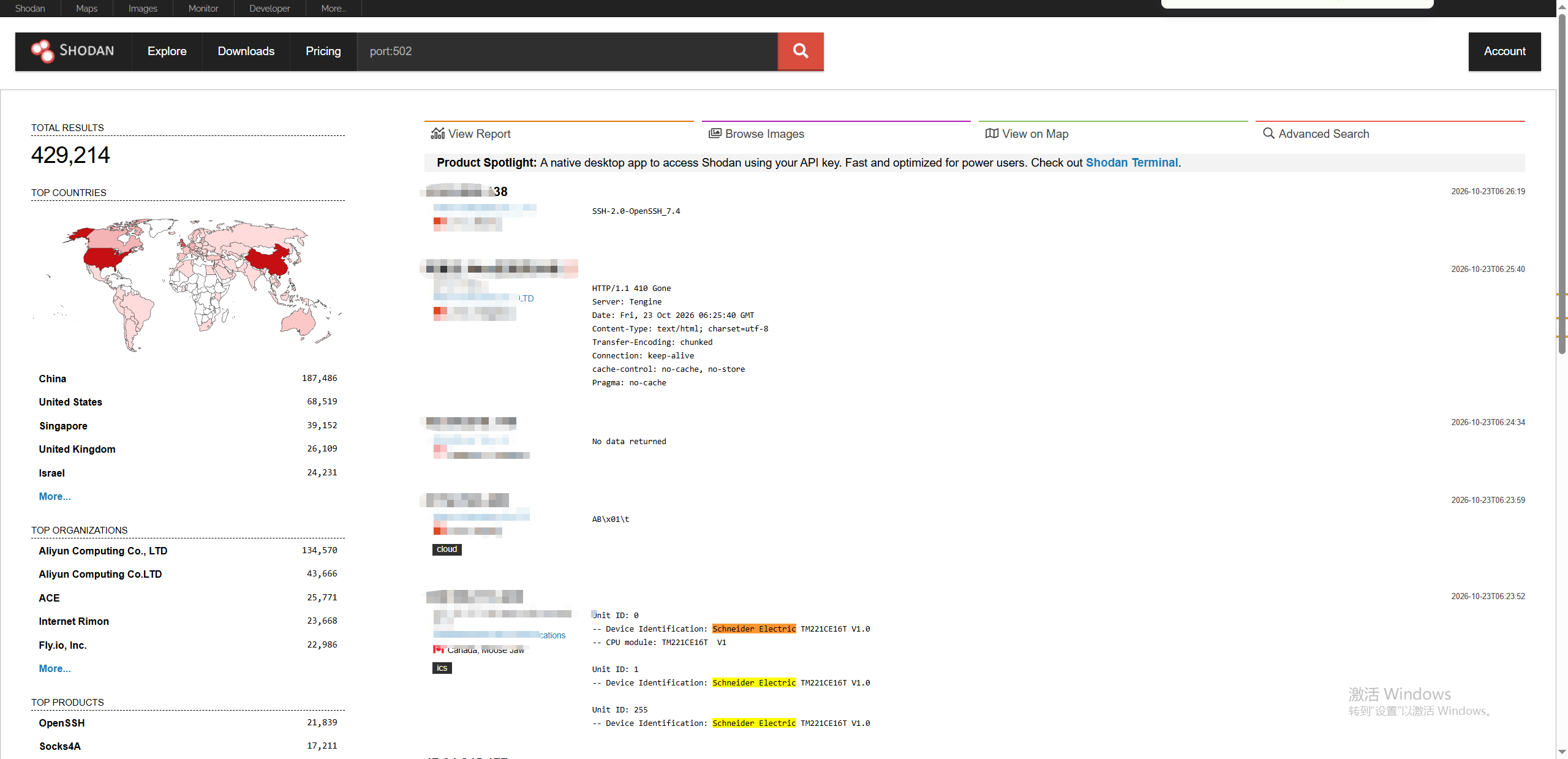
Exposing industrial protocols like Modbus TCP or EtherNet/IP directly to the internet is a fundamental violation of OT (Operational Technology) security. If you have mapped port 502 to a public IP, your equipment is already indexed by search engines like Shodan and is actively being scanned by automated botnets.
This technical guide cuts through the marketing noise to explain why applying IT networking shortcuts to OT environments is a recipe for disaster, and provides a strict, no-nonsense firewall configuration checklist to lock down your edge devices.
The Reality of Port Forwarding: Why Scanners Find You
Port forwarding is a tool for IT administrators to host secure public services (like HTTPS web servers). It was never designed for industrial control systems. When you forward traffic on a cellular router to a PLC, you are punching a hole straight through your perimeter defense.
Malicious scanners on the internet do not search blindly. They use automated scripts to continuously scan the entire IPv4 address space, specifically hunting for the default, well-known ports used by industrial protocols. Because legacy OT protocols lack built-in authentication, exposing these specific ports means any automated botnet can instantly interact with your physical equipment.
| Commonly Exposed Port | Industrial Protocol | The Impact of Exposure |
|---|---|---|
| TCP 502 | Modbus TCP | Attackers can issue “Write Register” commands to manipulate physical I/O without any password prompt. |
| TCP 44818 | EtherNet/IP | Allows unauthorized extraction of routing tags or remote crashing of the controller. |
| TCP 102 | S7 Comm (Siemens) | Vulnerable to replay attacks and unauthorized logic block downloads. |
According to the CISA (Cybersecurity and Infrastructure Security Agency) explicitly warns against exposing internet-accessible OT assets. The convenience of Port Forwarding is never worth the existential risk to the infrastructure. If a port is open to the internet, it will be found.
Why PLCs Are Defenseless by Design
Once a scanner finds your exposed port, the real nightmare begins. A common misconception is that exposing a PLC is just like exposing a Linux server—but it is absolutely not. Modern IT servers have built-in defenses: rate limiting, SSH keys, and encrypted payloads. Legacy OT protocols, however, were built in the 1970s and 1980s based on the assumption that the physical network cables were safely locked inside a factory.
| Security Metric | IT Server (HTTPS/SSH) | OT PLC (Modbus TCP) |
|---|---|---|
| Authentication | Strict (Passwords, MFA, Keys) | None (Executes any received command) |
| Payload Encryption | Yes (TLS/AES) | None (Plaintext) |
| Brute-Force Protection | Yes (Account Lockouts) | None (Prone to DoS crashes) |
What an Edge Router Firewall Can (and Cannot) Do
If the PLC is fundamentally defenseless, is simply placing a router in front of it a silver bullet? Not quite. To establish realistic security expectations, we must define the exact role of edge devices. According to the NIST SP 800-82 (Guide to Operational Technology Security), true defense-in-depth requires multiple layers, because no single appliance can neutralize every threat.
A purpose-built industrial VPN router provides robust boundary defense (Layer 3/4). It is designed to act as the primary gatekeeper at the remote site: dropping automated Shodan scans, blocking unauthorized IPs, and ensuring that only encrypted, authorized traffic crosses the perimeter.
Crucial Limitation: A cellular router is not an IT-grade Next-Generation Firewall (NGFW). Edge environments require rugged, low-latency hardware, which means these routers do not perform Deep Packet Inspection (DPI) or antivirus scanning. If an authorized engineer connects to the router via VPN using a laptop infected with malware, the router will encrypt and pass that malicious traffic directly to the PLC. You must still secure your endpoint devices.
| Threat Vector | Can the Edge Router Stop It? | Required Solution |
|---|---|---|
| Random Internet Scans (Shodan) | Yes (via Drop All / IP Whitelisting) | Router Firewall |
| Man-in-the-Middle Interception | Yes (via IPsec/WireGuard Encryption) | Router VPN |
| Malware on an Authorized VPN Laptop | No (Traffic is trusted) | Endpoint Antivirus / NGFW |
4 Valid Architectures for Remote Access
If port forwarding is off the table, how do you actually reach the machine? You have four technically sound options.
1. The VPN Server (Requires Public Static IP)
You configure the edge router as an OpenVPN, IPsec, or WireGuard server. The firewall drops all traffic except the specific encrypted handshake on the VPN port. Once authenticated, the engineer is bridged to the LAN. Drawback: Requires paying the carrier for a static IP.
Further Reading: Unsure which protocol is best for your edge device? Read our WireGuard vs OpenVPN vs IPsec Performance Guide to see how they handle 4G networks.
2. Outbound-Only SD-LAN (Zero Trust)
This is the modern standard. Using zero-config platforms like the Valtoris m2mCloud ecosystem, the cellular router initiates a connection outward to a central cloud broker. Because the connection originates from the inside, it works perfectly on cheap CGNAT SIM cards and requires absolutely zero open inbound ports. You simply bind the router to your account, and the entire remote site becomes securely accessible to authorized engineers.
3. Strict IP Whitelisting (The Legacy Compromise)
If a legacy system needs direct port access, you must set up a strict IP Filter. The firewall should be set to “Drop All”, with one explicit rule to allow traffic to Port 502 only from the exact static IP of your headquarters. A typical configuration would be:
Rule 2: Action=Drop, Protocol=TCP, Dest Port=502, Source IP=Any
4. Edge Acquisition (One-Way Push)
If you only need to monitor equipment data without remote programming access, bypass two-way VPNs entirely. Use a router with built-in Modbus Collect or DTU capabilities to poll the PLC locally via Modbus TCP/RTU, then push the data outbound to an MQTT server. This unidirectional flow is the ultimate Zero Trust setup.
| Architecture | Works on CGNAT? | Complexity | Security Posture | Best Use Case |
|---|---|---|---|---|
| VPN Server at Edge | No | High | Strong | Strict IT-managed corporate networks. |
| SD-LAN (m2mCloud) | Yes | Low | Excellent (Zero Open Ports) | Remote PLC programming over standard cellular. |
| IP Whitelisting | No | Medium | Acceptable | Legacy systems that absolutely cannot support VPNs. |
| Edge Acquisition | Yes | Low | Highest (Unidirectional) | Read-only SCADA dashboards or MQTT monitoring. |
The Takeaway: If you need two-way access for PLC programming without paying for static IPs, SD-LAN is the most practical choice. If you only need to push data to a cloud dashboard, use unidirectional Edge Acquisition.
A 5-Step Firewall Configuration Checklist
Choosing the right architecture is only half the battle. Before that hardware ever leaves your facility, the edge device itself must be hardened. Regardless of which architecture you chose above, log into your industrial router and verify these five baseline security settings before deploying the cabinet to the field. (For UI-specific navigation, please refer to the VT-LTE500 User Manual).
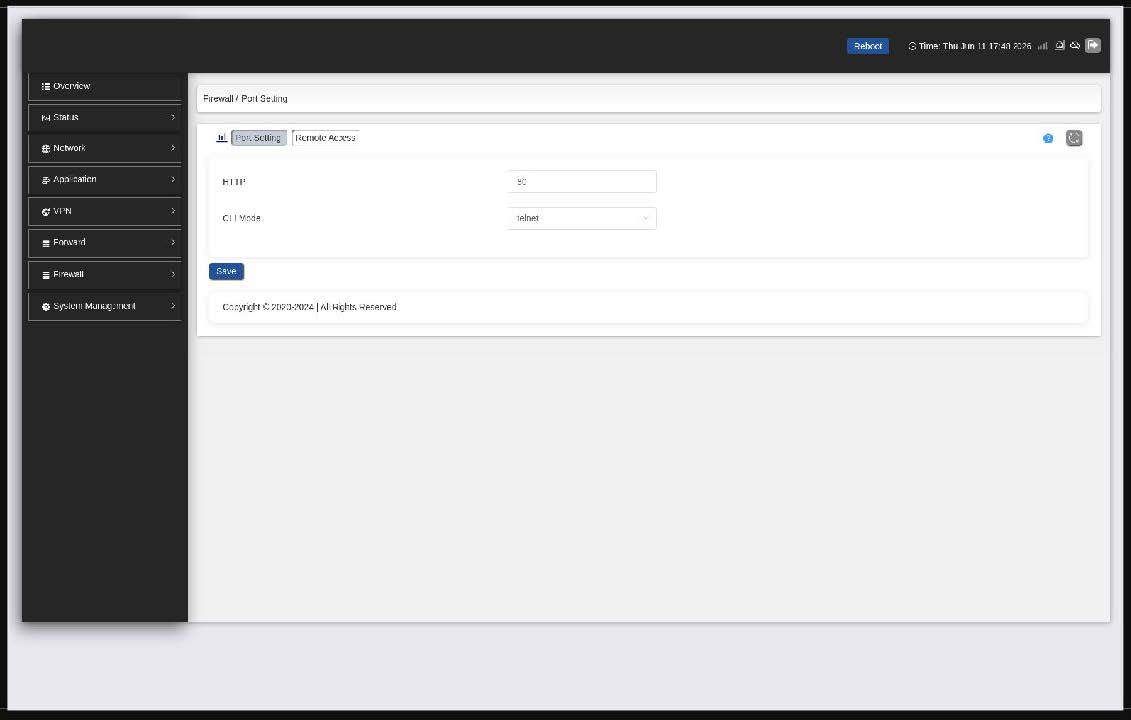
- Drop WAN Ping (ICMP Echo): In the VT-LTE500 Web UI, navigate to
Firewall -> Port & Remote Accessand uncheck PING from WAN. If automated scanners cannot ping your IP, they often move on. - Restrict Remote Management: On the same
Port & Remote Accesspage, ensure the Access Direction for HTTP, HTTPS, and SSH is strictly set to LAN only. Never expose the management UI to the public WAN. - Change Default Passwords immediately: Navigate to
System Management -> Accountand update the default admin password to a strong, unique string. - Implement LAN MAC Binding: Go to
Network -> DHCPand use the MAC Address Binding table to bind the PLC’s IP to its hardware MAC address. This blocks unauthorised devices from acquiring a valid IP on your local OT network. - Verify with an External Scan: Use your smartphone as a mobile hotspot (to ensure you are outside the network) and use a tool like Nmap (
nmap -Pn [Your Public IP]). The result should show 0 open ports.
How Modern Edge Routers Automate Zero-Trust
Knowing the theory is one thing; implementing it efficiently in the field is another. Traditional IPsec VPNs require static public IPs, complex certificate management, and manual routing tables—a process that can take 15 to 30 minutes per site.
With the SD-LAN router, you bypass complex cryptography setups. By navigating to Application -> m2mCloud in the Web UI, you simply toggle the service to On. The router dials an outbound encrypted tunnel to the cloud broker directly through carrier NAT, requiring zero inbound open ports.
| Remote Access Feature | Traditional VPN (IPsec/OpenVPN) | VT-LTE500 m2mCloud |
|---|---|---|
| Setup Time | 15-30 minutes (Certificates & Routing) | < 1 minute (Account Binding) |
| Public IP Required? | Yes (Costs extra monthly from ISPs) | No (Works instantly on cheap CGNAT SIMs) |
Conclusion: Stop Relying on Luck
Security through obscurity is no longer a winning strategy in industrial automation. The threat landscape is fully automated and it is just a matter of time before an OT port exposed to the public internet is indexed and probed.
The heart of the problem has never been the absence of security tools, but the friction they cause. The result is that controls engineers will take dangerous shortcuts like port forwarding just to get the system online when configuring complex CLI firewalls, managing VPN certificates, or fighting carrier NAT becomes a bottleneck to commissioning a machine.
This is why it is so important to move to an exclusively outbound Zero-Trust architecture. You build relationships from the inside out. You completely remove the public attack surface and are still reachable. Designing your OT network isn’t just about building higher walls, it’s about making the most secure way to remotely connect the absolute easiest for your team to use.
Simplify Your OT Security.
The Valtoris VT-LTE500 industrial cellular router offers pre-configured firewall templates, native MAC binding and zero-config m2mCloud SD-LAN capabilities, so you can connect to remote PLCs without exposing a single port.
Frequently Asked Questions (Troubleshooting & Scenarios)
My IT department absolutely refuses to give me a public IP. How do I access the PLC?
You do not need a public IP if you use an outbound-initiating connection. You can configure your industrial router as an OpenVPN Client to connect to a cloud-hosted VPN server, or use an SD-LAN solution like m2mCloud. Both methods push through strict firewalls and CGNAT from the inside out.
We ship machines globally, and all our PLCs use the default 192.168.1.10 IP. Will connecting them to m2mCloud cause IP conflicts?
Traditional VPNs will crash with overlapping subnets, but industrial routers solve this using 1:1 NAT (Network Address Translation). The router can map the local PLC IP (192.168.1.10) to a unique virtual IP (e.g., 10.0.1.10) for the VPN tunnel. Your engineers simply connect to the virtual IP, and the router handles the translation seamlessly without requiring you to change the PLC program.
If I use MAC binding, what happens if my PLC hardware fails and I replace it?
The new PLC will have a different physical MAC address. Because the router’s firewall is bound to the old MAC, it will block the new PLC from communicating on the network. You must log into the router (locally or via VPN) and update the MAC binding rule to match the new hardware.
Will the VPN encryption cause latency when going online with TIA Portal or Studio 5000?
That’s a good point. Traditional software based OpenVPN adds milliseconds and CPU load. But this is mitigated by modern edge routers with hardware crypto engines and lightweight protocols like WireGuard. With stable 4G/LTE, end-to-end encryption typically adds only 5-15ms latency, which is perfectly acceptable for real-time ladder logic monitoring and variable forcing.
Can a cellular router firewall detect if someone is trying to brute-force a Modbus password?
Standard Modbus TCP does not have passwords, so there is nothing to brute-force. An attacker simply sends a command, and the PLC executes it. This is exactly why the router’s firewall must block unauthorized IPs *before* the traffic ever reaches the PLC.
If my factory IT department blocks all outbound ports, will m2mCloud still work?
Yes. m2mCloud can encapsulate its VPN traffic using standard HTTPS (TCP 443) protocol. Since port 443 is required for regular web browsing, it is almost never blocked by corporate IT firewalls, allowing secure access without triggering alarms.
