
The Unattended Edge: Why Traditional Networks Fail
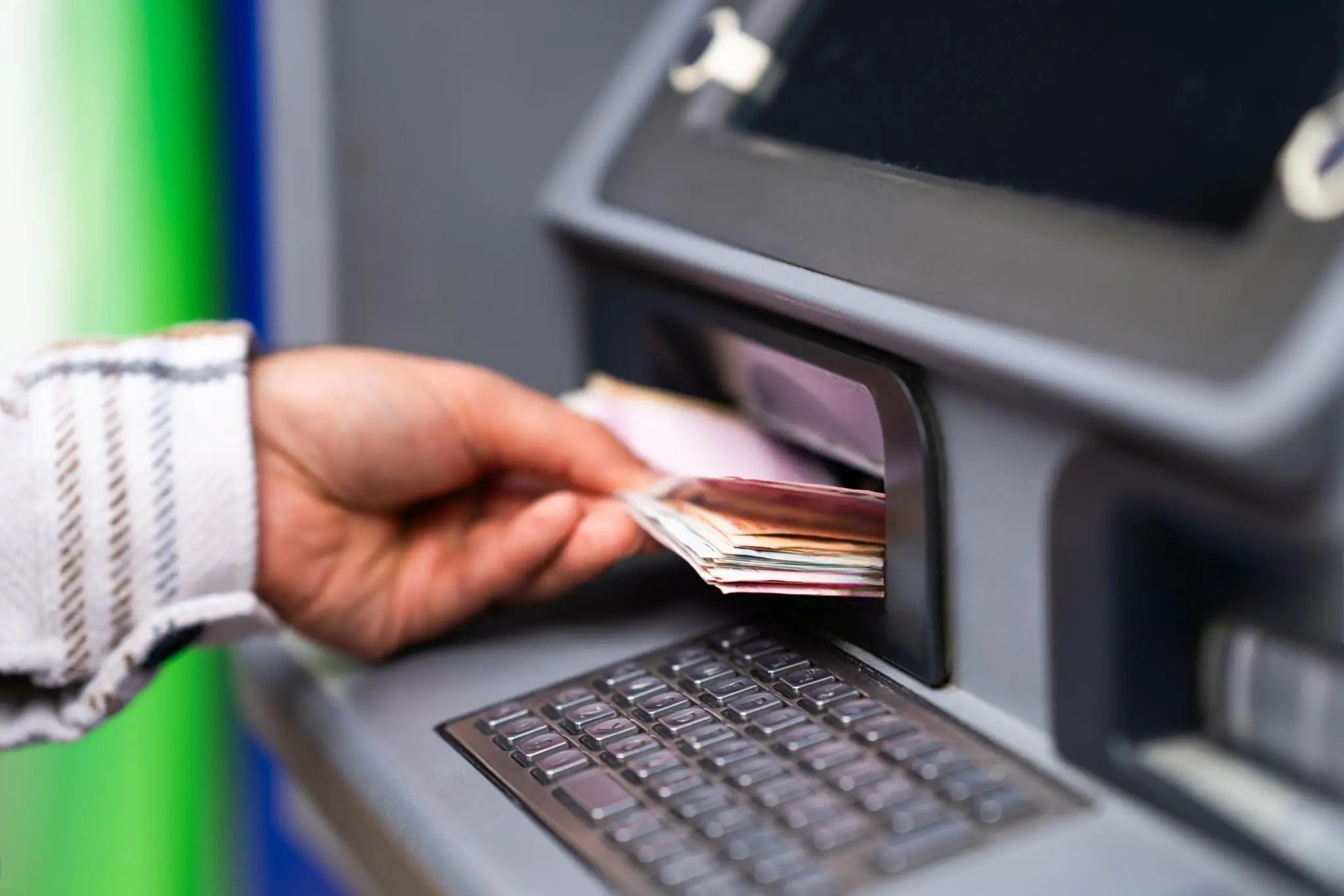
Automation is no longer confined to the clean rooms of factories and corporate data centers. The harshest and most volatile places you can think of are where unattended self-service terminals are installed. These dispersed devices are the very backbone of modern retail and financial infrastructure, from automated vending machines in subways and electric vehicle (EV) charging stations exposed to the brutal weather, to the most critical endpoint of all, the Bank Automatic Teller Machine (ATM).
What connects these different machines is not their touchscreen interfaces, robotic dispensers or cashless payment gateways; it is their absolute dependence on a constant, secure and uncompromised network connection. When these terminals are deployed in the real world, traditional wired broadband is usually too expensive to trench, may take months to provision from the local ISP or is not available at the precise installation location. Therefore, the only scalable architecture is wireless cellular connectivity over 4G LTE and 5G networks.
But many operators make a fatal error in the first phase of planning. Using a consumer-grade router, a typical commercial Wi-Fi hotspot, or an unhardened modem in these critical situations is a disastrous, expensive liability. Consumer hardware is designed to sit on a climate-controlled desk and stream video; not run military-grade encryption inside a freezing metal box vibrating from a currency counter.
If you are an IT security officer, SCADA engineer or system integrator responsible for delivering 100% uptime and compliance for hundreds of remote endpoints, you need to have an in-depth knowledge of the standards of atm network security. This full scope engineering audit will detail the specific architecture needed to secure unattended networks. We will transition from traditional self service kiosks to the ultimate benchmark. Using a real atm industrial router for financial grade deployments.
Tiered Scenarios: Designing for Your Specific Terminal
Not all unattended terminals share the same operational risk profile. Treating a standard ticket kiosk the same as a bank ATM leads to either dangerous security vulnerabilities (under-engineering) or vastly bloated hardware budgets (over-engineering). The hardware you select and the initial configuration strategy you adopt are strictly dictated by the specific environmental, thermal, and security requirements of your deployment tier.
| Deployment Tier | Example Terminals | Core Networking Challenge | Mandatory Router Features |
|---|---|---|---|
| Tier 1: Commercial Retail | Smart Vending Machines, Parcel Lockers, Digital Signage, Info Kiosks | Geographical scattering; high cost of manual physical rebooting if the cellular connection drops. | Hardware ICMP Ping Watchdog, Auto-Recovery logic, multi-carrier failover, low power consumption. |
| Tier 2: Harsh Public Infrastructure | EV Charging Stations, Automated Car Washes, Utility Pumping Stations, Transit Ticketing | Extreme temperature fluctuations, severe moisture, high Electromagnetic Interference (EMI) from heavy machinery. | -40°C to +85°C Operating Temp, Extruded aluminum chassis, passive cooling, 35mm DIN-rail mount, conformal coating. |
| Tier 3: Mission-Critical Financial | Bank ATMs, High-Volume Payment Terminals, Crypto Kiosks, Point-of-Sale (POS) Systems | Zero-tolerance for data breaches; strict PCI DSS auditing requirements; high risk of physical tampering. | Hardware-accelerated IPsec VPN, Stateful Packet Inspection (SPI) firewall, Private APN support, MAC filtering. |
Tier 1: Smart Vending Machines and Ticket Kiosks
In this tier, the primary challenge is geographical scattering and operational visibility. A modern smart vending machine does not require massive broadband speeds. It generally transmits lightweight JSON payloads: persistent telemetry for inventory data, MQTT heartbeat signals to the cloud, and basic cashless payment authorization requests. The critical failure point here is connectivity stalling. If the router’s cellular module freezes up from a temporary carrier drop or tower handover failure, the machine instantly stops taking payments, and central inventory visibility goes completely blind. An industrial router deployed here must prioritize autonomous self-healing—specifically via a hardware-level ICMP Watchdog—over raw data throughput to prevent unnecessary maintenance visits.
Tier 2: EV Charging Stations and Car Washes
The secondary tier introduces severe physical hostility to the networking equipment. Electric vehicle charging stations and automated car washes are typically deployed entirely outdoors. This exposes the internal networking equipment to freezing winter temperatures and blistering summer heat, often trapped inside unventilated, sealed metal kiosks. More critically, EV chargers operate alongside massive high-voltage DC transformers and rectifiers that generate intense Electromagnetic Interference (EMI). A standard consumer plastic router placed inside an EV kiosk will suffer immediate packet loss, degraded Wi-Fi broadcast integrity, and eventual silicon failure due to induction currents. Deployments in this tier strictly demand extruded aluminum enclosures to act as a grounded Faraday cage, shielding the internal PCB from destructive RF noise.
Tier 3: Bank ATMs and Payment Terminals
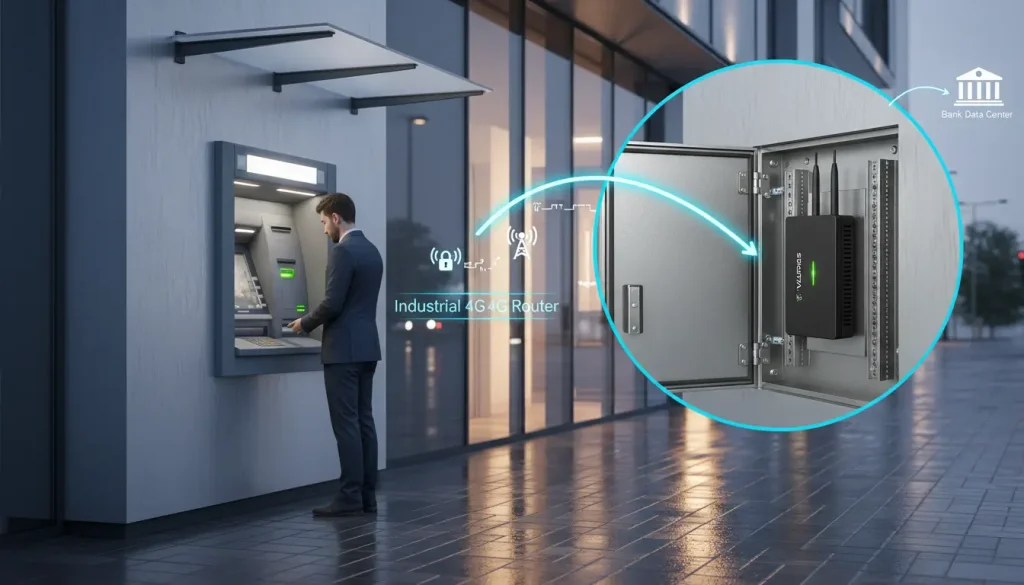
This is the absolute apex of unattended networking. The Bank ATM inherently inherits all the environmental challenges of Tier 2 (especially in “through-the-wall” outdoor deployments) but introduces a zero-tolerance policy for data breaches and packet sniffing. These machines process highly sensitive cardholder data, encrypted PINs, and direct financial transactions. The financial damage when ATM networks are compromised can be devastating: financial fraud, regulatory fines, and irreparable reputational damage to the institution. Robust atm network security requires military-grade IPsec VPN encryption, strict Stateful Packet Inspection (SPI) edge firewalls, and Carrier-Grade APN network segregation to successfully pass stringent PCI DSS compliance audits.
The Financial Edge: Consumer Hardware vs. Industrial Security
The financial and retail industries have a direct correlation between network uptime and revenue generation. Every minute an ATM or high-traffic EV charger is offline, the operator loses transaction fees, convenience charges and faces severe customer frustration. But the real killer for operational profitability for any system integrator is the cost of physical recovery— the dreaded “truck roll”.
If consumer-grade atm routers freeze due to carrier tower congestion, thermal CPU throttling, or a hung PDP context on the cellular module, they lack the logic to recover themselves. A highly paid IT technician must be dispatched in a service vehicle simply to physically unlock the kiosk cabinet, unplug the router, wait ten seconds, and plug it back in. In remote, rural, or highly congested urban locations, a single truck roll can cost an operator over $500 in skilled labor, fuel, and lost operational time. This single event instantly destroys the profit margin of that specific ATM for several months. To eliminate this operational bleed, architects must rely exclusively on purpose-built hardware designed for zero human intervention.
| Hardware Feature | Consumer/Commercial Router (Liability) | ATM Industrial Router (Asset) |
|---|---|---|
| Enclosure & EMI Protection | Flimsy plastic housing; highly susceptible to Electromagnetic Interference (EMI) from kiosk motors and transformers. | Extruded aluminum chassis acts as a grounded Faraday cage, shielding internal PCB components from RF noise. |
| Thermal Operating Range | 0°C to 40°C limit. Frequently throttles processing speed or reboots randomly inside outdoor summer kiosks. | -40°C to +85°C. Fanless, passive heat dissipation designed for extreme environmental and industrial deployment. |
| Power Interface | Fragile DC barrel jacks that easily vibrate loose in mechanical machines (like currency counters). | Secure 9-24V DC screw-terminal blocks with built-in reverse polarity diodes and surge protection MOVs. |
| VPN Cryptography | Software-based VPNs utilizing CPU; causes high latency, packet fragmentation, and bottlenecking during transactions. | Dedicated hardware-accelerated cryptographic engines maintaining line-speed encrypted throughput without CPU strain. |
Before deploying an unattended terminal to process financial data, verify these critical security and resilience parameters.
Meeting Strict PCI DSS Compliance Over Cellular Networks
Entities that store, process, or transmit cardholder data are required by organizations such as the PCI Security Standards Council to use strong cryptography and security protocols. Specifically, PCI DSS Requirement 1 dictates the installation and maintenance of network security controls (firewalls), and Requirement 4 mandates the encryption of cardholder data across open, public networks. When your transmission medium is the public airwaves via 4G LTE, robust software configuration is your primary defense against interception.
Private APN and Cellular Network Segregation
Before initiating hardware deployment and sim activation for industrial routers, banks and operators must work closely with their telecommunications provider to establish a dedicated, Private Access Point Name (APN). Deploying a private industrial lte network via custom APN setup is the foundational layer of defense. It prevents ATM traffic from mingling with public internet traffic, shielding the endpoints from automated port scanners, botnets, and DDoS attacks that constantly crawl the public web.
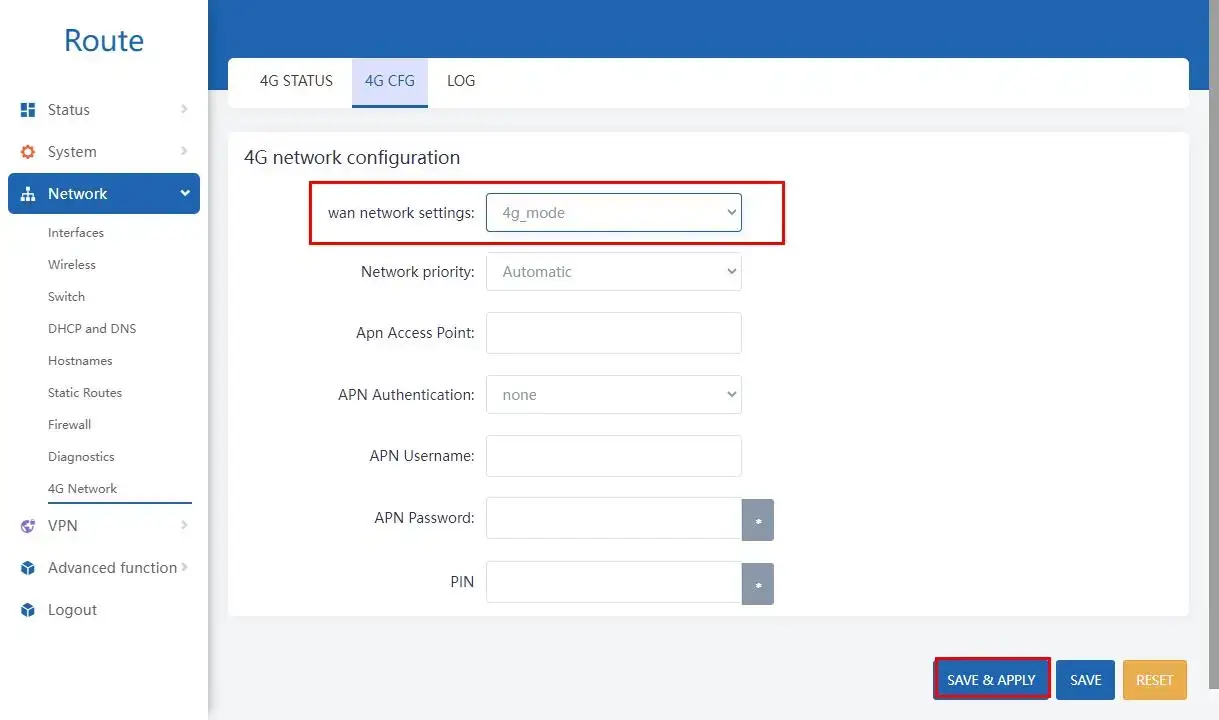
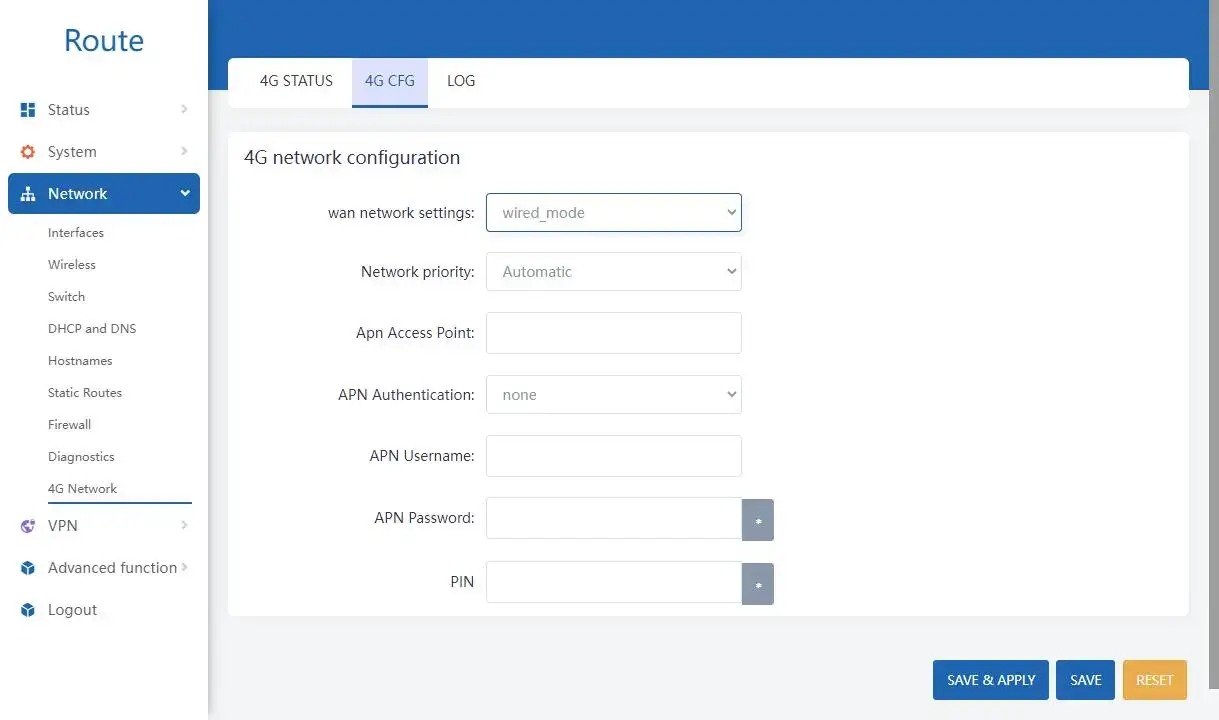
With a Private APN, the cellular carrier creates an isolated routing pathway at the carrier core network level. The ATM’s data never touches the public internet; it is routed directly from the cell tower’s baseband unit into the bank’s secure data center via a dedicated leased line (like MPLS) from the carrier. Once this is provisioned by the carrier, engineers must navigate to the router’s interface (e.g., Network -> 4G Network -> 4G CFG) and manually input the specific APN string, overriding any automatic carrier detection.
IPsec VPNs and End-to-End Cryptography
Even in a Private APN, Financial Auditing requires that all transaction data pass thru an encrypted tunnel. This ensures that the payload cannot be read, even if the carrier’s internal network is compromised. To build secure atm routing paths and still be compliant you need to use hardware accelerated L2TP/IPSec VPNs.
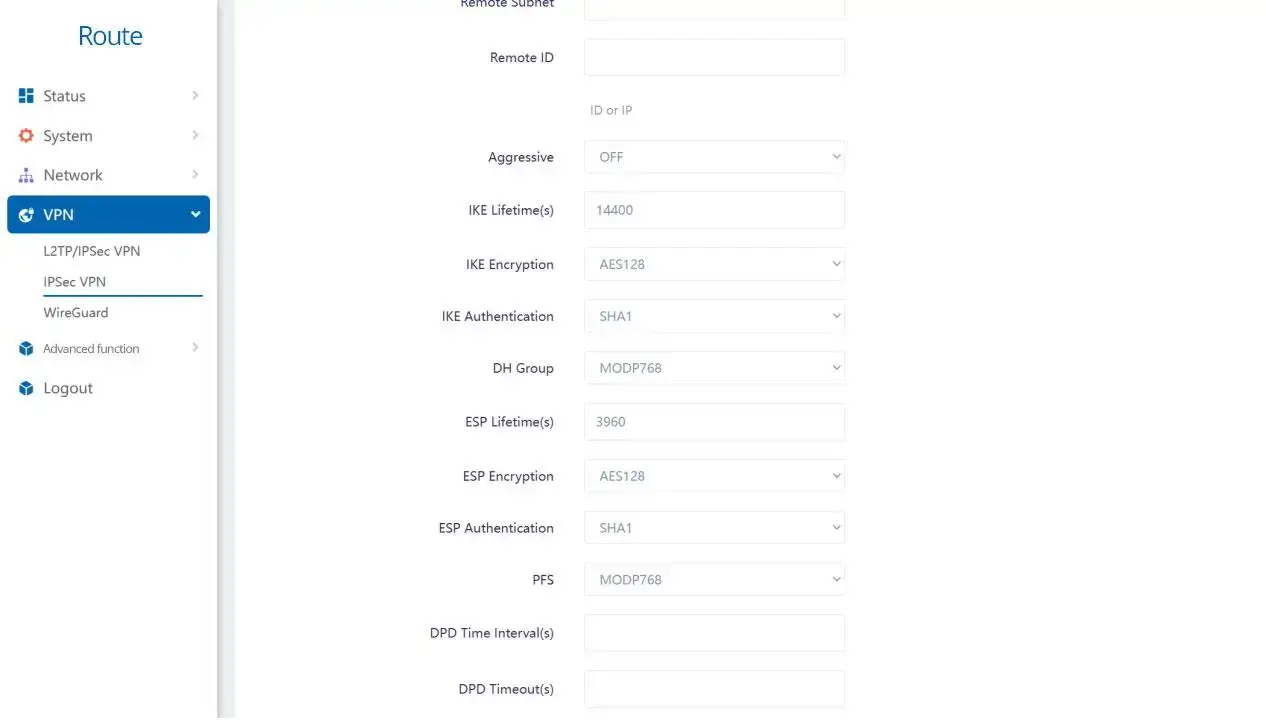
Within the configuration panel of a true industrial device like the Valtoris VT-LTE400 (navigating to VPN -> L2TP/IPSec VPN -> IPSec VPN), network architects must enforce specific cryptographic parameters to secure the payload. This is not a place for default settings.
| IPsec Parameter | Recommended Configuration | Engineering Rationale for ATM Networks |
|---|---|---|
| IKE Version | IKEv2 | Provides significantly faster negotiation and superior resilience during the temporary micro-drops inherent in cellular networks compared to legacy IKEv1. |
| Phase 1/2 Encryption | AES-128 or AES-256 | Military-grade symmetric encryption (preferably AES-GCM) ensures the key exchange and data payload cannot be intercepted or deciphered via packet sniffing. |
| Authentication (Hash) | SHA1, SHA-256, or SHA-512 | Checksum algorithms that continuously verify data integrity, ensuring no malicious actor has altered the financial packets in transit. |
| Perfect Forward Secrecy | Enable PFS (DH Group 14 or higher) | Ensures that if the long-term private key is compromised in the future, past transaction sessions remain secure because new session keys are generated independently. |
“You shouldn’t have to spend hours fighting with MTU fragmentation or writing custom bash scripts just to keep a remote PLC or ATM online. Engineering resources should focus on scaling infrastructure, not babysitting unstable plastic routers.”
Stateful Packet Inspection (SPI) and MAC Filtering
The Cybersecurity and Infrastructure Security Agency (CISA) frequently warns against exposing industrial control systems and payment terminals directly to the internet. A true PCI DSS compliant cellular router must act as an impenetrable hardware firewall at the network edge. The router employs Stateful Packet Inspection (SPI) to analyze the context of incoming traffic and discards all unsolicited inbound packets from the WAN interface that were not initiated by the ATM itself.
Also, the advanced configuration means locking down the local LAN physical interfaces. The network administrators can configure the firewall settings for strict MAC address filtering so that the router’s Ethernet port is bound only to the ATM’s internal computer MAC address. If a physical attacker breaches the kiosk cabinet with a crowbar, unplugs the ethernet cable from the ATM, and connects an unauthorized laptop to sniff traffic, the router’s hardware firewall will instantly deny network access, effectively neutralizing the physical local intrusion.
Ensuring 100% Uptime: The Mechanics of Cellular Failover
The absolute worst case for a bank is for an ATM to lose its connection mid-cash-dispensing sequence. This results in transaction timeouts, complicated database rollbacks, and irate customers whose accounts were debited without cash. To prevent this, industrial routers have autonomous self-healing logic.
Wired-to-Wireless Smart Failover
ATMs located in bank branches, retail convenience stores, and large shopping malls are typically connected to the network primarily via a terrestrial wired connection (e.g., fiber optics, DSL or enterprise Wi-Fi), with 4G LTE as a secondary backup connection only. However, terrestrial lines are highly vulnerable; a construction crew could accidentally sever the main fiber line outside the building, or a local switch could fail.
Engineers must configure Smart Failover logic to prepare for this. Set the Wired Priority Mode in the 4G Network settings of the router. In this state the router is constantly polling the physical WAN port with keep-alive polling . If the primary internet feed goes down, the router uses intelligent multi-WAN metrics to automatically switch all transaction traffic to the backup 4G LTE network in milliseconds, so customers don’t notice a disruption at the terminal screen.
ICMP Ping Watchdog (The Autonomous Technician)
When the ATM or self-service terminal operates solely on cellular data (such as a remote outdoor kiosk in a parking lot), the biggest threat is not a cut cable, but the “silent drop.” This occurs when the cellular module has an active radio connection (full bars), but the core gateway of the carrier has ceased routing TCP/IP packets due to an expired IP lease, tower congestion, or a stale PDP context. A standard consumer router would freeze indefinitely in this state, assuming the internet is fine because the radio is attached to the tower.
Industrial edge routers resolve this via a hardware-level ICMP Keep-Alive Watchdog (Ping Probe). The router is programmed to continuously ping a highly stable IP address—such as the bank’s central VPN server gateway or a reliable public DNS like 8.8.8.8—at regular intervals (e.g., every 60 seconds). If the pings fail consecutively, reaching a predefined threshold (e.g., 3 failed pings), the hardware watchdog acts as an autonomous technician. It physically cuts power to the cellular baseband module on the PCB for a fraction of a second, forcing a hard electrical reset of the modem. This action instantly clears the corrupted session, forces the modem to negotiate a fresh PDP context with the cell tower, and restores the data flow without requiring an expensive truck roll.
Zero-Touch Provisioning and Remote Management
When a bank or operator oversees a massive fleet of 1,000+ scattered ATMs, vending machines, or EV chargers, managing them individually via local web interfaces is a logistical impossibility. Managing a fleet of atm routers requires a centralized cloud platform or a privately hosted management server utilizing enterprise protocols like TR-069, SNMPv3, or MQTT.
Through a single pane of glass, the IT security and network operations team gains complete, real-time operational visibility. They can monitor granular cellular signal metrics (such as SINR, RSRP, and RSRQ), track monthly data consumption to strictly prevent M2M plan overage fees, verify the uptime status of IPsec tunnels across the entire fleet, and pinpoint offline nodes instantly on a map.
Most crucially, centralized management enables Zero-Touch Provisioning and Over-The-Air (OTA) updates. When a critical security vulnerability (like a zero-day exploit) is discovered, administrators can push encrypted firmware patches and updated security policies to thousands of remote devices simultaneously during off-peak hours (e.g., 3:00 AM). This dramatically reduces the network’s attack surface in hours rather than months, all without dispatching a single field technician.
ATM Field Troubleshooting Matrix
If an ATM, PLC, or remote Kiosk goes offline during deployment, do not initiate an RMA or authorize a truck roll until you follow this strict troubleshooting hierarchy. These are the most common field issues encountered by SCADA and IT engineers.
| Field Symptom | Probable Root Cause | Immediate Engineering Resolution |
|---|---|---|
| Router connected to 4G, but no internet access or ping to host. | CGNAT blocking or incorrect APN string. | Verify M2M SIM is active with the carrier. Manually force the custom Private APN in the 4G Network configuration instead of relying on Auto-APN. |
| IPsec VPN establishes, but Modbus/TCP or transaction packets consistently timeout. | MTU Fragmentation over 3GPP cellular network. | Lower the IPsec tunnel MTU to 1350 bytes and TCP MSS to 1310. This prevents the carrier from chopping packets expanded by cryptographic headers. |
| Router randomly goes offline and recovers exactly 5 mins later. | ICMP Watchdog Triggering due to poor SINR. | Check SINR metrics in the dashboard. If below 5dB, the signal quality is too noisy. Replace internal paddle antennas with an external high-gain Omni antenna mounted outside the chassis. |
Secure Your Financial Edge Infrastructure
You cannot afford to compromise on ATM, EV charger, or payment kiosk security. Eliminate the risk of network breaches and costly manual maintenance with the Valtoris VT-LTE400—a pure industrial cellular router featuring hardware-accelerated IPsec, extreme thermal tolerance (-40°C to 85°C), and automated ICMP failover watchdogs with zero recurring software fees.
Review the VT-LTE400 Security SpecificationsSecurity & Configuration FAQs
Why must I use a Private APN instead of a standard carrier APN for ATM networks?
A standard public APN routes your traffic through the carrier’s general internet gateway, exposing your ATM to public IP scanning, DDoS attacks, and packet sniffing by anyone on the internet. A Custom Private APN creates a completely segregated cellular network managed by your telecommunications provider. Your data never touches the public internet; it is routed via a dedicated line until it reaches your bank’s designated data center, drastically reducing the attack surface and satisfying PCI compliance.
How does Dead Peer Detection (DPD) ensure ATM VPN stability?
Dead Peer Detection (DPD) is an important IPsec mechanism to check the liveliness of the connection. In cellular networks there might be a situation when a connection drops without sending proper teardown packet, i.e. it drops silently. DPD sends the minimum number of keep-alive messages to the bank’s VPN server actively. If the router does not get a response within the configured DPD Timeout (e.g. 120 seconds), it will automatically tear down the dead tunnel and try to reconnect immediately. This ensures that the ATM does not hang indefinitely during a transaction attempt.
What is the MTU Fragmentation trap, and how do I avoid it over a cellular VPN?
Cellular networks (routing traffic via 3GPP GTP tunneling) inherently have a lower Maximum Transmission Unit (MTU) than standard wired connections. When you add the heavy cryptographic headers of an IPsec VPN (ESP headers), the total packet size frequently exceeds the carrier’s limit. This forces the router to chop the packet into smaller pieces (packet fragmentation), resulting in severe latency, high CPU load, and transaction timeouts for protocols like Modbus TCP. To avoid fragmentation and to achieve fast transaction speeds, you should manually reduce the router MTU to 1350 bytes and TCP MSS to 1310 bytes.
Does enabling the ICMP Ping Watchdog consume a large portion of my limited M2M data plan?
ICMP pings are important for auto-reboot and failover logic, but do consume background data continually. Pinging an external server like 8.8.8.8 every 10 seconds can use up about 15MB to 30MB of data per month. If your M2M plan for your ATM or vending machine is strictly capped (say 50MB/month) then this overhead is significant. We recommend to set the ping interval to 60 seconds, which will greatly reduce the cellular overhead, but still allow reliable monitoring of the connection.
Should I configure my ATM’s internal PC with a Static IP, or use the cellular router’s DHCP server?
For mission-critical financial networks, you must always assign Static IPs to the ATM’s internal computer, cash dispenser modules, and any associated IP security cameras. Relying on DHCP can cause IP addresses to unexpectedly change after a power cycle. If the IP changes, your Port Forwarding rules, strict MAC filtering policies and firewall configurations will instantly break and the machine will not be able to communicate with the host server. Only use the DHCP server for temporary maintenance laptops on an isolated VLAN.
