

📊 Interactive SCADA Network Health Check
Are your remote pipeline assets at risk of critical data loss during extreme weather or power fluctuations? Select your current telemetry architecture below to run an instant vulnerability diagnostic.
The Reality of Remote Pipelines: Why Traditional Telemetry is Failing
Deploying a pipeline monitoring system across hundreds of miles of rugged terrain—from the freezing plains to humid swamps—forces automation engineers to confront a harsh reality: continuous, uninterrupted network connectivity and stable power grids simply do not exist. While 4G LTE has largely replaced aging 900MHz licensed radio networks, bringing substantially higher bandwidth and broader geographic coverage, it has inadvertently introduced a dangerous false sense of security into the operational technology (OT) sector.
Many system integration teams attempt to lift and shift their traditional SCADA polling architectures directly onto cellular networks. They treat a 4G connection over public airwaves exactly as if it were a hardwired CAT6 Ethernet cable sitting securely inside a climate-controlled factory floor. This is a critical architectural flaw. In remote infrastructure, prolonged network dropouts, intermittent 4G cell tower congestion, carrier-initiated maintenance, and severe weather interference are not anomalies—they are standard operating conditions.
When a traditional SCADA master (such as Ignition or Wonderware) polls a remote Programmable Logic Controller (PLC) via a transparent cellular modem, it expects an immediate, deterministic response. If a heavy snowstorm degrades the Radio Frequency (RF) signal, or the local cellular carrier drops the connection momentarily to assign a new IP address, the poll times out. The telemetry data generated by the pipeline during that 15-minute outage is not delayed; it is permanently lost.
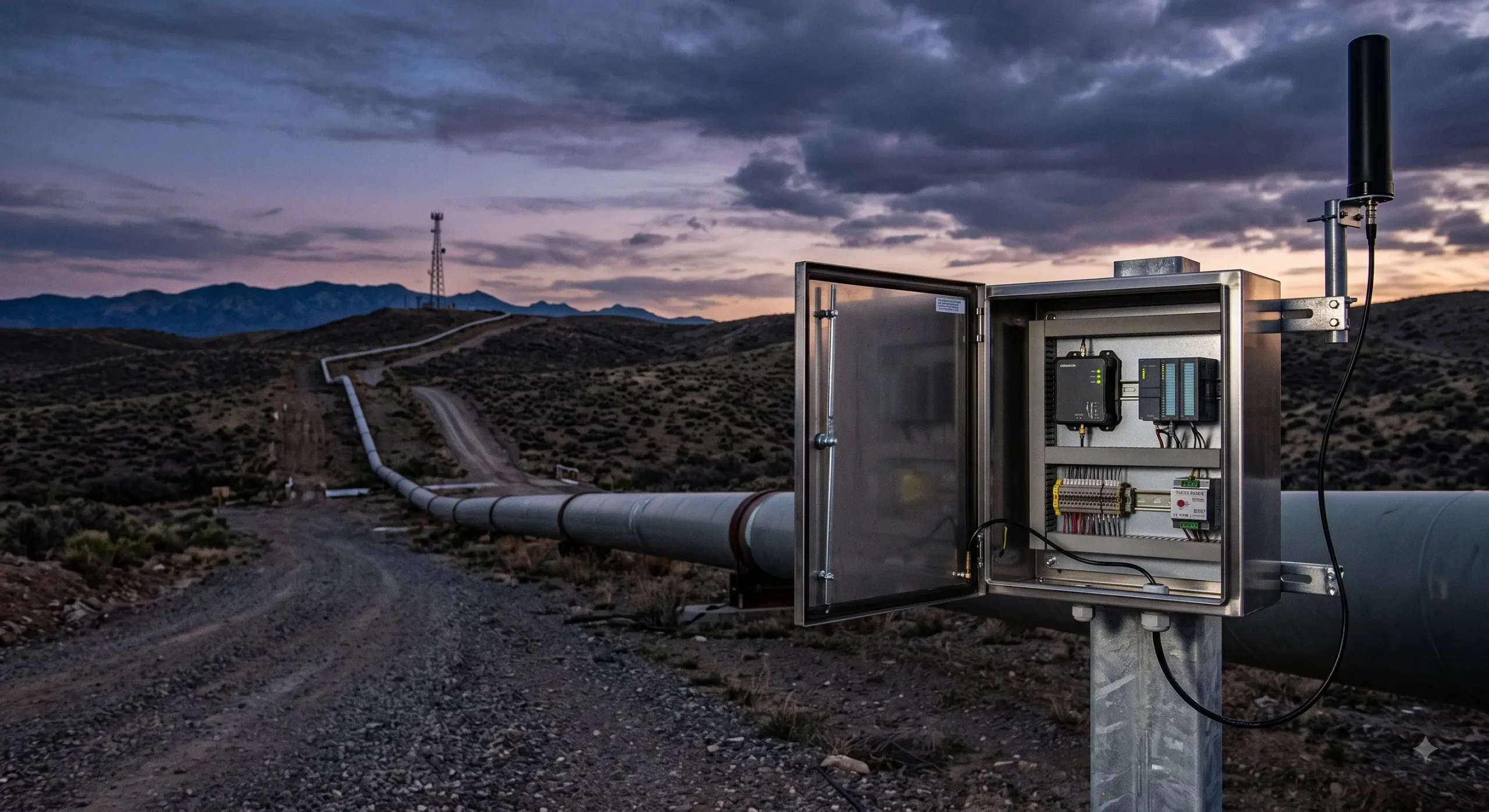
To architect a truly resilient pipeline monitoring system, engineers must stop expecting commercial cellular networks to be flawless. Instead, the architecture must be fundamentally designed to assume the network will fail frequently, and it must handle that failure gracefully without dropping a single byte of critical telemetry. This requires a transition from transparent modems to intelligent, edge-computing gateways designed for extreme industrial environments (-40°C to 85°C).
| Architectural Aspect | Traditional Transparent Polling | Edge-Based Telemetry (Modern) |
|---|---|---|
| Data Handling During Outage | Permanent data loss; SCADA logs “Timeout” | Data is buffered locally at the edge in flash memory |
| Bandwidth Efficiency | Very Low (Constant redundant TCP handshakes) | Very High (Pushes payload data only on status change) |
| Power Consumption | High (Constant transmission drains solar batteries) | Ultra-Low (Sleeps between scheduled transmissions) |
| Security Posture | Requires open inbound firewall ports (High Risk) | Outbound-only MQTT connections (Highly Secure) |
Top 3 Challenges in Cellular SCADA Communications
Understanding exactly why your SCADA telemetry drops offline is the prerequisite to engineering a permanent fix. When a pipeline site goes dark, engineers frequently blame the cellular carrier’s overall coverage. However, field diagnostics reveal that the root cause usually falls into one of three specific, highly technical categories that require distinct hardware mitigation strategies.
1. Carrier-Grade NAT (CGNAT) and Dynamic IP Leases
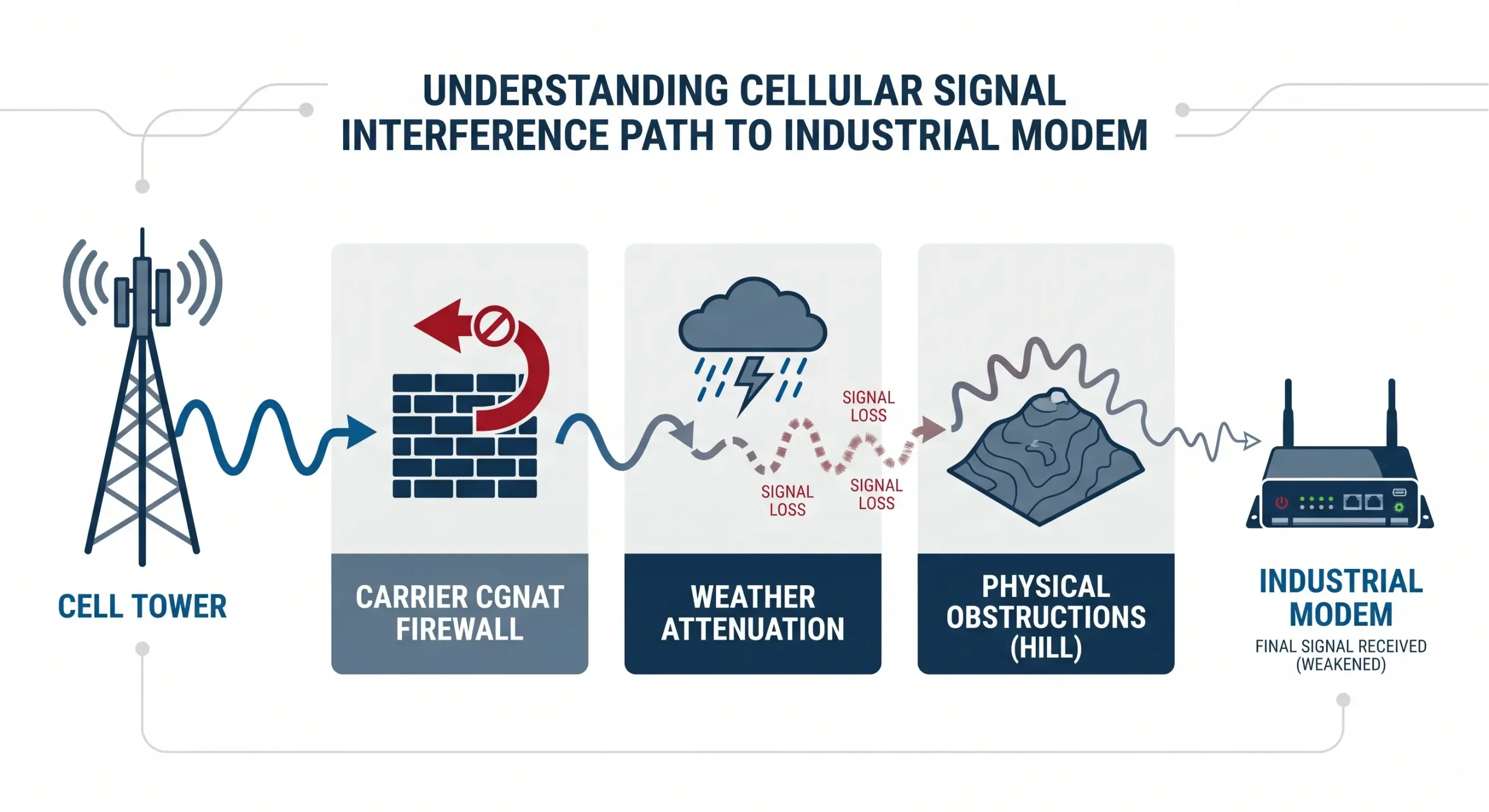
Perhaps the most common frustration in modern cellular SCADA is the inability to initiate a direct connection from the central master station to the remote site. Cellular carriers globally utilize Carrier-Grade NAT (CGNAT) to conserve the rapidly depleting pool of IPv4 addresses. This means your remote cellular modem does not receive a publicly routable IP address; instead, it sits behind the carrier’s massive firewall and shares a single public IP with thousands of consumer devices.
Because of CGNAT, traditional inbound polling requests (e.g., Modbus TCP over port 502) initiated by your SCADA master are immediately blocked at the carrier level. Furthermore, carriers actively force dynamic IP lease renewals. Even if you establish a connection, the carrier will periodically drop the link to reassign IPs, briefly severing the connection and breaking active TCP sockets, leading to phantom timeouts.
2. RF Path Obstructions, Fresnel Zones, and Weather Attenuation
A pipeline monitoring system must push wireless signals through varied and hostile terrain. Unlike urban environments where line-of-sight to a cell tower is common, remote pipeline sites suffer from significant “Fresnel zone” clearance issues. The Fresnel zone is the elliptical area surrounding the direct line-of-sight path between the modem’s antenna and the cell tower. If rolling hills, dense tree canopies, or seasonal foliage intrude into this zone, they absorb and scatter the RF energy.
3. Hardware Lockups in Extreme Thermal Environments
A fatal mistake in automation engineering is deploying consumer-grade or “light industrial” plastic routers inside unventilated NEMA 4X enclosures. During summer months, the internal temperature of a sealed steel cabinet baking in direct sunlight can easily exceed 75°C (167°F). Under this heat stress, commercial-grade CPUs will thermally throttle, or worse, the cellular baseband module will completely lock up.
When the cellular module crashes due to thermal overload or voltage transients, the device remains powered on (the LED lights may even stay green), but it stops routing traffic—a state commonly known as “bricking.” Without an independent, specially designed hardware watchdog circuit to physically cut and restore the DC power rail to the modem chip, the site will remain permanently offline until a technician arrives to manually reboot the system.
Conquering the Solar Power Dilemma: Ultra-Low Power for Off-Grid Sites
Power management is one of the most important but often overlooked aspects of remote pipeline monitoring. Grid power is almost non-existent to remote valves, flow meters, and wellheads. They are totally self sufficient using only local solar panels and deep-cycle batteries (Lead-Acid or LiFePO4). In cold winter months, with short days and sub-zero temperatures, the capacity of the battery is greatly diminished.
A cellular gateway that consumes 5 to 10 Watts of continuous power will deplete the localized battery bank in days, taking the SCADA node offline. Telemetry modernization means installing hardware that understands the limitations of off-grid power.
Industrial-grade cellular DTUs (Data Terminal Units) are specifically designed for these austere power environments. They are tolerant to an ultra wide input voltage range of 9~48V DC or 9~24V DC. This makes them immune to voltage spikes caused by large pump motors starting up, or the voltage sag of a dying solar battery.
When evaluating cellular gateways for solar-powered sites, look strictly at the idle current draw. High-performance industrial DTUs achieve a working current of just 50mA@12V during active 4G dialing and communication, and an incredibly low 25mA@12V during idle states. This micro-ampere power profile ensures that your telemetry equipment will survive weeks of heavy cloud cover without depleting your critical infrastructure batteries.
Resolving RS485 Bus Collisions: The Multi-Master Solution
In brownfield pipeline upgrades, a common architectural nightmare arises when integrating legacy infrastructure with modern cloud telemetry. Typically, a remote site already has a local Human Machine Interface (HMI) or a local PLC acting as the Modbus Master, continuously polling the flow meters via an RS485 two-wire bus.
When an engineer installs a new 4G cellular gateway to push that same flow meter data to a centralized cloud SCADA, they inadvertently introduce a second “Master” onto the same RS485 network. Because standard RS485 is a half-duplex protocol, it cannot handle multiple masters transmitting simultaneously. If the local HMI and the cloud gateway attempt to query the flow meter at the exact same millisecond, the electrical voltage differentials overlap on the bus. This creates a severe data collision, resulting in corrupted frames, CRC checksum errors, and a complete loss of communication for both the local operator and the cloud server.
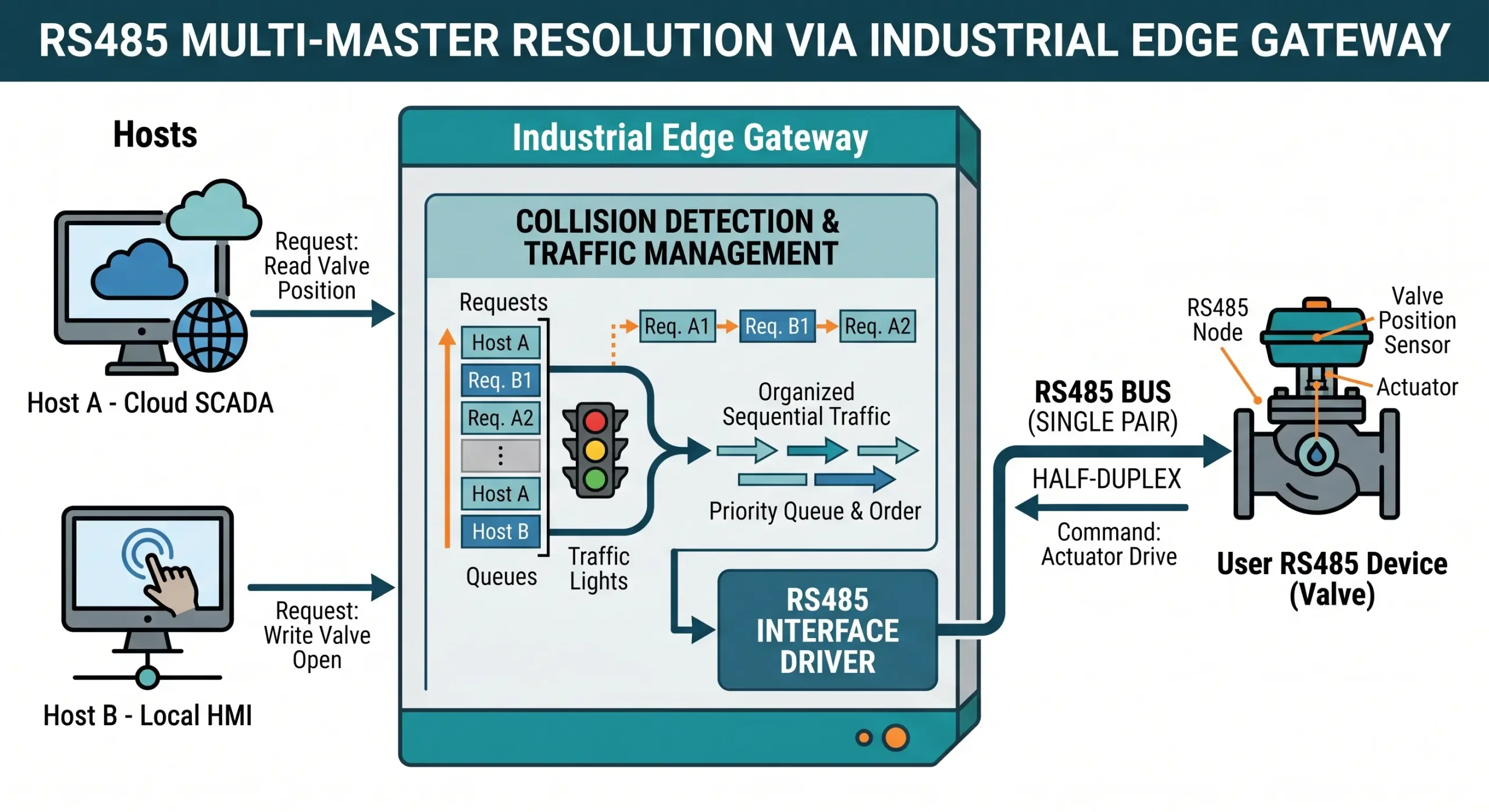
To safely extract data without breaking existing local controls, the cellular gateway must have advanced RS485 bus conflict detection and Multi-Host support.
The Intelligent Edge Gateway monitors the voltage states of the RS485 bus. You can program the gateway to only send if the RS485 bus has been quiet for a certain amount of time (say 29 milliseconds). In addition, the gateway meticulously schedules and orchestrates the traffic between the cloud master and the local master by defining a maximum waiting time for query commands. The advanced multi-host arbitration prevents data collisions, so you can add sophisticated IoT telemetry to aging pipelines without rewiring or reprogramming local control panels.
Stopping Data Loss: The Power of Edge Buffering and Local Storage
The best defense against RF attenuation and cellular instability is to push intelligence to the edge of the network. This architectural change introduces Local Data Buffering (Store-and-Forward Technology).
The edge gateway, when installed at a pipeline metering station, acts as the local Modbus master. It polls the local pressure transmitters and flow meters constantly at a fast deterministic rate over RS485. If the 4G LTE link is healthy, it will process this data and forward it up to the central SCADA system.
But once the cellular link is lost the edge gateway completely changes its behavior. Instead of throwing away the incoming PLC data, it begins to write the time-stamped telemetry locally to its internal non-volatile flash memory. Industrial DTUs can offer up to 256K of dedicated offline storage, protecting thousands of critical data points during an outage.
This turns a catastrophic network failure into a very manageable event. The critical pipeline data is preserved, whether it is 30 seconds for a tower handoff, or hours for a regional carrier blackout. Once the cellular connection is restored, the gateway automatically negotiates a connection to the central server and pushes the historical backlog of data, seamlessly filling in the gaps on the SCADA trend charts with no manual intervention.
From Modbus to MQTT: Slashing Bandwidth with Report-by-Exception
Edge buffering solves data loss, but we also need to solve the severe financial and operational inefficiency of legacy protocols over cellular networks. Modbus TCP follows a strict request/response polling cycle. If the SCADA master wants to know if a pipeline block valve is open, it has to poll the remote PLC constantly. 99.9% of the time the answer is “No change”. You are burning up huge amounts of paid for cellular bandwidth for absolutely zero new information.
Forward-thinking engineers install edge gateways to translate local Modbus traffic to MQTT (Message Queuing Telemetry Transport) to future-proof a pipeline monitoring system.
📉 SCADA Cellular Bandwidth Waste Calculator
Calculate how much cellular data budget you are wasting by transparently polling static values over 4G LTE instead of using edge processing.
When an edge gateway converts Modbus to MQTT, it utilizes a Report-by-Exception architecture. The gateway continuously polls the PLC locally (using zero cellular data). It only opens a cellular transmission to the central cloud broker when a data value actually changes beyond a predefined deadband. This dramatically lowers operational costs and bypasses CGNAT issues because MQTT initiates an outbound connection from the device to the server.
| Protocol Feature | Modbus TCP (Traditional) | MQTT (Publish/Subscribe) |
|---|---|---|
| Communication Flow | Master polls Slave continuously (Constant chatter) | Edge node publishes only on data change |
| Header Overhead | Heavy (TCP/IP ACKs required for every poll) | Extremely Light (Optimized for IoT) |
| Cellular Bandwidth Usage | Very High (Predictable but expensive) | Very Low (Bursty, economical usage) |
| Connection Initiation | Inbound (Blocked by Carrier CGNAT) | Outbound (Bypasses CGNAT effortlessly) |
Zero-Code JSON Gateways: Escaping the Development Hell
While MQTT is highly efficient, formatting the raw industrial data into a structure that modern cloud platforms (like AWS, Azure, or private IoT servers) can easily ingest is notoriously difficult. Historically, engineers had to write complex Python or C++ scripts at the edge to parse raw hexadecimal Modbus RTU payloads into human-readable JSON formats.
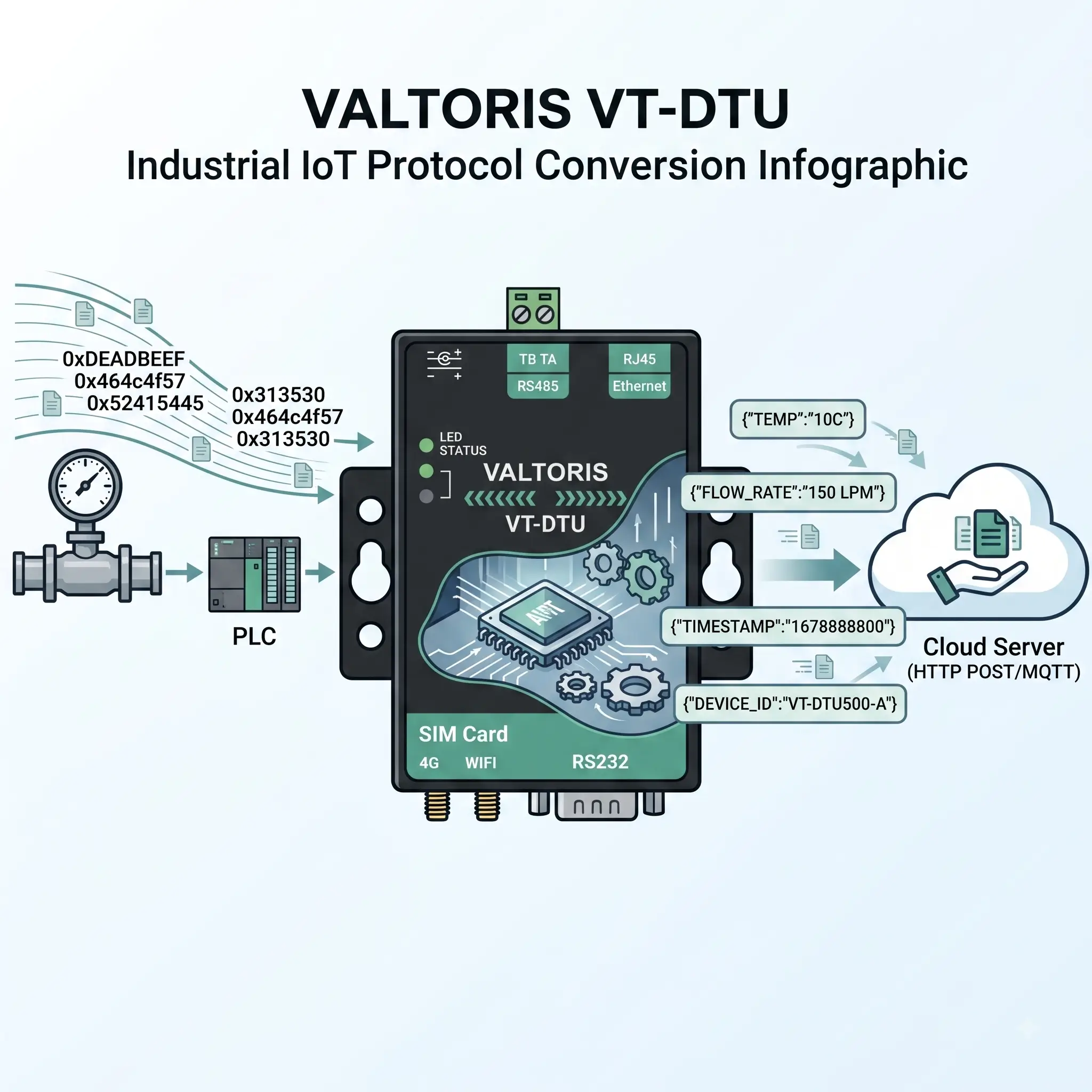
Advanced industrial DTUs with native support, zero-code JSON gateway capabilities, remove this development bottleneck. The equipment will automatically collect data from the Modbus RTU or DLT-645 instruments, and periodically convert them into standardized JSON formats for transmission.
More importantly, the configuration process does not require any manual text editing or scripting. Engineers can map Modbus registers to JSON keys thru a full GUI and can even import and export the entire list of collection points in Excel. Once mapped, the gateway can push this structured JSON telemetry to the cloud directly using MQTT, HTTP POST or HTTP GET protocols. This enables OT engineers to deeply integrate with IT cloud databases in minutes, not months.
Cybersecurity at the Edge: Securing Pipeline Telemetry
Nation-state actors and ransomware syndicates pose an unprecedented threat to critical infrastructure such as natural gas pipelines. As pipeline operators migrate to IP-based cellular telemetry, cybersecurity at the edge gateway is a necessity.
Payloads to be secured with strong cryptographic standards for industrial cellular gateways. With MQTT, the gateway supports SSL/TLS encrypted transmission. This means that even if the cellular packets are intercepted over the air, the critical pipeline pressure and flow data cannot be deciphered or manipulated by malicious actors.
Eliminating “Truck Rolls”: Remote Troubleshooting and Auto-Recovery
For utility operations managers, the most painful and visible metric is the cost of a “truck roll.” Dispatching a highly skilled technician in a specialized 4×4 vehicle to a remote pipeline station simply to power-cycle a frozen cellular router is an egregious waste of operational expenditure (OPEX). Modernizing your SCADA telemetry layer is ultimately about improving the autonomy and self-healing capabilities of your remote assets.
To completely eliminate these specific truck rolls, true industrial cellular gateways integrate deeply with an independent hardware watchdog circuit. If the gateway detects a systemic lockup or a loss of connection for a sustained period, the specially designed watchdog circuit will automatically perform a hard reset, recovering the connection autonomously without any human intervention.
| O&M Cost Factor | Single Traditional Truck Roll | With Auto-Recovery Gateway |
|---|---|---|
| Technician Labor (incl. travel time) | $85/hr (Avg 4 hours = $340) | $0 (Self-heals autonomously) |
| Vehicle Fuel & Wear and Tear | $150 | $0 |
| Lost Productivity / Opportunity Cost | High (Tech pulled from core maintenance) | None |
| Total Estimated Cost Per Event | ~$490.00 | $0.00 |
Conclusion: Future-Proofing Your Pipeline Monitoring System
Legacy transparent polling architectures over a volatile cellular network are no longer a gamble modern pipeline operators can afford. The compounding challenges of carrier CGNAT firewalls, RF signal attenuation, RS485 bus collisions and protocol inefficiency will inevitably lead to dropped compliance data and wildly expensive site visits.
By upgrading your SCADA telemetry layer with intelligent edge gateways, you are fundamentally transforming the durability of your network. Local edge buffering is introduced to ensure that critical pressure information is not lost due to weather-induced carrier outages. By switching to zero-code JSON and MQTT report-by-exception, you can reduce cellular data overhead and avoid complex backend development altogether. Finally, hardware watchdogs and ultra-low idle power profiles (25mA) keep your off-grid sites alive thru the harshest winters.
