
Need to fix a broadcast storm in an industrial network? If you’ve ever wondered, “what is the outcome of a layer 2 broadcast storm,” the signs on the factory floor are impossible to miss: Your SCADA screen is hanging on and off, Modbus TCP connections are being dropped at random and your industrial cellular router’s dashboard is reporting a CPU utilization of 99%. You haven’t put any complex logic into the programming, but the whole communications backbone seems to be chocking on invisible traffic.
Check the symptoms occurring on your control network:
In 90% of these cases, the hardware isn’t broken. The problem is the fundamental network architecture. Before you start replacing expensive PLC communication modules or blaming your ISP, you need to understand how “Flat Networks” create broadcast radiation, and how you can implement an industrial network broadcast storm fix by choosing to natively isolate PLC traffic on a cellular router.
Table of Contents
The Anatomy of a Network Broadcast Storm: The Flat Network Trap
To understand why your network is choking, we have to look at how Ethernet behaves at Layer 2 (the Data Link Layer). When a system integrator sets up a remote pump station or a factory work cell, the cheapest and easiest approach is to plug everything—the Siemens or Allen-Bradley PLC, the touchscreen HMI, the CCTV camera, and the 4G uplink router—into a single, unmanaged DIN-rail network switch. They assign everything an IP address in the `192.168.1.x` range. This architecture is known in IT circles as a Flat Network.
In a flat network, there are no physical or logical boundaries. Every single device resides in the exact same “Broadcast Domain.”
🚨 The Multicast Multiplier Effect
Industrial protocols are extremely chatty by design. Protocols like EtherNet/IP and PROFINET rely heavily on multicast and broadcast packets for device discovery, implicit I/O messaging, and ARP resolution. When a device sends a broadcast packet (such as an ARP request asking “Who has IP 192.168.1.50?”), the unmanaged switch blindly copies that packet and blasts it out of every single active port.
According to the Cisco Converged Plantwide Ethernet (CPwE) Design Guide—the global gold standard for industrial network architecture—failing to segment these domains is the leading cause of industrial network degradation. If you have an IP camera streaming high-resolution video using multicast, or a malfunctioning network interface card (NIC) stuck in a discovery loop, it will spew thousands of broadcast packets per second.
Why Do Cellular Routers Crash During an Ethernet Broadcast Storm?
An industrial cellular router is primarily a Layer 3 routing device. It features an ARM processor that encrypts VPN tunnels, manages NAT tables, and maintains a constant 4G/5G connection to the cell tower. It is not intended to serve as a garbage disposal unit for local Layer 2 noise.
Every single device on a flat network—including your crucial cellular router—is forced by the IEEE 802.3 Ethernet standard to receive every broadcast packet, interrupt its CPU to inspect the packet header, and then discard it if it’s irrelevant. If not contained, an ethernet broadcast storm can quickly escalate, causing critical routing functions to fail. This constant CPU interruption prevents the router from managing its cellular modem, which is exactly what causes your SCADA system to experience Modbus TCP timeouts.
Prove It Yourself: Step-by-Step Wireshark Packet Analysis
If your IT department insists that the network infrastructure is fine and blames your PLC logic, you can definitively prove the existence of a network storm using Wireshark. We are not looking for timing errors here; we are looking for sheer packet volume and CPU exhaustion.
Follow these exact steps to catch the storm in the act:
- Tap the Network: Since unmanaged switches physically cannot mirror ports, you must temporarily insert a Network Tap or a legacy Ethernet Hub between the switch and the router to connect your diagnostic laptop. Alternatively, run Wireshark directly on the SCADA workstation if it sits on the same flat network.
- Capture the Chaos: Start a Wireshark capture without any capture filters. Let it run for 60 to 120 seconds during a period where the SCADA system is reporting lag.
- Apply the Broadcast Filter: In the display filter bar, type eth.dst == ff:ff:ff:ff:ff:ff or (ip.addr >= 224.0.0.0 and ip.addr <= 239.255.255.255). This isolates all ARP broadcasts and Layer 2 multicast traffic.
- Generate the I/O Graph: Navigate to Statistics > I/O Graphs. Click the ‘+’ to add a new graph, set the Y-Axis to Packets/s (Packets per second), and apply the filter from Step 3.
What you are looking for is the baseline noise level. According to ODVA’s EtherNet/IP specifications, background broadcast traffic should comfortably remain under 100 packets per second. If your Wireshark I/O graph shows the router’s port is being bombarded with 3,000 to 5,000 broadcast packets per second (pps), you have found the smoking gun. By tracing the MAC or IP addresses in these packets, you can isolate the exact storm IP—the malfunctioning device or camera that is initiating the chaotic ip storm. Meanwhile, the router’s CPU is spending 95% of its clock cycles just reading and dropping junk mail from that IP camera or noisy VFD.
Need to prove the network failure to your IT department?
Download our 1-Page Broadcast Storm Diagnostic Report Template to properly document CPU spikes and packet volume for management.
Download Diagnostic Template (PDF)🩹 Immediate Field Fix (To Stop the Bleeding)
If you need to restore SCADA control right this second, look at your Wireshark capture and identify the MAC/IP address blasting the most packets (frequently an IP camera or a misconfigured VFD). Physically unplug that specific device from the unmanaged switch. Your Modbus TCP timeouts will immediately drop, buying you time to implement proper VLAN isolation.
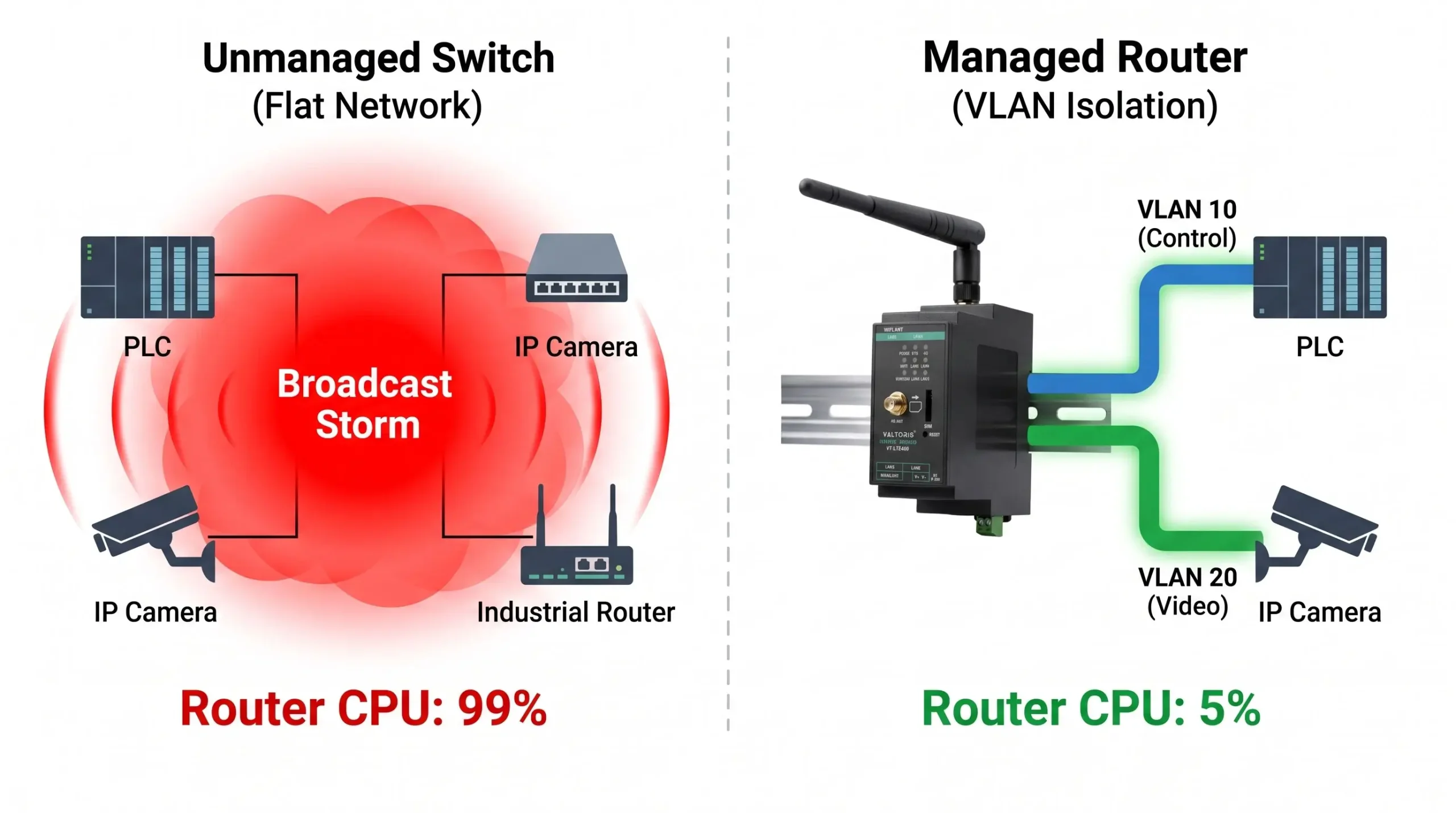
Visualizing a Network Broadcast Storm vs. VLAN Isolation
In a flat network, irrelevant camera multicast traffic (red) floods the router’s CPU. With VLANs (green), traffic is strictly confined to its assigned port, protecting the gateway.
The Expensive Mistake: Buying an External Managed Switch
When engineers finally realize they need to shrink the broadcast domain, the conventional IT advice is to purchase a Layer 2 or Layer 3 Managed Switch to implement VLANs (Virtual Local Area Networks). While an external managed switch will indeed fix the problem, it introduces three massive headaches for industrial edge deployments:
- Cost Prohibitive: Ruggedized, industrial DIN-rail managed switches often cost anywhere from $500 to $1,500+.
- Space Constraints: Control panels in remote pump stations, traffic cabinets, or mobile AGVs have extremely limited physical DIN-rail real estate.
- Management Complexity: It introduces another point of failure, requires an additional 24VDC power drop, and adds another proprietary web interface that maintenance technicians must learn to troubleshoot at 2 AM.
The Smart Fix: Isolate PLC Traffic directly on a Cellular Router
The most elegant and cost-effective industrial network broadcast storm fix is simply to remove the external managed switch. Instead, use the built-in hardware switching capabilities of a sophisticated industrial cellular gateway to segment the traffic at the edge.
By leveraging Port-Based Untagged VLANs directly on the router’s LAN ports, you can physically isolate traffic streams. Port based vlans (most standard PLCs can’t deal with 802.1Q tagged vlans) strip the tag before it gets to the end device. You can assign physical LAN Port 1 exclusively to your deterministic PLCs, and LAN Port 2 to the high-bandwidth IP Cameras. The router’s hardware switch ASIC ensures that a broadcast storm generated by the camera on Port 2 cannot physically cross the silicon barrier to flood the PLC on Port 1.
✅ 100% Transparent to Your PLCs
Unlike complex IT-managed 802.1Q tagged VLANs, Port-Based VLANs are completely transparent to the edge devices. The VT-LTE400 strips the VLAN tag before the packet reaches the PLC. You do NOT need to change your PLC network configuration or ladder logic—it is truly plug-and-play.
How to Configure VLAN Isolation on the Valtoris VT-LTE400
If you are deploying an enterprise-grade device like the Valtoris VT-LTE400, you already have a powerful managed switch built directly into the chassis. VT-LTE400 is equipped with 4 physical 10/100M Fast Ethernet LAN ports. Dedicated hardware switch chip is responsible for processing VLAN rules at wire speed, and will not affect the main routing processor.
Here is how you execute the ultimate broadcast storm fix in under 5 minutes:
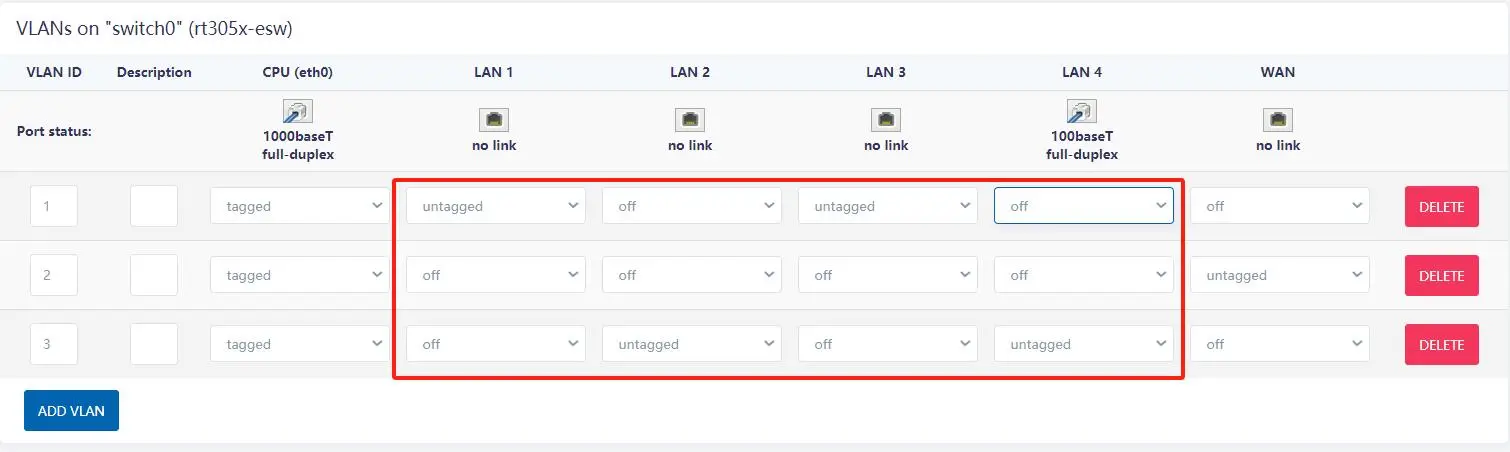
- Switch Menu: Login to the VT-LTE400 web UI, and go toNetwork > Switch.
- Enable VLAN Functionality: Select the “Enable VLAN functionality” check box. This activates the hardware switch chip.
- Create VLAN IDs: By default all physical LAN ports are members of VLAN 1 and the WAN port is in VLAN 2. Click “Add” to create a new VLAN (e.g., VLAN ID 3) to contain your noisy devices.
- Assign Ports (Untagged): Assign physical LAN Port 1 to VLAN 1 (Untagged) and set the other physical ports to ‘Off’. Assign LAN Port 2 to VLAN 3 (Untagged). Crucial Step: Leave the ‘CPU’ port as ‘Tagged’ for all active VLANs so the router’s brain can route internet access to both subnets.
- Configure Interface Subnets: Go to Network > Interfaces and click ‘Add New Interface’. Create a new logical interface mapped to
eth0.3(VLAN 3) with a completely different subnet (e.g., assign192.168.10.1to VLAN 3, while VLAN 1 remains192.168.1.1).
By saving this configuration, you have established a physical quarantine zone. A broadcast storm on Port 2 will hit the router’s internal switch chip and be instantly dropped before it ever touches the PLC on Port 1. Beyond performance, this segmentation is also a mandatory requirement under ISA/IEC 62443 cybersecurity standards, preventing lateral movement if an IP camera is compromised by malware.
Frequently Asked Questions (Broadcast Storms & VLANs)
💡 Pro Tip: The Foundation of Secure Remote Access
Once you have physically isolated your PLC behind an industrial cellular router to stop broadcast storms, you have simultaneously solved another massive problem: Cybersecurity.
This exact port-based isolation is the core architecture used to bypass restrictive corporate IT firewalls safely. It allows machine builders to troubleshoot equipment globally without exposing the factory’s main LAN.
Learn more about Air-Gapped PLC Remote Access Architecture →Eliminate Network Congestion Today
Don’t just add another managed switch to a crowded DIN-rail. Upgrade your basic gateway to the VT-LTE400 to get secure cellular routing and hardware-level VLAN isolation in a single footprint. By combining the network ports into multiple isolated VLANs, your Modbus TCP traffic is instantly protected from broadcast storms.
Plug & Play setup • Global Shipping • Direct Technical Support