
Why Zigbee Mesh Matters for Industrial Equipment
Here’s a number that puts this in context: the global Zigbee market was valued at $4.9 billion in 2024 and is projected to reach $8.63 billion by 2033, growing at a CAGR of 6.5% . According to the Zigbee Alliance , industrial automation accounts for over 30% of Zigbee applications , making it one of the largest segments after smart homes.
If you have 15 PLCs on a factory floor, each with an RS485 port, running new cable means trenching, conduit, and downtime. Wireless is the obvious answer. Zigbee mesh gets mentioned a lot—self‑healing, low power, reliable.
But search for “Zigbee mesh network” and you’ll find smart bulbs, home automation hubs, and articles about pairing light switches. Almost nothing about connecting a Modbus RTU device to a control room server.
This guide is different. It focuses on what actually happens when you replace RS485 cables with Zigbee mesh, what hardware you need, and how to make it work in industrial environments.
The Mesh Basics (Three Minutes)
| Device Type | What It Does | Power | Routes Data? |
|---|---|---|---|
| Coordinator | One per network. Starts and manages it. | Mains | Yes |
| Router | Stays awake, passes data for others | Mains | Yes |
| End Device | Sleeps, only talks to its parent | Battery | No |
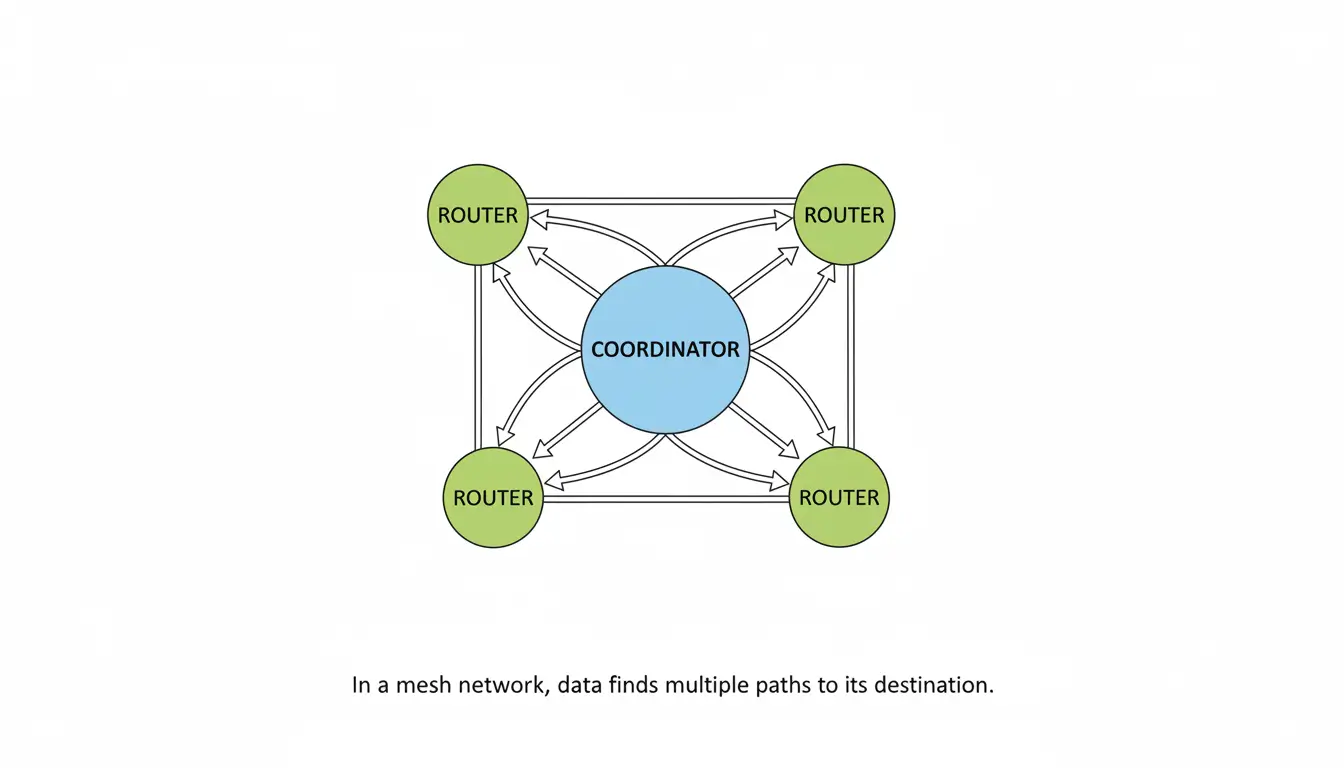
In a mesh network routers help each other out by passing data. Lets say Device A is trying to reach the coordinator. It is too far away. So Device A sends the data to Device B. Then Device B sends it to Device C and finally Device C sends it to the coordinator. If something goes wrong with one of the paths the data will just find another way to get there.
According to the IEEE 802.15.4 standard , Zigbee operates in the 2.4 GHz band with typical indoor range of 10–100 meters per hop, and up to 2 kilometers line‑of‑sight with high‑power hardware .
The Part That’s Never in the Smart Home Articles
Your equipment uses RS485 or RS232. It probably uses Modbus RTU or a special protocol.
You can’t connect a Zigbee radio directly to it. Expect data to work. You need a device that takes the data from each equipment and sends it over the Zigbee network.
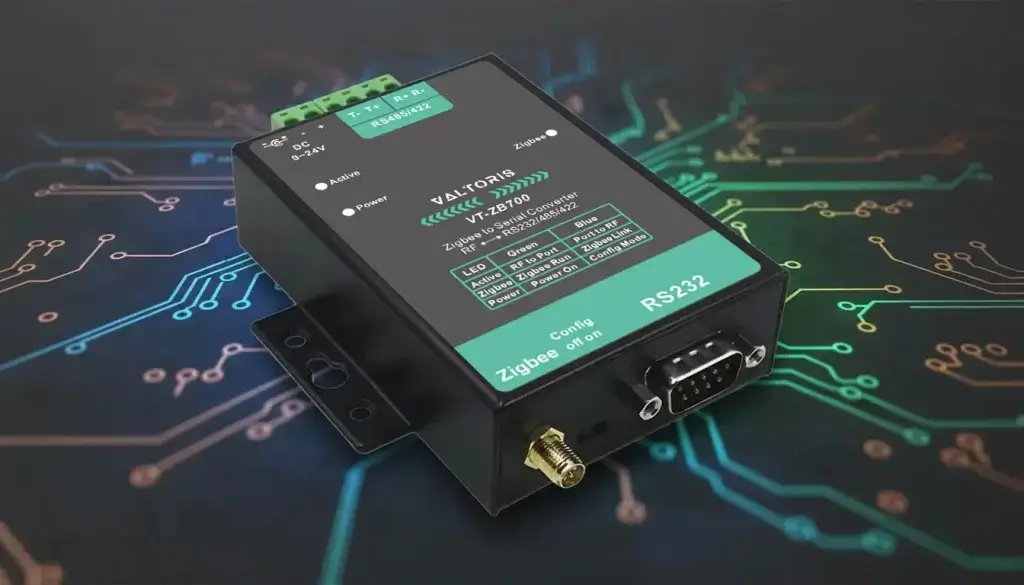
That’s what a Zigbee converter for data does. You need one for each equipment. It takes RS485 data. Sends it out over Zigbee. Your equipment won’t even notice the cable is gone.
The converter sits next, to each equipment. It grabs the data and puts it on the Zigbee network. This way your equipment keeps working as usual.
What to Look For in Hardware
If you’re shopping for converters, here’s what actually matters:
| Spec | Consumer Grade | Industrial Grade |
|---|---|---|
| Temperature | 0°C to 40°C | -40°C to 85°C |
| Enclosure | Plastic | Metal |
| Power | 5V USB | 9-24V DC |
| Antenna | Internal | External SMA |
| Transmit power | 10dBm | 20-25dBm |
Valtoris makes stuff that hits these specs. So do a few others. Check datasheets, don’t trust marketing.
What a Setup Looks Like
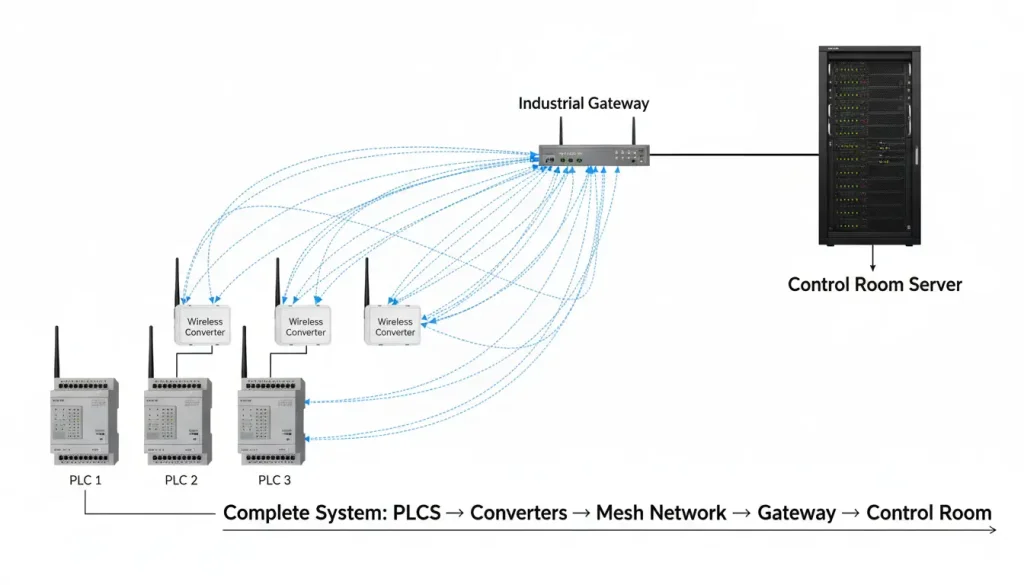
Let us say you have fifteen Programmable Logic Controllers scattered around a factory floor. Each of these Programmable Logic Controllers has an RS485 port. You want all the data from these Programmable Logic Controllers in the control room.
At each PLC: Put a Zigbee serial converter. Wire it to the RS485 port. Power it with 24V DC from the same cabinet. Configure the serial settings to match the PLC—baud rate, parity, data bits, stop bits. Get these wrong, nothing works. Get them right, it’s fine.
In the control room: Put a Zigbee gateway. This is the coordinator. It starts the network and collects data from all the converters. Connect it to your network via Ethernet.
The converters join the network. They form a mesh. If one can’t reach the gateway directly, it hops through another. Your SCADA software connects to the gateway’s IP address and sees all 15 PLCs.
The whole installation process takes one day.. The best part is that you do not need to do any trenching or use any conduit.
Configuration Cheat Sheet
Before you start, fill this out for each device:
| Parameter | Your Value | Notes |
|---|---|---|
| Device location | __________ | |
| Serial baud rate | __________ | Check your equipment manual |
| Parity | None / Even / Odd | Usually None for Modbus |
| Data bits | 7 / 8 | Almost always 8 |
| Stop bits | 1 / 2 | Almost always 1 |
| Device role | Router / End Device | Router if mains powered |
| PAN ID | __________ | Same for all devices |
| RF channel | 11-26 | Pick one not crowded with WiFi |
Keep this sheet. When something stops working six months from now, you’ll thank yourself.
Three Ways to Configure
All routers: Every converter set as router. The mesh is robust—every device helps pass data. Works when all devices have reliable power.
Routers + end devices: Some converters set as router (mains powered), some as end device (battery powered). End devices save power but don’t route. They need to be within range of a router.
Star network: Every converter talks directly to the gateway. No mesh. Simpler, but less resilient.
Battery-Powered Sensors
End devices can sleep. A converter in end device mode draws very little power when idle. Pair it with a battery and a sensor that wakes up every 15 minutes to send a reading—it can run for years.
End devices don’t route. They need to be within range of a router or the gateway. Plan router placement accordingly.
| Sensor Type | Wake Interval | Battery Life Estimate |
|---|---|---|
| Temperature | 15 minutes | 3-5 years |
| Pressure | 5 minutes | 2-3 years |
| Vibration | 1 minute | 1-2 years |
What Actually Matters in Industrial Settings
Temperature is a deal. If you are talking about stuff for people it usually stops working at 50°C.. If you need something that will work outside Temperature needs to be able to handle -40°C to 85°C. You should really check the datasheet for the Temperature details.
When it comes to the box that holds everything an Enclosure made of plastic is not that great. It lets in signals and gets too hot inside. On the hand a metal Enclosure acts like a cooler and blocks out noise from motors and hard drives.
For Power you have to think about what you’re using it for. A 5V USB connection is fine for charging your phone.. For something bigger, like an industrial control panel you need 24V DC Power. So look for something that can handle 9-24V DC Power input.
The Antenna is also important. If you have a SMA connector that means you can use a bigger Antenna or put it outside a metal box. This is really helpful because a bigger Antenna or one that is outside can work better.
How Many Devices?
Theoretical limit is 65,000. Practical limit depends on data traffic.
| Traffic Pattern | Max Devices | Notes |
|---|---|---|
| Temp every 15 min | 200+ | Light traffic |
| Status every minute | 100 | Moderate traffic |
| Poll every 5 seconds | 30-50 | Heavy traffic |
If every device sends data every second, the network gets congested. Zigbee isn’t for high-speed polling. It’s for monitoring.
Real Range
Through concrete and steel, expect 20-50 meters per hop. The mesh extends this. Add more devices, cover more ground.
| Environment | Range per Hop |
|---|---|
| Open field, line-of-sight | Up to 2000m |
| Warehouse with racks | 30-50m |
| Office with drywall | 50-80m |
| Factory with machinery | 20-40m |
| Multiple concrete floors | 10-15m per floor |
Software Changes?
None. The gateway presents data as TCP/IP. Your SCADA or monitoring software connects to an IP address and port. If your software expects a COM port, some gateways offer virtual serial port software that makes it look like a local COM port.
If a Device Fails
The mesh routes around it. Other devices find new paths. The network stays up.
If the gateway fails, everything stops. Keep a spare.
Common Mistakes
| Mistake | Symptom | Fix |
|---|---|---|
| Wrong baud rate | No data, or garbage data | Check equipment manual, match exactly |
| A/B wires swapped | No communication | Swap wires at one end |
| No termination | Intermittent data on long cable runs | Add 120Ω resistor if cable >10m |
| PAN ID mismatch | Device won’t join network | Set same PAN ID on all devices |
| Channel congestion | Dropped packets, slow joins | Use WiFi analyzer, pick clear channel |
When you are working with settings you need to make sure they are exactly the same. This means the baud rate and the parity and the data bits and the stop bits all have to match the equipment you are using. If these serial settings do not match your equipment you will not get any result. You should look at the manuals that came with your devices to find the serial settings. It is an idea to write these serial settings down so you can remember them. Then double-check the settings before you save them to make sure they are correct.
Examples
We have a factory that has 25 PLCs. These PLCs are over the place in an area of 50,000 square feet. Each of these PLCs has RS485. We wanted to add cables but that would have meant digging up the whole floor. So we used converters at each PLC. We set them up as routers. There is a gateway in the control room. All the PLCs send their information to the SCADA system. When one of the PLCs needs to be maintained and is shut down the mesh network finds a way around it.
We also have a warehouse with 40 temperature sensors. These sensors are on racks. They are powered by batteries. We used converters at each sensor. We set them up as end devices. We also put converters on the structural columns and we set them up as routers. These routers are powered by the mains. The mesh network covers the warehouse. The sensors wake up every 10 minutes send their readings. Then they go back to sleep. This way the batteries last for years.
Then there is a pump station. This pump station is 500 meters away from the control room. We used to have a problem with the RS485 cable because it would fail whenever there was lightning. So we set up two converters in a point-to-point system, not a mesh network. One converter is at the pump. The other one is, at the control room. Now we do not have to use cables anymore. We do not have any more failures.
Quick Product Reference
If you’re looking at hardware for industrial deployments:
| Model | What It Does | Best For |
|---|---|---|
| Zigbee to Serial Converter | RS232/485/422 to Zigbee | Connecting field devices |
| Zigbee to Ethernet Gateway | Zigbee to Ethernet | Collecting data, connecting to network |
Both should have –40°C to 85°C rating, metal case, 9–24V DC power, and external antenna connectors.


One More Thing
The first time you set one of these up, it’ll take an hour to figure out. The web interface is fine, but you have to know what your equipment expects. Write down the serial parameters. Match them exactly. Test with one device before scaling to twenty.
After that, it’s just repeat.
Zigbee mesh isn’t magic. It’s a tool. For RS485 gear that needs to go wireless without trenching and pulling cable, it’s a tool that works.
