

Before we get into the specifics of SCADA networks and the hype around 5G, let’s answer a simple question: what is a cellular modem and why is it the preferred alternative to hardwiring for today’s operational technology (OT) environments??
But here’s the hardcore engineering reality that doesn’t make mainstream tech headlines: In terms of powering the critical, unglamorous backbone of our connected world, the water level sensors in remote municipal reservoirs, the diagnostic PLCs on heavy factory floors, the string inverters on 5MW solar farms, traditional hardwiring is simply physically and financially impossible. To trench fiber optic cables on abrasive terrain or active highways costs thousands of dollars a mile.
Here an industrial cellular modem is an absolute must-have. It is not only relevant, but the most reliable, cost effective and critical tool of the trade. Far more than a consumer Wi-Fi hotspot that you might use in an airport, a true industrial cellular gateway is a secure, deterministic bridge. It reads local serial or Ethernet telemetry (Modbus RTU, Modbus TCP or DLT-645) and securely transmits it over existing 4G LTE, NB-IOT or GSM networks directly to your central SCADA system or IoT cloud dashboard.
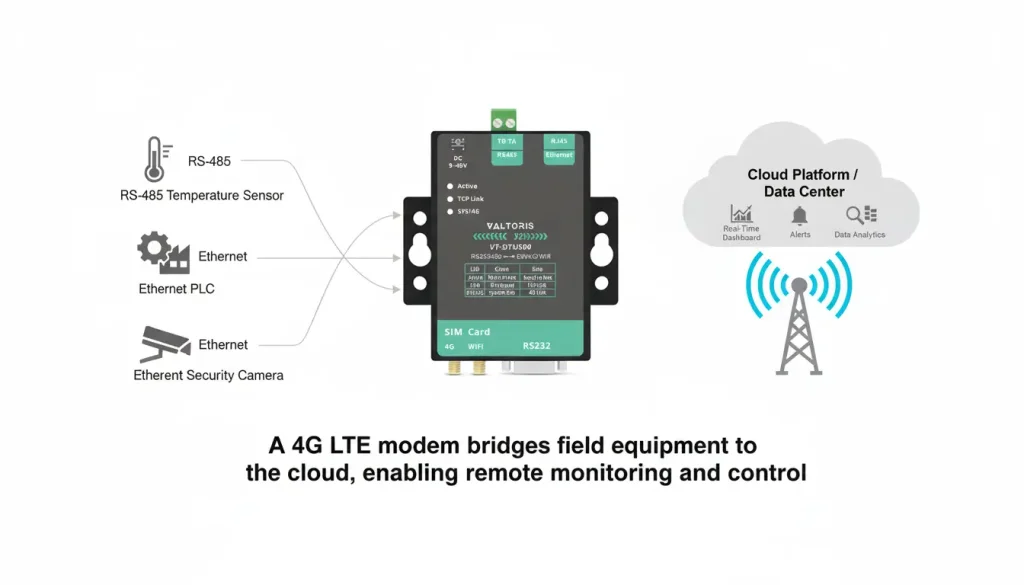
In this ultimate, no-nonsense guide, we cut through the commercial noise to explore the hardcore engineering realities of remote data acquisition. We will break down exactly what an industrial cellular modem does, uncover the biggest pain points automation engineers face (including the dreaded CGNAT trap), and provide a rigorous technical framework for choosing the right hardware to eliminate costly field service truck rolls.
Table of Contents
- What Exactly is an Industrial Cellular Modem?
- └ Cellular Modem vs. Hotspot vs. Cellular Router
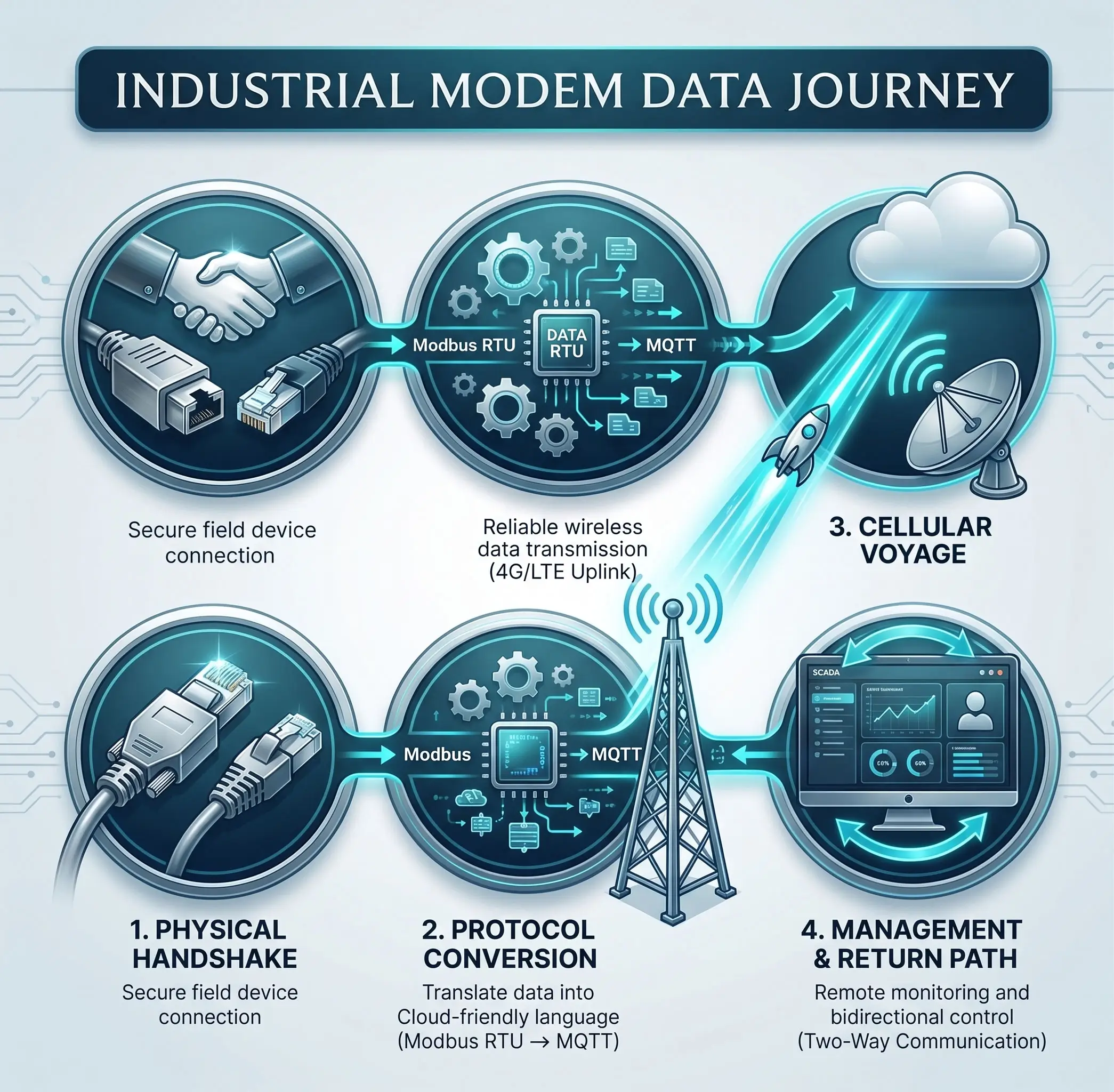
- How Does a Cellular Modem Work? The 4-Stage Data Pipeline
- The 4 Biggest Pain Points in Remote PLC Communication
- The CGNAT Trap: Why You Can’t Ping Your Remote PLC
- Security First: How to Connect SCADA to the Cloud Without Getting Hacked
- Modbus Polling vs. MQTT: Stopping the “Bill Shock” on Cellular Data
- └ The Solution: Edge Computing & MQTT
- 5 Must-Have Features When Choosing an Industrial Cellular Modem
- 4G vs. 5G for IoT: It is Not an Upgrade
- Proven in the Field: Real-World Applications
- Conclusion & Next Steps
- Frequently Asked Questions
What Exactly is an Industrial Cellular Modem?
At its core, an industrial cellular modem (frequently referred to in the industry as a Data Transfer Unit, or DTU) establishes machine-to-machine (M2M) connectivity for remote assets lacking native WAN interfaces. It acts as a dedicated protocol translator and a secure courier for your operational data.
If you are looking for an industrial 4G modem, you are not looking for maximum download speeds to stream 4K video. You are looking for something that works 24/7/365, surviving extreme electrical and environmental abuse without dropping a single packet of telemetry data.
The difference between a consumer Wi-Fi hotspot and a ruggedized industrial modem lies in the fundamental hardware architecture:
- Thermal & Mechanical Toughness: Industrial modems come in an extruded aluminum or a flame-retardant alloy plastic (such as SECC metal) housing. They utilize high-tolerance industrial capacitors for passive heat dissipation, guaranteeing survival in ambient temperatures ranging from -40°C to +85°C (-40°F to 185°F). Native 35mm DIN-rail buckles are also available to deal with the mechanical vibration of factory machinery.
- Electrical Robustness (Wide Voltage): Severe voltage transients, spikes and brownouts are common at the industrial sites. Industrial modems require wide range terminal block inputs (e.g. 9-48V DC or 9-24V DC) with reverse polarity and overvoltage protection. They don’t use cheap consumer barrel jacks that will vibrate loose easily.
- Interface Flexibility: They integrate directly with your edge devices (sensors, meters, PLCs) through robust industrial ports like RJ45 Ethernet, RS232 (DB9), and RS485 terminal blocks, ensuring broad compatibility with decades-old legacy infrastructure.
Cellular Modem vs. Hotspot vs. Cellular Router
In the procurement phase, understanding the operational distinction between these three device categories prevents severe over-spending or under-specifying for your IoT project.
| Device Category | Primary Use Case | Network Management | Suitability for Industrial SCADA |
|---|---|---|---|
| Consumer Hotspots | Casual web browsing, temporary Wi-Fi. | None. Basic DHCP only. | Catastrophic. No watchdogs; permanently freezes during network dropouts. |
| Industrial Modems (DTUs) | Transparent serial-to-IP / Ethernet-to-IP tunnels. | Layer 2/3 bridge. Native edge protocol translation (Modbus to MQTT). | Ideal. Highly cost-effective for polling remote legacy PLCs and sensors. |
| Industrial Cellular Routers | Complex gateway for multi-node sites. | Full routing, Stateful Firewalls, VPN Termination (IPsec/WireGuard). | Required when connecting multiple IP cameras, HMIs, and PLCs concurrently. |
How Does a Cellular Modem Work? The 4-Stage Data Pipeline
Understanding the underlying architecture is critical to building a reliable network. So, how does a cellular modem work reliably in harsh environments? Let us follow the path of a piece of data—like a pump pressure reading—from a remote sensor to your cloud dashboard.
- Stage 1: Physical Ingestion & The Handshake. Your sensor sends out information through its RS485 or RS232 port. It interfaces directly with the modem’s robust terminal blocks. The modem matches the baud rate, parity, and stop bits, physically ingesting the raw electrical signals (e.g., a Modbus RTU frame saying “Register 3001 = 72.5 PSI”).
- Stage 2: Protocol Translation & Encapsulation. Raw serial data is unroutable over the internet. Your sensor and the cloud need to understand each other. The modem’s internal CPU acts as an interpreter, translating the “machine dialect” (Modbus RTU) and encapsulating it into a web-friendly format, such as a JSON payload within an MQTT message or an HTTP POST request.
- Stage 3: The Cellular Journey (Backhaul). Now packaged as an IP packet, the data is handed to the modem‘s built-in 4G module. Utilizing a dedicated M2M/IoT SIM card (Micro SIM), it authenticates on the local LTE network and pushes the structured packets over the carrier’s radio access network.
- Stage 4: Continuous Assurance & Bidirectional Management. Cellular networks drop connections; a naive device goes silent. A true industrial modem utilizes heartbeat packets—a tiny, regular “I’m still here!” message sent to your server. If the link fails, the modem autonomously auto-reconnects. Furthermore, commands from the cloud can be received, stripped of IP headers, converted back into a Modbus write command, and pushed out the serial port in milliseconds.
🔍 Interactive Diagnostic: Is Your SCADA Network Vulnerable?
Select your current or planned field topology below to instantly identify potential failure points and compliance risks.
Standard consumer SIMs utilize Carrier-Grade NAT, making inbound SCADA polling impossible. Furthermore, constant Modbus TCP polling over cellular wastes 80% of bandwidth on TCP handshake overhead. Recommendation: Switch to a Static IP SIM or utilize a DTU with edge-level MQTT Publishing.
The 4 Biggest Pain Points in Remote PLC Communication
In the real world, automation engineers aren’t looking for generic marketing definitions of 4G networks. They are battling highly specific, deeply frustrating network anomalies on a daily basis. Deploying cellular networks in harsh field environments introduces severe operational challenges. Recognizing and mitigating these core struggles is the first critical step to architecting a reliable, zero-downtime M2M network.
- The Dreaded “Truck Roll”: The absolute biggest pain point in remote telemetry is a frozen network interface. Heavy rain, EMI interference, or carrier tower resets can momentarily drop a cellular connection. If a remote modem locks up due to a carrier glitch and fails to reconnect, dispatching a technician 50 or 500 miles simply to power-cycle a $150 device destroys operational margins.
- High Latency & Modbus Timeouts: Traditional Modbus RTU is highly sensitive to timing delays. Polling a remote serial device directly from a cloud SCADA over a variable-latency 4G network frequently results in communication timeouts and fragmented packets, flooding the HMI with false error alarms.
- The “Blind Spot” Inbound Connection Failure: Engineers frequently install a modem, verify it has internet access, but find they are completely unable to ping the PLC or download ladder logic remotely from their office. This is a routing and NAT issue that plagues novice deployments.
- Cellular Data Overage Bills: Inefficient polling architectures generate massive amounts of overhead data. When managing a fleet of 500 remote pump stations, inefficient TCP handshakes and constant polling of unchanged data can result in cellular data bills that exceed the operational budget.
The CGNAT Trap: Why You Can’t Ping Your Remote PLC
This is arguably the most common deployment hurdle in the automation industry. You buy a standard 4G SIM card from a major telecom carrier, install the modem, wire up the PLC, and head back to the office. You type in the IP address shown on the modem’s WAN interface to poll the PLC, and… nothing. The request times out.
The Reality of Carrier-Grade NAT:
Cellular providers use Carrier-Grade NAT (CGNAT) to conserve rapidly depleting IPv4 addresses. This means your modem is assigned a dynamic, private IP address (often starting with 10.x.x.x) that sits behind the carrier’s massive enterprise firewall. Your modem can reach out to the internet (outbound traffic), but the public internet (your SCADA server or engineering laptop) cannot initiate an inbound connection to reach the modem.
To enable bi-directional communication you need to implement one of the following architectures:
1. Procure a Static Public IP SIM: Request an M2M/IoT specific SIM card with a Static Public IP address from your carrier. This gives you access to the modem directly from anywhere on the web.
2. Shift to a “Publish” Architecture: Rather than having the server request data ( Polling ) , configure the modem as a TCP Client or MQTT Publisher . The modem builds the outbound connection thru the CGNAT to your server . It doesn’t even touch the inbound restriction .
3. Utilize VPN Tunnels (Requires a Cellular Router): If you need to poll inbound, you must upgrade from a simple Modem/DTU to an Industrial Cellular Router . The router creates an outbound VPN tunnel (WireGuard/IPsec) to your corporate server, establishing a secure bridge enabling two-way traffic.
Security First: How to Connect SCADA to the Cloud Without Getting Hacked
It is a universal consensus among veteran automation engineers: exposing a raw PLC directly to the public internet is a recipe for disaster. Pushing proprietary machine data and critical control logic across public cellular airwaves demands rigorous encapsulation and cryptographic security. According to the U.S. Cybersecurity and Infrastructure Security Agency (CISA), mitigating attack vectors on Operational Technology (OT) networks requires strict network segmentation and encrypted tunneling at the edge.
Your industrial modem has to be a fortified perimeter to safely bridge the IT/OT gap. If you are working with a regular Cellular Modem (DTU), you need to secure the data payload itself. This means using MQTT over SSL/TLS Instead of sending data in plaintext, the modem encrypts the telemetry using CA certificates and client private keys before it leaves the device.
Private APNs are also used in many large-scale industrial deployments. Provisioning a custom APN logically segregates your cellular traffic at the carrier level and tunnels it straight behind your corporate firewall over a dedicated private line , avoiding the public internet altogether .
Modbus Polling vs. MQTT: Stopping the “Bill Shock” on Cellular Data
If the software protocols don’t match, and you burn thru your OpEx budget, hardware connectivity is irrelevant. Traditional scada systems use legacy protocols like modbus rtu or modbus tcp. These protocols were designed for hardwired, localized, copper networks where bandwidth is infinite and latency is zero.
When a central SCADA server polls a remote PLC over a cellular network it is constantly asking “What is the tank level?” every 3 seconds. The PLC responds. 99% of the time the value has not changed. That constant polling back and forth, not to mention the heavy overhead of the TCP/IP handshake, makes cellular data bills go thru the roof over a cellular network. Worse, if the cell latency suddenly goes to 500ms, the SCADA server will drop the connection altogether. This leads to a flood of false error alarms.
The Solution: Edge Computing & MQTT (Publish/Subscribe)
The modern, bandwidth-efficient way to get data from the PLC to the cloud is to shift from “Polling” to “Publishing”. You must specify an intelligent industrial cellular modem (DTU) that handles protocol translation directly at the edge of the network. This structural shift aligns directly with the guidelines from the OASIS standard for MQTT, which emphasizes lightweight, publish-subscribe messaging as the optimal architecture for constrained networks and high-latency IoT environments.
| Protocol Feature | Traditional Modbus TCP (Polling) | MQTT via Edge Gateway (Publishing) |
|---|---|---|
| Data Architecture | SCADA Server constantly asks for data. | Modem sends data only when ready or changed. |
| Network Overhead | Extremely High (TCP handshakes for every query). | Very Low (Persistent connection, lightweight headers). |
| Security Profile | Requires inbound open ports (High Risk of scanning). | Outbound only (Bypasses CGNAT & Enterprise Firewalls). |
| Cellular Billing | Prone to massive cellular overage charges. | Predictable, minimal data consumption. |
Instead of the cloud polling the PLC, the modem autonomously polls the RS485 or RS232 devices locally at high serial baud rates (where latency is effectively zero). It parses the raw hex registers, encapsulates them into a structured, lightweight JSON payload, and pushes it to the cloud via MQTT.
📊 M2M Cellular Data Usage & Bandwidth Estimator
Industrial IoT SIM cards are billed by the megabyte. Use this tool to estimate your monthly Modbus polling data footprint and determine if you need a high-speed router or a cost-effective CAT1 DTU.
Tired of High Cellular Data Bills & Modbus Timeouts?
Meet the Valtoris VT-DTU500 Series. Engineered with native Modbus-to-MQTT edge computing, it pushes data by exception, slashing your cellular costs by up to 80% while ensuring zero data loss.
5 Must-Have Features When Choosing an Industrial Cellular Modem
At first glance, many cellular modems look identical on specification sheets. But in the field some falter within months, while others perform faultlessly for years. To ensure you’re operating successfully, audit your Bill of Materials (BOM) against these five critical features:
- Hardware Watchdogs (Auto-Recovery): Software pings are not enough. A real industrial modem has its own silicon watchdog circuit. If the baseband processor locks up or the cellular link degrades indefinitely, the watchdog physically cuts power to the internal module, forcing a hard electrical reset and re-registration on the cellular network. This is the best way to defend against the “truck roll”.
- External Antenna Support (SMA): Control panels are generally steel boxes , which are sealed . That makes them perfect Faraday cages , which block RF signals . Don’t believe internal antennas. Industrial modems must have threaded SMA connectors so that you can route a high gain magnetic or fiberglass antenna to the outside of the cabinet to get the best signal to noise ratio (SNR).
- Protocol Conversion & Multi-Host Polling: If you use a “dumb” transparent modem, as discussed, you will have to write complex Python translation scripts on your central server. Choose a device that has built-in protocol conversion, that converts legacy Modbus RTU to JSON by itself. Also look for Multi-Host Polling Support Advanced modems can arbitrate simultaneous concurrent TCP requests from multiple SCADA clients, locally sequencing commands to avoid RS485 bus collisions.
- Industrial Form Factor (Power & Mounting): Must support 35mm DIN-rail mounting natively to be easily integrated into crowded PLC racks. Electrically, it must accept wide-voltage DC inputs (e.g. 9-48V) from safe screw terminal blocks, with galvanic isolation to prevent surges and voltage transients from nearby heavy machinery from affecting the CPU.
- Offline Data Caching: What happens when the network is down for 20 minutes? SCADA system loses historical data Premium industrial DTUs (e.g., the VT-DTU500 series) include non-volatile storage (e.g., 256KB buffer). They cache your RS485 telemetry locally for cellular outages and sequentially replay historical data upon link restoration, guaranteeing a zero-data-loss architecture.
| Engineering Consideration | The Consumer Choice Leads To… | The Industrial Choice Provides… |
|---|---|---|
| Environment & Thermal | Thermal throttling, frozen interfaces, emergency truck rolls. | Continuous operation through extreme weather (-40°C to 85°C) and EMI noise. |
| Compatibility & Protocols | Weeks of backend script development to translate raw serial data. | Edge-level protocol encapsulation (Modbus RTU to MQTT/JSON/TCP). |
| Management & Recovery | Blind spots during outages; physical site visits required to reboot. | Hardware watchdogs for zero-touch auto-reconnect; OTA firmware patching. |
| Total Cost of Ownership | Low initial CapEx, but massive OpEx due to constant troubleshooting. | Higher initial CapEx, but virtually zero maintenance OpEx over a 10-year lifespan. |
4G vs. 5G for IoT: It is Not an Upgrade
This is a critical architectural decision. Many assume 5G is inherently better because it is newer. When it comes to the Internet of Things and industrial automation, that is rarely true.
- Coverage & Penetration: 4G networks are ubiquitous and mature. Their lower frequency bands penetrate thick factory walls and rural terrain exceptionally well. Conversely, high-speed 5G networks (mmWave) often struggle with line-of-sight and building penetration, making them unsuitable for isolated pump stations.
- The 5G Overheating Trap: Beware the allure of massive bandwidth. 5G modules are extremely fast, but they consume 3.5W to 6W of continuous power. Baked by the sun in a sealed outdoor NEMA cabinet, this massive heat generation rapidly induces thermal throttling, leading to dropped connections and module degradation. For 95% of sensor telemetry and Modbus polling, an LTE CAT1 modem (consuming only 0.25W to 1W) is infinitely more reliable, running drastically cooler and enabling long-term battery or solar operation.
Proven in the Field: Real-World Applications
Deploying the right industrial cellular modem transforms operational architecture. Here are three examples where industrial gateways mitigated severe network challenges:
- Utility-Scale 5MW Solar Farm Telemetry: A utility client required a resilient monitoring backbone in a high-desert environment experiencing severe dust ingress and 48°C ambient heat. Instead of trenching vulnerable copper cabling across abrasive terrain, engineers deployed industrial 4G LTE gateways at each major string inverter cluster. Utilizing Modbus RTU-to-TCP translation and offline data caching, local serial data was instantly pushed over the cellular network, ensuring zero data loss despite extreme thermal loads.
- Municipal Pump Stations (Risk Mitigation): A local utility required real-time SCADA access for wastewater management. Trenching fiber optic cables would cost thousands of dollars per mile. Deploying Industrial 4G DTUs established immediate telemetry, reducing infrastructure deployment costs by 65% and eliminating operational blind spots.
- Oil & Gas Pipelines (Extreme Reliability): Frigid winters (-30°C) routinely froze standard commercial routers. Upgrading to wide-temperature (-40°C) industrial modems equipped with silicon watchdogs ensured 100% data uptime, eliminating dangerous and costly winter field dispatches.
Conclusion & Next Steps
Choosing an industrial cellular modem is less about purchasing a networking component and more about selecting a long-term data integrity partner. The ultimate goal is for the modem to become invisible—so reliable, so resilient, and so secure that you never have to think about the link, allowing you to focus entirely on your operational data and facility management.
For critical deployments, the need to standardize connectivity hardware requires a reliable baseline engineered specifically around the industrial failure points discussed above. In an effort to support you in deploying the right architecture, we provide two different solutions:
- For pure serial-to-cloud MQTT applications: Our VT-DTU300 Series is the ultimate compact, DIN-rail mounted edge computing. Native Modbus-to-JSON parsing and 256KB offline caching with no extraneous network routing overhead.
- For complex IT/OT convergence: The hybrid VT-DTU500E/G Series is the all-in-one industrial gateway for your site that requires Ethernet routing, Stateful Firewalls and VPN tunneling (IPsec/WireGuard) with legacy serial protocols.

Frequently Asked Questions
Q: I inserted an active SIM card into my cellular modem, but I cannot remotely access my connected PLC. Why?
Q: If the modem is installed in a remote location, how can I configure or update it without a site visit?
Q: Can multiple host computers poll the same remote RS485 device at the same time through the modem?
Q: Can I power the modem directly from my control panel’s existing 12V or 24V DC supply?
Q: What happens to my historical telemetry data if the cellular network goes down for several hours?
Request a Free Telemetry Architecture Review
Deploying commercial-grade modems or selecting the wrong protocol encapsulation leads to dropped SCADA packets and massive field maintenance costs. Submit your field topology below. Our automation engineers will review your architecture and specify the exact industrial cellular hardware guaranteed to stabilize your remote telemetry.
Want to see how easy edge protocol translation can be? Ask for a demo of our Vircom JSON Mapping Tool.
