

Why Remote Monitoring Matters More Than Ever
The global district heating market is worth a lot of money around 800 to 1,000 billion dollars in 2024. The global district heating market is expected to get bigger every year, 5 to 7 percent. But here is the thing the global district heating market can be improved. Up to 60 to 70 percent of heating system failures, in the district heating market can actually be stopped from happening. This can be done with the kind of remote monitoring of the global district heating market.
When people check the heating systems by hand they often do not see the problems until it is too late. They miss the signs like when the pressure is not right or the water is not flowing properly or when the pump is not working. These problems can become emergencies if they are not taken care of.
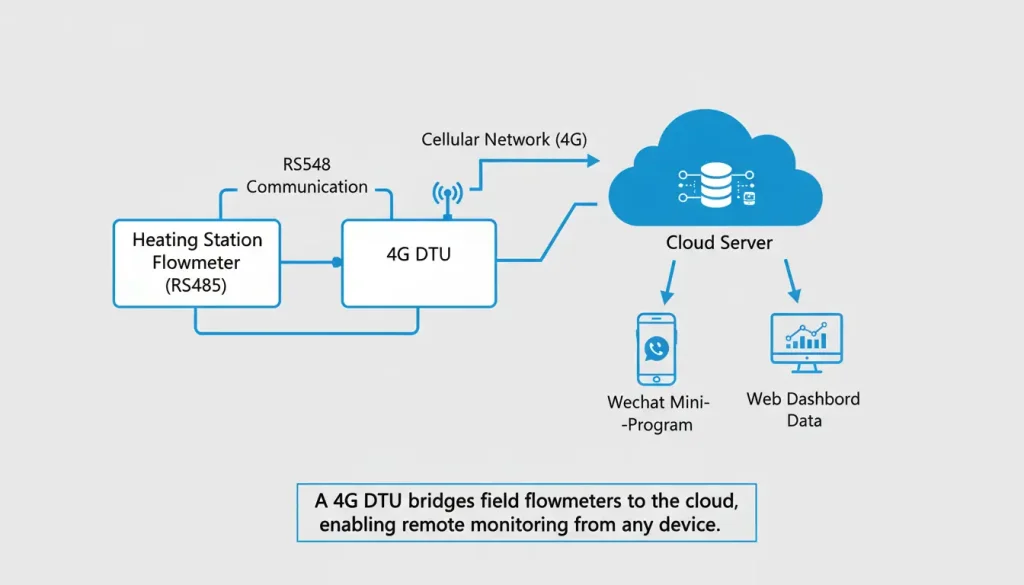
A 4G DTU (Data Terminal Unit) bridges the gap between legacy flowmeters and modern cloud platforms. This thing gets information from devices that use RS232 or RS485. It changes the information into a format called JSON. Then it sends this information over phone networks. The people in charge can see what is happening now like how much is moving how much has moved and how long it has been running. They can do this at any time and from any place even using a program, on WeChat.
This guide walks through a real‑world deployment of a 4G serial server for heating station flowmeter monitoring, with configuration steps, cost savings, and practical tips.
The Problem: Manual Reads Miss Critical Data
A typical heating station has several flowmeters, pressure sensors, and temperature probes. Most use Modbus RTU over RS485. In the past, operators visited sites weekly or monthly to record readings. This approach has three flaws:
- Delayed detection – a flowmeter failure can go unnoticed for days, causing energy waste or uneven heating.
- Labor cost – field visits consume hours of skilled technician time.
- No trend analysis – without continuous data, predicting equipment wear is guesswork.
According to a 2024 survey of utility operators, remote monitoring can reduce operational costs by 30–50% , primarily by eliminating routine site visits and enabling predictive maintenance .
How a 4G DTU Solves It
A 4G DTU (like the VT-DTU500G) acts as a bridge between field devices and the cloud. It:
- Connects to flowmeters via RS232 or RS485
- Reads Modbus RTU registers
- Converts data to JSON format
- Transmits over 4G LTE to a cloud platform
- Allows secure access via mobile apps (WeChat, custom dashboards)
The result: operators see real‑time flow, totalized volume, average flow, and runtime on their phones. Alerts can be configured for abnormal values.

Step-by-Step Implementation Guide
4G Serial Server Configuration Process
Step 1: Software Installation and Connection
Download VirCom5.50.exe or higher version. Connect the USB to RS232 cable to the serial port, power on the 4G serial server (VT-DTU500G), open VirCom5.50.exe, click on Device Management, and search for serial ports as shown in Figure 2.

Step 2: AT Command Configuration
To get the module working you need to put in the AT command configuration. First you have to write down the Valtoris cloud server IP address and the port number in the module. When you are done you should click on Set Parameters. Next you have to click on Return so the changes actually work.
This setup for the 4G DTU is important because it makes sure the Valtoris cloud server IP address and the data transmission over networks are working correctly. The Valtoris cloud server IP address and the 4G DTU configuration are important, for getting data from one place to another over networks.

Step 3: JSON Configuration Setup
To get started you need to enter the Firmware or Configuration File mode. Then you have to click on the JSON configuration option. This 4G DTU with Modbus support is really advanced. It allows for sophisticated data handling for complex industrial automation applications. The 4G DTU with Modbus support is very useful, for these kinds of industrial automation applications.

Step 4: Flowmeter Data Configuration
Enter the 4G serial server JSON configuration interface to configure flowmeter data parameters. This industrial-grade 4G DTU provides the flexibility needed for customized utility metering systems.

Step 5: Save and Activate Configuration
After designing the flowmeter configuration, click Save and Download to make it effective. This 4G DTU with Modbus support ensures accurate real-time data transmission in industrial settings, making it the best 4G DTU for industrial automation systems.
WeChat Mini-Program for Flowmeter Data Query
Step 1: Access WeChat Mini-Program
Open WeChat, search for the WeChat mini-program “Valtoris IoT“, open the “Valtoris IoT” mini-program, and add the relevant points from the JSON to the WeChat mini-program.
Step 2: Configuration and Monitoring
For detailed configuration, refer to the Valtoris IoT WeChat mini-program usage guide or consult Valtoris technical engineers. The flowmeter data collected through the 4G serial server VT-DTU500G can be viewed in the upload records for data content, providing complete remote monitoring with 4G DTU capabilities.

Real‑World Results: A Heating Utility Case
A district heating utility with 45 stations deployed 4G DTUs on their flowmeters. After six months:
| Metric | Before | After |
|---|---|---|
| Monthly site visits | 90 | 12 |
| Emergency call‑outs | 14 | 3 |
| Average outage duration | 8 hours | 1.5 hours |
| Annual O&M cost | $210,000 | $130,000 |
The system paid for itself in under 10 months. Operators now receive alarms when flow drops below setpoint, preventing under‑heating complaints.
What to Look for in a 4G DTU for Heating Applications
| Feature | Why It Matters |
|---|---|
| Wide power input (9–36V DC) | Works with panel 24V; no extra power supply |
| Industrial temperature (–40°C to 85°C) | Outdoor cabinets, unheated spaces |
| RS485 with Modbus RTU | Connects to most flowmeters |
| JSON conversion | Direct cloud integration without middleware |
| MQTT support | Efficient, reliable cloud messaging |
| Dual SIM failover | Keeps connectivity if one carrier fails |
| DIN rail mount | Clean installation in control panels |
Common Questions
Q: Does this work with any flowmeter?
Most flowmeters support Modbus RTU over RS485. Check the device manual for register addresses and baud rate.
Q: How much data does it use?
Reporting every 15 minutes consumes roughly 200–300 MB per month per DTU. Larger intervals reduce usage.
Q: Can I use it with existing SCADA?
Yes. The DTU can send data via MQTT to a local SCADA server or cloud platform.
Q: Is the WeChat mini‑program free?
The mini‑program is provided by the service platform; usage is included with the cloud service.
