

When configuring remote PLC access across a 4G LTE cellular network, controls engineers ultimately face an important architectural choice: WireGuard vs OpenVPN, or legacy IPsec. In the Operational Technology (OT) world, this is more than an IT preference. It’s a fundamental level system reliability failure to get the VPN protocol wrong: stateful tunnels that break during cellular IP handoffs, crypto overhead that chokes low-power edge CPUs, or telemetry data permanently blocked by Deep Packet Inspection (DPI) at the factory firewall.
The usual advice for a corporate VPN assumes static public IPs and stable fiber. However, industrial cellular networks operate in a hostile routing environment with Carrier-Grade NAT (CGNAT) and high latency jitter. This technical guide (2026) delves past the superficial speed tests into the underlying mechanics of the top VPN protocols and how they actually hold up under industrial edge conditions and Draconian IT security policies.
- The OT vs. IT Divide: Why Industrial VPNs Play by Different Rules
- IPsec: The Enterprise Standard
- OpenVPN: The Reliable Workhorse for Firewall Evasion
- WireGuard: The Next-Gen Challenger for Stateless Roaming
- Head-to-Head Showdown: The Decision Matrix
- Hardware Limitations at the Edge
- The “No-VPN” Alternative: Zero-Config SD-LAN
The OT vs. IT Divide: Why Industrial VPNs Play by Different Rules
The root cause of most cellular VPN connection failures is a simple misalignment of expectations: engineers often try to force enterprise-grade IT protocols into edge-level OT environments, only to watch them break under real-world conditions.
See the differences at baseline. An IT admin, when choosing a VPN, is connecting two climate controlled data centers via fiber optics, with static public IPs. An automation engineer, when deploying an industrial VPN router, must overcome three physical and digital barriers:
- Low-Power Edge Processors: Industrial cellular routers rely on fanless, low-wattage ARM processors. Protocols with heavy cryptographic overhead will max out the CPU, throttling data speeds regardless of how fast the 4G signal is.
- Cellular Jitter & IP Roaming: As cell towers switch or networks drop momentarily, edge routers often change their WAN IP address. Stateful VPNs will drop the connection completely, forcing a heavy re-authentication process.
- Strict IT Firewalls: Machine builders (OEMs) deploying equipment into a client’s facility are frequently forbidden from opening inbound UDP ports, severely limiting their remote access options.
If you just tested your hardware in the calculator above, you likely hit an uncomfortable realization: raw 4G speed is completely irrelevant if your router’s CPU is choking on encryption overhead. Once you accept that edge hardware is easily bottlenecked, the VPN protocol you choose becomes your only real leverage to keep the connection alive.
To understand how to bypass these limits—and survive CGNAT and strict firewalls—we need to look under the hood of the “Big Three” architectures. Let’s start with the protocol your client’s IT department will inevitably ask you to use first.
IPsec: The Enterprise Standard
IPsec (Internet Protocol Security) is the foundation of corporate networking. According to the NIST Guide to IPsec VPNs, it provides highly standardized site-to-site connectivity. While it dominates enterprise IT, deploying it on a mobile 4G edge router creates distinct challenges.
📌 The Short Version: IPsec is trusted by IT everyplace and is super fast on edge routers with hardware acceleration. However, it is notoriously rigid, needing exact parameter matches to connect and often struggling to maintain connections across changing 4G cellular networks.
The NAT Traversal (NAT-T) Challenge
IPsec was designed for static public IP addresses. Cellular networks rely heavily on CGNAT, so the IPsec tunnel must encapsulate its ESP (Encapsulating Security Payload) packets within UDP port 4500 to pass the carrier’s NAT routing. During network congestion the cellular provider may drop these NAT-T keep-alive packets and lock up the tunnel, requiring a hard reboot of the edge device.
| IPsec Implementation | Industrial Fit |
|---|---|
| IKEv1 / IKEv2 | Requires exact matching of Phase 1 (Cipher, Hash, DH Group) and Phase 2 configurations. Prone to connection drops if SA lifetimes mismatch between the edge router and central firewall. |
| Hardware Offloading | Many advanced routers include AES-NI hardware offloading, making IPsec highly efficient on CPU resources if configured correctly. |
So, what happens when IPsec’s rigidity becomes a roadblock? If the client’s IT department absolutely refuses to open the required UDP ports for your remote access, you need a backup plan. You have to trade raw performance for stealth.
OpenVPN: The Reliable Workhorse for Firewall Evasion
For years, OpenVPN has been the default for remote PLC access. It is noticeably slower than WireGuard or hardware accelerated IPsec but it has one feature that is essential for field integrators: TCP 443 Camouflage.
Bypassing Strict IT Policies
Factory IT departments frequently block outbound UDP traffic to prevent unauthorized external access. OpenVPN can be configured to run over TCP Port 443. To Deep Packet Inspection (DPI) firewalls, this tunnel appears identical to standard, secure HTTPS web browsing. This allows machine builders to access their PLCs without requiring the end-user’s IT department to open specialized ports. In short, OpenVPN prioritizes universal reach over raw speed, acting as the ultimate “skeleton key” for hostile IT environments.
⚠️ The Cost of TCP Camouflage: Running OpenVPN over TCP causes “TCP Meltdown” on poor cellular connections. Because both the inner connection and outer VPN tunnel require acknowledgments, latency spikes drastically compared to UDP-based tunnels.
But what if your biggest problem isn’t a tight IT firewall, but a flaky, inconsistent 4G signal? OpenVPN is heavy camouflage. If you’re allowing regular UDP traffic through, you don’t need it. You need raw speed and you need to be able to survive constant connection drops without manual intervention.
WireGuard: The Next-Gen Challenger for Stateless Roaming
WireGuard operates directly inside the Linux kernel. As detailed in the official WireGuard academic whitepaper, its lean codebase (under 4,000 lines) makes it exceptionally fast. However, OT engineers prefer it for a different reason: Stateless Roaming.
Surviving Cellular IP Roaming
Traditional VPNs are stateful. If a 4G router drops signal for an instant or roams to another cell tower (which will change the WAN IP), the tunnel breaks. The router has to drop the connection and do a complex cryptographic handshake to build it up again.
WireGuard is a stateless protocol. If the cellular IP address changes during the session, WireGuard will accept the authenticated packets coming from the new IP and automatically update its routing table. The connection is reestablished immediately without a 30 second handshake delay.
The Certificate Management Nightmare
Operational Technology (OT) engineers notoriously despise managing Public Key Infrastructure (PKI). OpenVPN requires generating, signing, and managing a complex hierarchy of certificates (CA, Cert, Key). WireGuard eliminates this administrative burden entirely by using a simple public/private keypair exchange. This zero-bloat approach makes deploying routers to hundreds of field sites significantly faster and virtually eliminates connection failures caused by expired certificates.
Head-to-Head Showdown: The Decision Matrix
If your head is spinning from the technical deep dives, let’s simplify. Which protocol should you actually deploy for your next field project? There is no universal “best” VPN. The right choice depends entirely on what is actively trying to kill your connection: the IT firewall, the edge CPU, or the cell tower.
Network engineers do not rely on a single protocol; they deploy the right architecture based on site constraints. Use this cheat sheet to guide your deployment:
| Real-World OT Scenario | The Verdict | Reasoning |
|---|---|---|
| The Locked-Down Factory The client’s IT department blocks all UDP traffic and refuses exceptions. | OpenVPN (TCP) | Route traffic over TCP 443 to disguise telemetry as standard web traffic. Accept the lower throughput. |
| The Remote Pump Station Weak 4G LTE signal, dynamic carrier IPs, and prone to micro-disconnects. | WireGuard | Stateless roaming survives IP changes instantly. Kernel-space execution prevents CPU bottlenecking. |
| The Corporate Backbone Connecting two entire factory networks permanently via stable fiber or 5G broadband. | IPsec | Natively integrates with enterprise firewalls (Cisco/Fortinet) and utilizes AES-NI hardware offloading. |
The Hardware Baseline: What to Look for in an Edge Router
You have selected your protocol. But a protocol is only as fast as the silicon running it. The most common mistake engineers make at this stage is deploying a basic cellular router that lacks the processing power to handle modern cryptographic overhead, inadvertently throttling their own data.
If you are procuring hardware for a remote automation site, look for devices that meet these three baseline requirements:
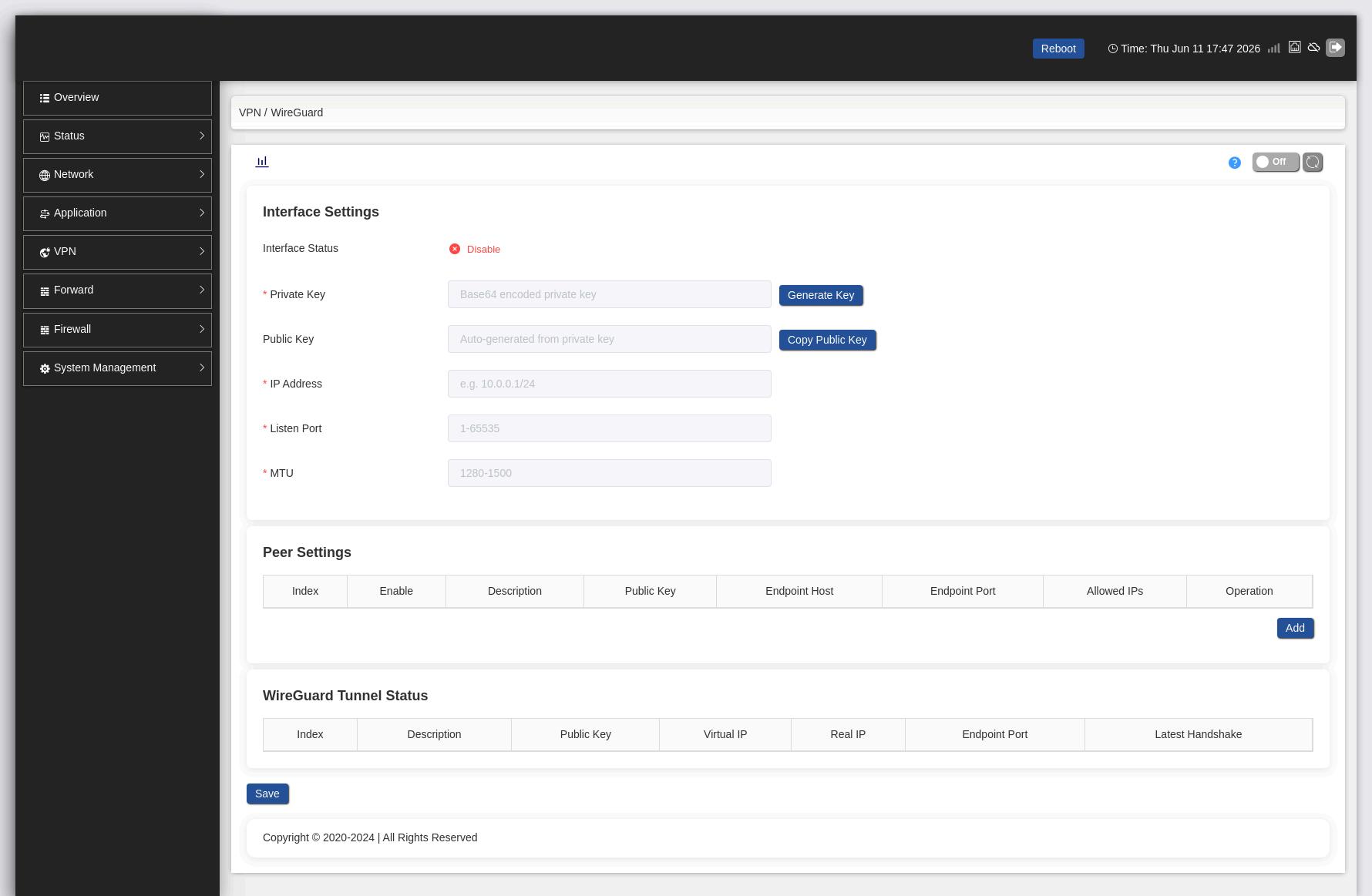
- Multi-Protocol Firmware: The router must support OpenVPN, WireGuard, and IPsec natively. You need the flexibility to switch protocols on-site if the client’s IT policies unexpectedly change.
- Industrial SoC & Sufficient RAM: Encryption is CPU-intensive. Avoid entry-level chips. If you are handling heavy telemetry or video streaming, prioritize industrial cellular routers designed for high-speed VPN throughput—typically powered by dual-core SoCs (like the MediaTek MT7621AT) and at least 512 MB of DDR3 RAM.
- Edge Caching (The VPN Failsafe): Remember that even the fastest WireGuard tunnel will drop if the cellular signal completely vanishes. To survive this, ensure your equipment functions as a true edge gateway rather than just a dumb pipe. Devices with a built-in Modbus Collect (TCP+RTU master) engine can continue polling field devices and cache register values locally during micro-disconnects. When the VPN recovers, the cache is pushed northbound, preventing SCADA polling timeouts.
However, equipping your site with the perfect protocol and enterprise-grade edge hardware does not make your connection invincible. You cannot out-engineer the foundational limitations of telecom carriers. Before finalizing your architecture, you must recognize when a VPN simply won’t work.
Engineering Reality Check: What Cellular VPNs Cannot Do
Even with top-tier processors and efficient WireGuard tunnels, industrial cellular routers operate within the laws of physics and carrier networks. Acknowledge these hard boundaries:
- The Double-CGNAT Dead End: Traditional VPNs (WireGuard/IPsec) require at least one endpoint to have a Public IP. If your engineer is on a hotel WiFi (NAT) and the router uses an M2M SIM (CGNAT), a direct peer-to-peer tunnel will fail. You must use a Zero-Config Cloud Broker (like m2mCloud) to punch through both firewalls.
- No Deterministic Real-Time Control: A VPN over 4G LTE is flawless for SCADA telemetry and remote PLC programming. However, due to inherent cellular jitter, it should never be used for sub-millisecond closed-loop motion control or Safety/E-Stop signals.
The “No-VPN” Alternative: Zero-Config SD-LAN
This brings us to the ultimate deployment question: even with the most powerful edge router handling the cryptographic load, what happens if manual VPN configuration, certificate management, and IT firewall negotiations simply take up too much of your engineering time? Or worse, what if you hit a “Double-CGNAT” dead end where a peer-to-peer tunnel is physically impossible?
This is why top-tier industrial routers do not force you to rely solely on traditional VPNs. They offer a modern bypass: Software-Defined LANs (SD-LAN).
Technologies like m2mCloud use an outbound-only connection to a centralized broker. Because the edge router initiates the connection outward (just like loading a webpage), it effortlessly passes through factory firewalls without requiring IT to open specialized ports or assign public IPs.
💡 Product Integration: The VT-LTE500 natively supports m2mCloud at the firmware level. By simply entering the server address (e.g., cloud.haolink.com) and port in the router’s interface, you establish a secure, Peer-to-Peer encrypted tunnel to your SCADA system in under 60 seconds—zero cryptographic routing tables, public IPs, or certificate management required.
Conclusion: There is No “One Size Fits All”
Professional network engineers are not blindly loyal to a protocol. If your top priority is bypassing strict IT policies, OpenVPN is your trusty skeleton key. WireGuard is the obvious winner if your first concern is to survive weak 4G signals and high-speed telemetry.
By understanding how these protocols work, controls engineers can stop fighting connectivity drops and ensure reliable, secure access to remote automation systems.
The “Swiss Army Knife” of Remote Access.
Field engineers rarely know what strict firewall restrictions they will face until they are on-site. The Valtoris VT-LTE500 gives you ultimate deployment flexibility: spin up WireGuard if UDP is allowed, switch to OpenVPN TCP 443 if IT locks down the network, or configure IPsec for strict enterprise tunnels. Adapt to any site, instantly.
Frequently Asked Questions (VPN Troubleshooting)
Why does my IPsec VPN tunnel drop exactly every 24 hours?
This is typically caused by a Phase 1 or Phase 2 Security Association (SA) lifetime mismatch. If the central firewall is configured to re-key at 86,400 seconds (24 hours) and the edge router is set to 3,600 seconds, the tunnel will drop when the cryptographic keys fail to synchronize. Ensure both endpoints have identical SA lifetimes.
Can I run WireGuard over TCP to bypass a strict IT firewall?
Natively, no. WireGuard strictly uses UDP to maintain its stateless, high-performance architecture. If a corporate IT department explicitly blocks all outbound UDP ports, you cannot use native WireGuard. You must switch to OpenVPN configured for TCP 443.
My cellular VPN connects, but I cannot ping large PLC packets or load VNC. Why?
Most likely you have an MTU mismatch (Maximum Transmission Unit). Cellular networks usually use an MTU size of 1420 bytes. Add the VPN encryption headers (~70 bytes) and the packet fragments and it is over the limit. To compensate for the cryptographic overhead, you will need to reduce the MTU setting on your VPN configuration for the Tun/Tap (e.g. to 1340).
Does VPN overhead significantly increase my 4G cellular data usage?
Yes. Cryptographic headers add bytes to every packet. For high-bandwidth video, the overhead is negligible (around 3-5%). However, for frequent, tiny SCADA payloads like Modbus TCP (which are often just a few bytes), VPN headers can increase your overall monthly cellular data consumption by up to 30-40%. If you pay per MB on an M2M SIM, WireGuard’s smaller header size is slightly more cost-effective than IPsec.
My 4G router doesn’t have a static IP. Can I just use DDNS (Dynamic DNS) with OpenVPN?
DDNS only tracks your changing IP address; it does not bypass Carrier-Grade NAT (CGNAT). If your cellular provider assigns you a private NAT IP (e.g., starting with 10.x.x.x or 100.x.x.x), DDNS is useless because incoming connections are blocked at the carrier level. You must either use a VPN server with a public IP as the central hub, or switch to a reverse-tunneling SD-LAN solution like m2mCloud.
