
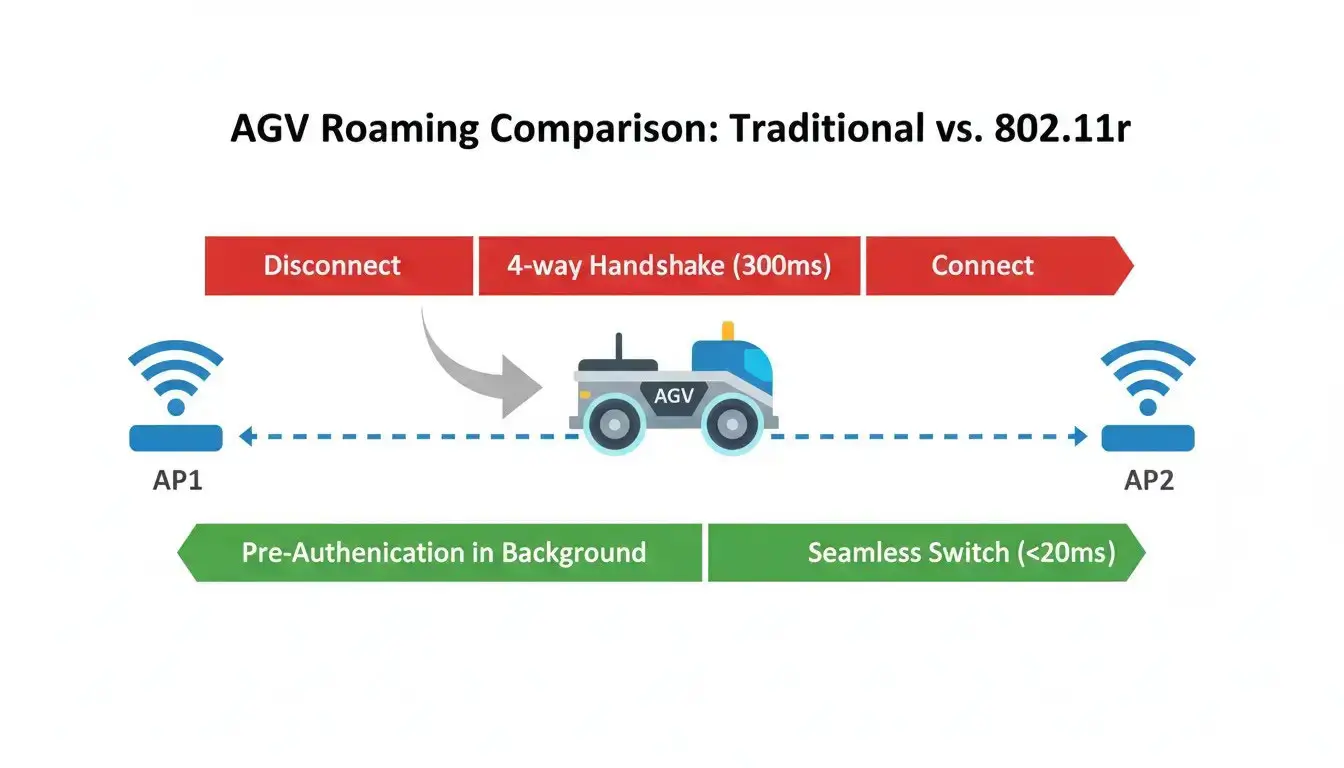
If your facility is experiencing AGV WiFi roaming disconnects, implementing an 802.11r fast transition network architecture is the direct technical fix. Standard enterprise WiFi relies on a “break-before-make” handover, requiring the wireless client to sever its current connection and execute a full 4-way cryptographic handshake with the next Access Point (AP). This negotiation takes between 300 and 500 milliseconds. For deterministic industrial control systems, missing a single 2ms update cycle triggers an immediate PLC watchdog timeout. The AGV executes an emergency stop because the routing layer is too slow, even if the physical signal strength indicates full bars.
Check the symptoms you are experiencing on the floor:
Your network isn’t broken, it’s just too slow for industrial safety systems. Read on for the 802.11r fix.
- 1. The Root Cause: The “Phantom Disconnect”
- 2. The 2ms Window: Industrial Protocols vs. IT WiFi
- 3. Prove It Yourself: Spotting the Delay in Wireshark
- 4. “Physics is the Enemy”: Breaking the “Sticky Client” Trap
- 5. The Industrial Antidote: Fixing Disconnects with 802.11r
- 6. Case Study: Zero Downtime in Logistics
- 7. Frequently Asked Questions (AGV Roaming)
The Root Cause of AGV WiFi Roaming Disconnects: The “Phantom Disconnect”
If you have spent hours replacing antennas, tweaking RF transmission power, or auditing your ladder logic, you need to step back. The problem is almost certainly not your control logic, and it isn’t a dead zone in your factory’s WiFi coverage. You are experiencing a network phenomenon known on the factory floor as a Phantom Disconnect.
🔍 Diagnostic Definition: The Phantom Disconnect
A state where the physical wireless link (Layer 1/Layer 2) appears completely intact—evidenced by green link lights and strong RSSI values—but routing (Layer 3) is momentarily paused. During this critical delay, time-sensitive packets like Modbus TCP keep-alives or Profinet I/O frames are lost and deterministic safety systems shut down the equipment immediately.
When an AGV moves through a large industrial space, it must hand over its connection from one router to another to maintain continuous coverage. Standard enterprise and consumer WiFi networks execute this handover using a “break-before-make” logic. The AGV’s wireless client must physically sever its connection with AP 1 before it can begin negotiating a new connection with AP 2. For laptops downloading emails or smartphones streaming a video, this interruption is completely invisible due to software buffering. For hard real-time industrial control systems, it is catastrophic.
The 2-Millisecond Window: Why Industrial Protocols Can’t Survive a Normal AP Switch
To understand why the machinery stops dead in its tracks, we have to look at the mathematical mismatch between IT network protocols and OT (Operational Technology) safety tolerances.
With regular WPA2-PSK or WPA2-Enterprise encryption, if your AGV decides to jump from AP 1 to AP 2, it must undergo a full 4-way cryptographic handshake. In this negotiation, we ask for access, exchange keys, verify credentials and give a new path through the network. This handshake can easily take 300 to over 500 milliseconds in a noisy manufacturing facility with plenty of 2.4GHz EMI interference from welding arcs and VFDs (Variable Frequency Drives).
Now, compare that to your PLC. Industrial Ethernet protocols are entirely deterministic. They rely on strict, predictable timing. A typical Profinet I/O update cycle might be configured for just 2 milliseconds. If the PLC has not updated for a certain number of consecutive cycles (often triggering a watchdog threshold as low as 32ms or 50ms), the controller logically concludes that the remote I/O node has been physically cut or compromised.
Your AGV isn’t breaking down; it is doing exactly what it was programmed to do: Fail safe when communications are lost. The consumer-grade WiFi equipment managing the handover is simply too slow for industrial mathematics.
Prove It Yourself: Spotting the Delay in Wireshark
You don’t have to take our word for it. If you want to definitively prove to your IT department that the wireless infrastructure is the root cause of the AGV stoppages, you can capture the exact moment of failure using a packet sniffer like Wireshark.
- Set up a Mirror Port: Connect your laptop to a mirrored port on the switch that feeds the APs, or run a wireless capture interface in promiscuous mode near the “overlap zone” where the AGV typically stops.
- Filter for EAPOL: In Wireshark, set your display filter to
eapol(Extensible Authentication Protocol over LAN). This will isolate the WPA2 4-way handshake frames. - Delta Time analysis: Analyze the time difference between Message 1 (AP sending to the AGV) and Message 4 (the last acknowledgment from the AGV).
In a normal roaming situation you might see a big gap in the Delta Time column. In the middle of that 400ms gap, if you clear the filter, you will see the PLC sending TCP Retransmissions or Profinet Alarm frames like it’s going out of style, none of which get a reply, because the cryptographic tunnel has not been established yet. The smoking gun is in the packet capture.
Industrial WiFi Troubleshooting Guide
Want to see the exact handshake packets? Download our free PDF guide: “Analyzing AGV Roaming Delays with Wireshark”.
Download PDF GuidePLC Watchdog Timeout vs. Seamless Roaming
Standard roaming halts in the middle (red) to negotiate keys, triggering the PLC fault. 802.11r pre-authenticates for a glide-through.
“Physics is the Enemy”: Breaking the “Sticky Client” Trap
Faced with these frustrating roaming drops, the knee-jerk reaction of many maintenance engineers is to try and brute-force the physics. They remove the stock 3dBi antennas on the AGV’s onboard router and replace them with massive, high-gain 10dBi antennas, praying that a “stronger signal” will fill in the gap and avoid the disconnect from occurring.
In the heavy metal and concrete environments of modern warehousing, this is the worst possible adjustment you can make. Increasing the antenna gain artificially inflates the perceived signal strength and exacerbates a condition known as the Sticky Client Syndrome.
Wireless clients (like the router on your AGV) make their own autonomous decisions about when to roam based on the RSSI (Received Signal Strength Indicator) of the current AP. If you put a massive antenna on the AGV, it will hold onto the fading signal of AP 1 long after it has physically driven under AP 2. The AGV becomes “sticky.” It clings to a heavily degraded, error-prone connection through metal warehouse racks, dropping packets frantically rather than cleanly letting go and negotiating with the strong AP directly above it.
The Industrial Antidote: Fixing AGV WiFi Roaming Disconnects with 802.11r
You cannot fix a protocol issue with bigger antennas. The definitive solution to the AGV roaming problem is the IEEE 802.11r-2008 standard, specifically engineered to support fast roaming for sensitive industrial motion control applications.
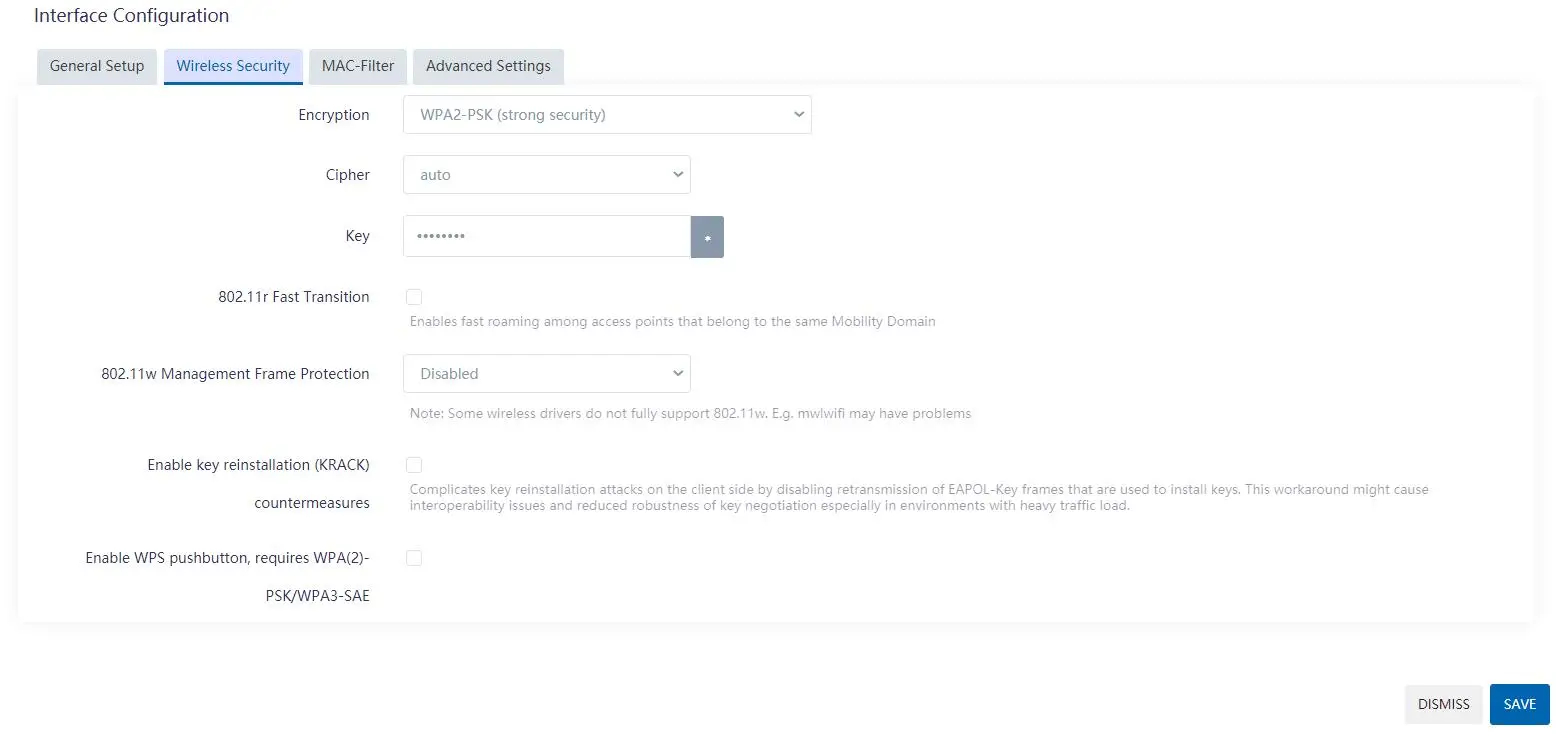
This standard introduces Fast BSS Transition (FT). Instead of waiting for the AGV to disconnect from AP 1 to begin negotiating with AP 2, 802.11r allows the network infrastructure to pre-calculate and pre-distribute the cryptographic keys (the Pairwise Master Key, or PMK) across the access points in the background.
⚠️ The “Two to Tango” Rule: 802.11r Deployment Checklist
Enabling 802.11r on the AGV’s onboard router is only half the battle. Fast Transition requires exact coordination with your factory’s Access Point (AP) infrastructure to successfully bypass the 4-way handshake:
- Mobility Domain ID (MDID) Match: 802.11r is a bidirectional protocol. Your facility’s ceiling APs (e.g., Cisco, Aruba) must have 802.11r enabled globally on the controller, and their assigned MDID must exactly match the domain configured on your edge router (e.g.,
1111). - FT-PSK vs. 802.1X (Enterprise): For deterministic industrial control requiring strict sub-20ms roaming, use FT-PSK (Pre-Shared Key) on a dedicated, isolated SSID. Standard WPA2-Enterprise (RADIUS) authentication introduces backend server query latency that often defeats the purpose of ultra-fast roaming.
- Physical RF Overlap (15% – 20%): Software protocols cannot defy physics. Your APs must have a 15% to 20% physical signal overlap. The AGV needs to see an edge signal of -65dBm to -70dBm or better to give the router enough physical time to finish the pre-authentication cache before it drops the old AP.
| Roaming Characteristics | Standard Consumer/IT WiFi | 802.11r Industrial WiFi |
|---|---|---|
| Handover Logic | Break-before-make (Disconnects completely first) | Make-before-break (Pre-authenticates via backend) |
| Authentication Delay | 300ms – 500+ ms (Requires full 4-way handshake) | < 20 ms (Utilizes cached PMK keys) |
| Impact on Deterministic PLC | Watchdog timer expires; AGV triggers Emergency Stop | Completely transparent to PLC; AGV continues motion |
Case Study: Zero Downtime in an Automotive Logistics Center
In theory, standards are great. But how does this translate on the floor? Imagine a Tier-1 automotive parts manufacturer with a fleet of 50+ AGVs. They had the usual commercial Wi-Fi bridges on their chassis. With a very high density of steel stamping machines and constant layout changes, their AGVs were experiencing an average of 15 network-related stoppages per shift. Every stoppage required a human operator to physically walk onto the floor, reset the safety relay, and manually clear the SCADA fault, costing thousands in lost throughput.
The facility replaced all onboard commercial bridges with a decoupled AGV onboard network architecture, using robust industrial-grade Wi-Fi routers natively supporting 802.11r protocols. By configuring the APs and the AGV routers to share the same Mobility Domain and enabling FT Over-the-Air, the roaming handover times dropped from an erratic 450ms to a consistent 12ms. The result? Network-related AGV stoppages dropped to zero immediately after deployment.
Frequently Asked Questions (AGV Roaming)
💡 Looking for a comprehensive architecture? To explore our complete distributed modular design and learn how to decouple networks for maximum resilience, please visit our AGV Onboard Network Solutions.
🚀 Advanced Integration: Legacy RS485, Modbus & Remote PLC Debugging
If your AGV chassis relies on legacy serial PLCs, fixing the Wi-Fi roaming is only step one. You need an edge gateway that handles both seamless handover and industrial protocol conversion:
- Fixing Modbus Timeouts: Eliminate Modbus RTU to TCP gateway timeout errors and handle raw ASCII strings natively using built-in Data Transfer Units (DTU) and Modbus Collect engines.
- Zero-Config Remote Access: Troubleshoot PLC ladder logic directly from your office via SD-LAN (m2mCloud), bypassing carrier NAT and strict factory firewalls entirely.
Stop Guessing. Start Testing.
Don’t let standard consumer Wi-Fi behavior dictate your factory’s uptime. Choose the industrial routing architecture that fits your fleet’s exact requirements:
- Choose VT-LTE400: If your AGVs use modern Ethernet-based PLCs and your only goal is to fix Wi-Fi roaming disconnects.
- Choose VT-LTE500: If you also need to connect legacy RS485 serial devices, convert Modbus RTU to TCP, or require zero-config remote PLC debugging via SD-LAN.
