

Many hotel tech upgrades start with a simple promise: “Just add smart switches. It’s easy.” In practice, it rarely is.
A 12‑floor hotel built in the 1980s faced the classic problem. Walls were thick, conduits were stuffed with decades of old telephone and coax cable, and no wiring diagram existed. When the property decided to update things by adding internet cameras, smart temperature controllers, digital signs and a computer controlled heating and cooling system the toughest part was not the devices themselves. The property found it really hard to get these devices to communicate with each other to get them to work together smoothly to get the internet cameras and the smart temperature controllers and the digital signs and the computer controlled heating and cooling system to all talk to each other properly.
The Hidden Cost of “Simple” Wiring
The global smart hotel market was valued at $150–200 billion in 2024 and is projected to hit $400–500 billion by 2030, growing at 15–20% annually.
There’s a problem. Many hotels have buildings. These old buildings have wiring issues. In fact 40% to 50% of network failures in hotels are caused by wiring problems.
We have a building too. We wanted to update our network.. It was not easy. We would have had to drill through walls fix old plaster and work around our guests.
The cost of doing this was high. Contractors said it would cost $5 to $10, per foot. For the common areas it would be $60,000 to $80,000. This was too much for us to spend.
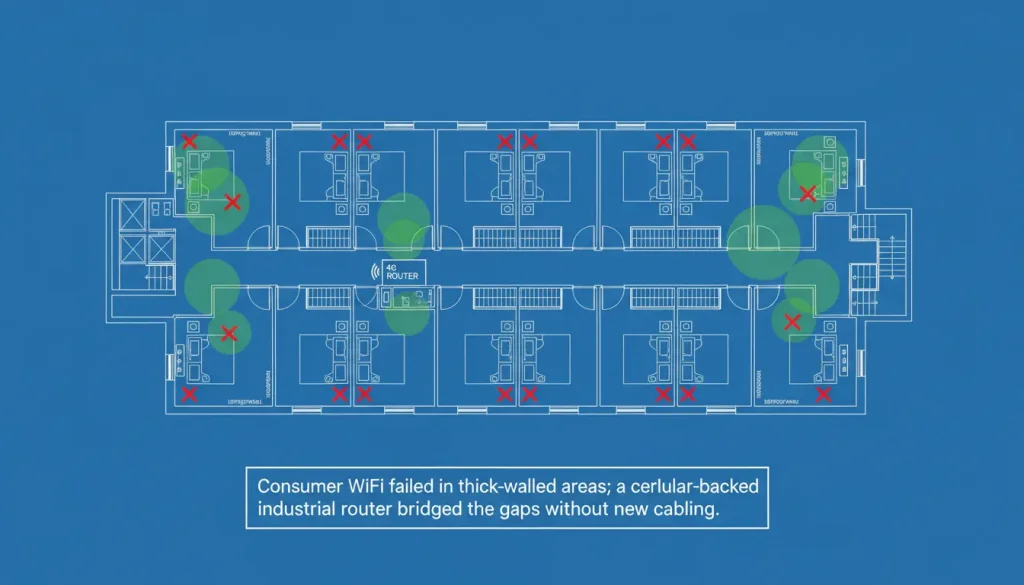
We tried the “easier” route first. We bought consumer‑grade mesh WiFi systems, hoping they’d cover the whole building. Cameras on the far end of the hallway dropped signal every time the microwave in the kitchenette was used. The HVAC controller on the 8th floor kept losing connection because the wireless signal had to pass through three concrete walls. Our “smart” system was anything but.
The Turning Point
During research on “how to get Ethernet through concrete,” the team found a reference to industrial 4G routers—devices typically used for remote oil pumps and solar farms. The specs were different from consumer gear:
- Wide temperature range (–40°C to 85°C) – not needed for the hotel’s climate, but a signal of reliability.
- Metal case – EMI shielding to cut through interference.
- DIN rail mount – fits in the existing telecom cabinet.
- 4G LTE with dual SIM – automatic failover if one carrier’s network hiccups.
- RS232/RS485 ports – direct connection to older controllers without extra converters.
A Valtoris industrial 4G router was selected. The core idea was simple: use cellular as the backbone instead of relying on the building’s ancient wiring.
What Surprised the Team
1. The router handled real‑time monitoring better than the previous “enterprise” WiFi.
The main HVAC controller was connected via Ethernet to the router. Data from floor sensors arrived every 30 seconds—no timeouts, no packet loss.
2. 4G backup kicked in automatically when the wired network acted up.
The building’s fiber link went down twice during the first month. Each time, the router seamlessly switched to cellular. The front desk didn’t even notice until told.
3. Modbus TCP support meant existing controllers didn’t need replacing.
A handful of older thermostats still used RS485. The router’s serial port integrated them directly into the new building management platform—no extra gateways.
4. Installation was faster and cleaner than any cabling project.
One technician mounted the router on DIN rail inside the telecom cabinet, ran a short Ethernet cable to the existing switch, inserted a SIM card, and powered it on. Total time: under an hour. Compare that to three weeks of contractor work and torn‑up ceilings.

The Trade‑offs Nobody Tells You
A few things weren’t perfect:
- Signal placement took a bit of trial and error. We initially put the router in the basement utility room, but the 4G signal was weak. Moving it to the second floor near a window improved signal strength by 25 dB. If you try this, plan for antenna placement before mounting.
- Initial configuration is more involved than a consumer router. You need to enter the APN from your cellular carrier, decide whether to use VPN, and set up failover rules. But once configured, it’s rock solid.
- Cost: An industrial router costs more than a consumer WiFi unit—roughly 2–3 times the price. But compared to trenching new cable, it was a fraction of the cost.
According to industry data from IoT Analytics , wireless solutions can reduce cabling expenses by 60–80% in retrofit projects . For this property, that meant saving $50,000–60,000 in avoided construction.
Results After Six Months
| Metric | Before | After |
|---|---|---|
| Camera outages (per month) | 8–10 | 0 |
| HVAC remote control failures | Several times a week | None |
| Guest complaints about AC | 4–5 per month | 1 (user error) |
| Emergency maintenance calls | 2–3 per month | 0 |
The system also enabled new capabilities we hadn’t planned. We now get real‑time alerts when a guest leaves their balcony door open (energy loss) and can pre‑heat rooms before arrival—all through the same cellular connection.
Key Takeaways for Hotel Operators
If facing a quote for running new Ethernet through old walls, consider a different approach:
- Audit existing infrastructure. Is there decent cellular signal? Most hotels have it, even in basements, thanks to modern DAS systems.
- Pick an industrial 4G router with the right interfaces. Serial ports may be needed for older controllers; multiple Ethernet ports for cameras.
- Test antenna placement. Avoid burying the router in a metal cabinet without an external antenna. A few extra minutes on placement pays off.
- Use dual SIM for reliability. One carrier might have a dead spot; two carriers rarely do.
The hotel system is not smart just because it has a lot of things, like sensors or dashboards. The hotel system became smart when the network finally worked properly and people did not get frustrated with it every day. The network was the problem. When that was fixed the hotel system became smart.
