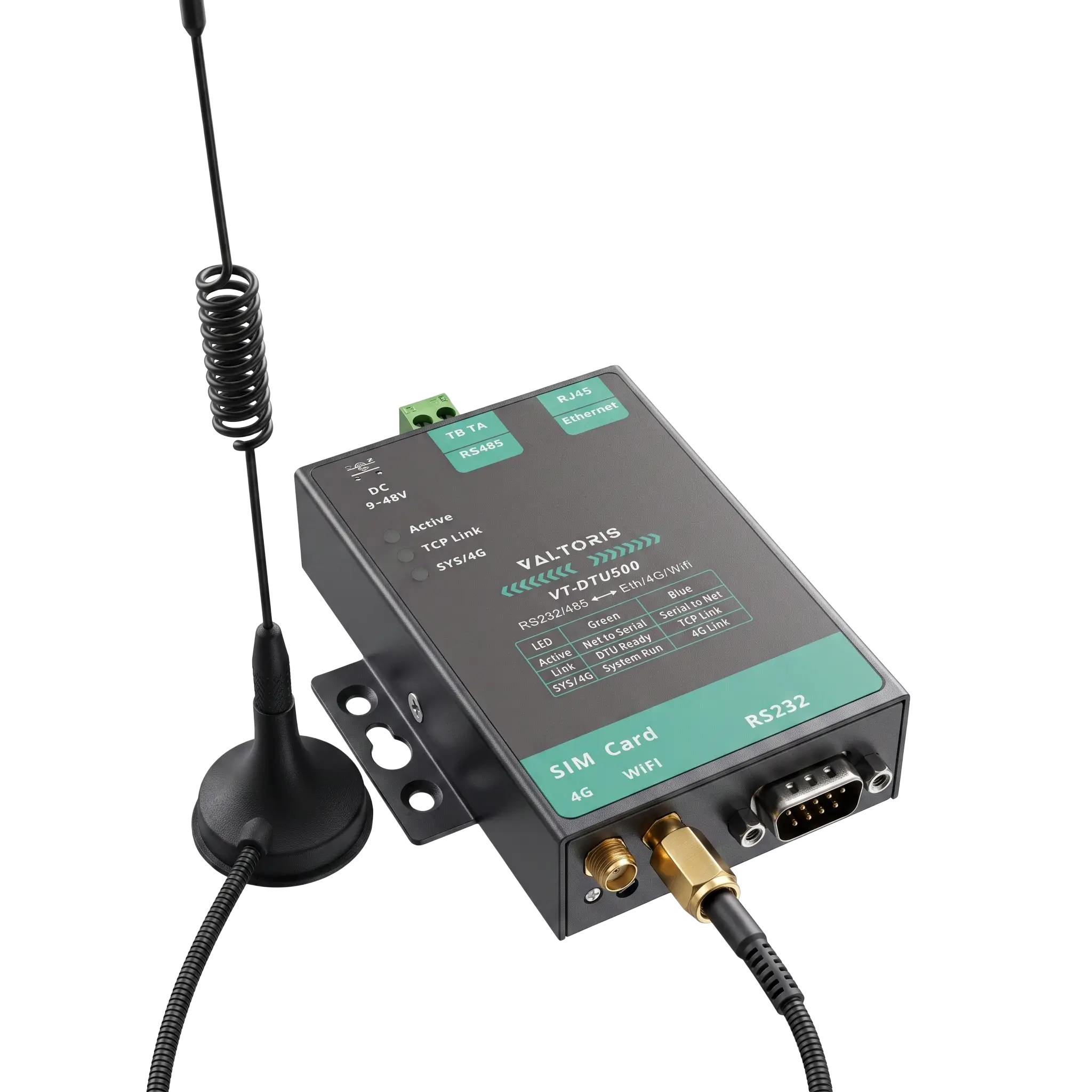
The concept of applying a Supervisory Control and Data Acquisition (SCADA) system to distributed remote infrastructure, whether a large solar photovoltaic (PV) array in the desert, a municipal wastewater pumping station, or an offshore oil platform, is simple in theory. The normal process of deploying your Programmable Logic Controller (PLC) or Remote Terminal Unit (RTU) is to wire to a basic cellular modem, insert a carrier SIM card and start polling registers from your central control room over Ethernet.
But the physical and networking realities of the industrial edge are seldom so forgiving. Automation engineers frequently face critical failures within days of deployment. The main SCADA dashboard starts flashing red with alarms for “Exception Code 0x0B (Target Device Failed to Respond)”. Invisible TCP/IP polling overhead drives up the monthly cellular data bill into the thousands of dollars. Or, even more frustratingly, the corporate Information Technology (IT) department has a hard rule against opening firewall ports to permit external inbound IP traffic, leaving your operational technology (OT) completely marooned.
When a remote site goes offline in a SCADA network, the alarm isn’t just a minor blip on an HMI screen. It represents a potential production stoppage, a regulatory reporting violation, or in critical environments, a severe safety hazard. According to industry analysis, while industrial Ethernet dominates the internal plant floor, cellular connectivity remains the absolute backbone for reaching geographically dispersed sites that wired infrastructure simply cannot serve.
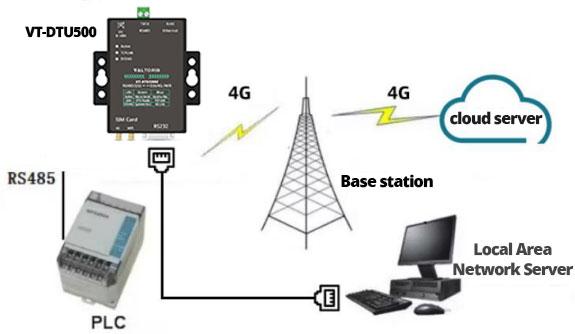
This comprehensive technical guide dives deep into the architecture of remote industrial M2M (Machine-to-Machine) networking. We will explore the technical limitations of Carrier-Grade NAT (CGNAT), calculate the hidden financial bandwidth demands of legacy Modbus polling versus edge-driven MQTT architectures, and outline exactly what hardware features are required in cellular modems for SCADA to bridge the gap between harsh OT environments and strict IT cybersecurity mandates.
Telemetry Bandwidth & Financial Impact Analyzer
Discover the hidden operational expenditure (OpEx) of legacy transparent polling versus an edge-driven MQTT exception reporting architecture.
The 4 Biggest Pain Points When Deploying Cellular Modems for SCADA
Standard commercial cellular networking operates on a fundamentally different paradigm than industrial telemetry. A 500-millisecond spike in latency when a consumer is loading a webpage on their smartphone means the browser just waits and buffers. But the same latency spike on a central SCADA server interrogating a legacy field instrument over a 4G LTE link means the whole communication frame breaks down. The serial protocol interprets the delay as end-of-message and assumes the data packet is bad, and quietly discards it.
Choosing a scada modem is more than simply getting yourself online. It’s about ensuring that you don’t create a fragile point of failure that turns a minor TCP/IP hiccup into an expensive, manual maintenance operation. Let’s examine the four major pain points crippling remote telemetry networks:
1. The Protocol Timing Trap
Modbus RTU over an RS485 bus relies on extremely strict inter-character timing (typically a mandatory 3.5 character silence to denote the end of a frame). Cellular networks, by their very nature, suffer from inherent latency and jitter. If a basic “transparent” 4G modem receives a fragmented TCP packet and outputs it to the serial bus with a microscopic delay, the downstream device will discard the message.
Deploy a device with an embedded Storage Modbus Gateway. This allows the modem to poll the instruments locally and answer SCADA queries instantly from its RAM cache, isolating the strict RS485 timing from unpredictable 4G latency.
2. Thermal Throttling & Hardware Crashes
Automation enclosures deployed in desert solar arrays or unventilated municipal pumping stations frequently experience internal temperatures exceeding 70°C (158°F). Standard commercial routers and USB dongles undergo severe thermal throttling under these conditions, eventually dropping their cellular connections to prevent their silicon processors from burning out.
Utilize true industrial-grade hardware rigorously tested and rated for -40°C to 85°C continuous operation, built with SECC metal housings and wide-temperature industrial capacitors.
3. Multi-Host Data Collisions
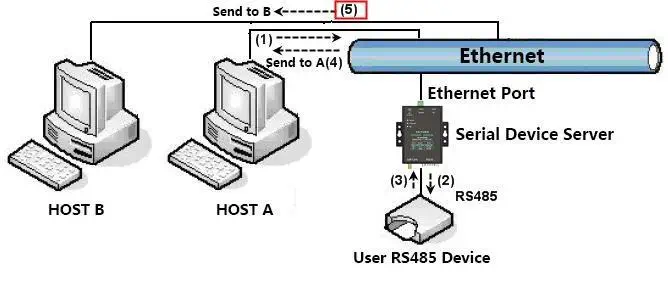
It is increasingly common to have a local touchscreen HMI (Human Machine Interface) and a remote cloud SCADA system querying the same field device simultaneously. Because RS485 is a half-duplex bus (only one device can “speak” at a time), simultaneous queries from a basic transparent modem will collide on the copper wire, resulting in corrupted frames and frozen serial ports.
Implement a gateway with Multi-Host Arbitration. This firmware feature intelligently queues incoming TCP requests and schedules them sequentially on the RS485 bus, preventing collisions.
4. Unpredictable IP Addressing
Traditional SCADA architectures are built on the master station actively pulling data from the remote IP address (a “Pull” architecture). However, cellular carriers do not assign static public IP addresses to standard data SIMs by default. They hand out dynamic private IPs that change all the time, so the remote site is invisible to the central server.
Switch to a “Push” architecture with MQTT publish/subscribe protocols or establish an outbound VPN tunnel to bypass the carrier’s dynamic IP restrictions entirely.
The CGNAT Trap: Why Standard SCADA Modems Drop Inbound Requests
Perhaps the most common scenario plays out daily in automation integration labs around the world: An engineer meticulously configures a controller, connects it to a new 4G cellular modem, inserts a standard data SIM card purchased from a local telecom carrier, and verifies the modem has outbound internet access. They deploy the control panel to the field. Back in the centralized control room, they enter the modem’s IP address into their SCADA software and execute a connection request.
Nothing happens. The connection times out. Even a simple ICMP Ping command executed from the command prompt returns a frustrating “Request Timed Out.”
The invisible culprit is Carrier Grade Network Address Translation (CGNAT). Because the global pool of IPv4 addresses was completely exhausted years ago, telecom carriers can no longer afford to assign a unique, publicly routable IP address to every cellular device. Instead, your remote modem is assigned a private IP address (often residing within the 10.x.x.x or 100.64.x.x ranges). The carrier places thousands of these industrial modems behind a massive, centralized NAT firewall, sharing a single public IP address to access the broader internet.
Because the cellular modem is effectively “hidden” deep inside the carrier’s private network architecture, unsolicited inbound connections originating from your SCADA server are inherently blocked. The carrier’s firewall will silently drop your incoming TCP SYN packets.
Architectural Strategies to Defeat CGNAT
To overcome the CGNAT barrier, you must completely invert the direction of the network conversation. The connection must be initiated from the inside out. There are three primary engineering approaches to achieve this when deploying an industrial cellular router for scada systems:
- Procure Static Public IP M2M SIM Cards: You can negotiate with your telecom provider to purchase specialized Machine-to-Machine (M2M) SIM cards provisioned with Static Public IPv4 addresses. While this allows traditional SCADA polling to work, these plans are significantly more expensive. Furthermore, they expose your remote modem directly to the public internet, requiring rigorous edge firewall rules to prevent automated brute-force cyberattacks from scanning bots.
- Migrate to MQTT (Publish/Subscribe): Instead of the SCADA system incessantly polling the modem, the modem acts as an active edge gateway. It reads the local field data and actively publishes that data outbound to a centralized MQTT broker over port 1883 or 8883. Because the modem initiates the connection outward, CGNAT allows the traffic to flow freely.
- Deploy Virtual Private Networks (VPNs): The remote cellular modem initiates an outbound, encrypted secure tunnel to your corporate VPN concentrator. Once this outbound tunnel is established, it effectively bypasses the CGNAT barrier, creating a bidirectional link that makes the remote field device appear as if it is sitting locally on your corporate LAN.
Security First: Bypassing Corporate IT Firewalls with Built-In VPNs
In today’s critical infrastructure deployments, the IT (Information Technology) department and the OT (Operational Technology) department are often at odds with each other. “OT engineers need instant, seamless access to remote field data to keep plant uptime uninterrupted. On the other side, IT administrators must follow zero-trust cybersecurity protocols to the letter to prevent debilitating ransomware attacks from penetrating the corporate network.
Ask a corporate IT administrator to open external inbound firewall ports (e.g., Port 502 for Modbus TCP) to allow unencrypted SCADA traffic to flow directly in from the public cellular network, and you will be unequivocally denied. “The exposure of plain text industrial protocols to the open internet is a gross violation of global cyber security frameworks. For detailed guidance on securing industrial control systems, refer to the Cybersecurity and Infrastructure Security Agency (CISA) Best Practices for ICS.
The most elegant and secure solution is to deploy a router for scada that has a full complement of native VPN clients. Rather than relying on simple port forwarding, advanced gateways natively integrate powerful cryptographic tunneling protocols directly into their firmware.
| VPN Protocol | Cryptographic Profile & Overhead | Best Use Case in SCADA |
|---|---|---|
| IPsec (IKEv2) | Operates at the kernel level. Excellent throughput but complex to configure with strict NAT traversal requirements. | Site-to-Site connections linking a massive remote solar plant’s local subnet directly to the primary enterprise datacenter. |
| WireGuard® | State-of-the-art cryptography. Extremely lightweight code base resulting in minimal CPU overhead and ultra-fast reconnection times. | Highly recommended for remote edge devices on fluctuating 4G LTE networks requiring minimal latency and low data consumption. |
When the cellular router initiates an outbound VPN connection to the central server, it effortlessly punches a secure hole through both the carrier’s CGNAT and the rigid corporate IT firewall. Because the connection originates from the inside and is heavily encrypted, IT administrators do not need to open any dangerous inbound listening ports. Once the tunnel is verified, a secure, bi-directional pathway is established. Your SCADA system can now safely poll the remote device via its new virtual IP address, with all traffic completely shielded from public view.
Modbus Polling vs. MQTT: Stopping Cellular Data Bill Shock
Assuming you successfully establish a VPN tunnel and begin polling your remote sites using traditional Modbus TCP over a 4G LTE network, you will almost certainly encounter a secondary, financially painful issue: exorbitant cellular data overage charges.
Modbus is a legacy, request-response protocol engineered in the late 1970s for hardwired, local copper networks (RS232/RS485) where bandwidth was effectively infinite and free. The architecture is inherently inefficient for cellular networks. The SCADA master must continuously ask the slave for data, and the slave must respond, regardless of whether the physical world has changed. If your SCADA system is configured to poll 100 registers every 5 seconds, it generates a continuous, massive stream of TCP/IP network traffic—even if the tank level or pressure values haven’t fluctuated by a single decimal point in 24 hours.
A basic “transparent” cellular modem simply forwards all of this redundant polling traffic over the airwaves. Every single Modbus query requires a TCP packet, which carries an IP header, a TCP header, the Modbus Application Protocol (MBAP) header, and TCP Acknowledgement (ACK) packets. This overhead dramatically inflates your monthly data consumption. (Refer to the Telemetry Bandwidth Analyzer at the beginning of this article to see the exact financial impact).
To eliminate this cellular data bill shock, modern M2M architectures are decisively shifting away from centralized polling toward Edge Computing and the MQTT (Message Queuing Telemetry Transport) protocol. Rather than the cloud server constantly asking “Did the inverter voltage change?”, an advanced industrial gateway performs the intensive Modbus polling locally over the hardwired RS485 bus.
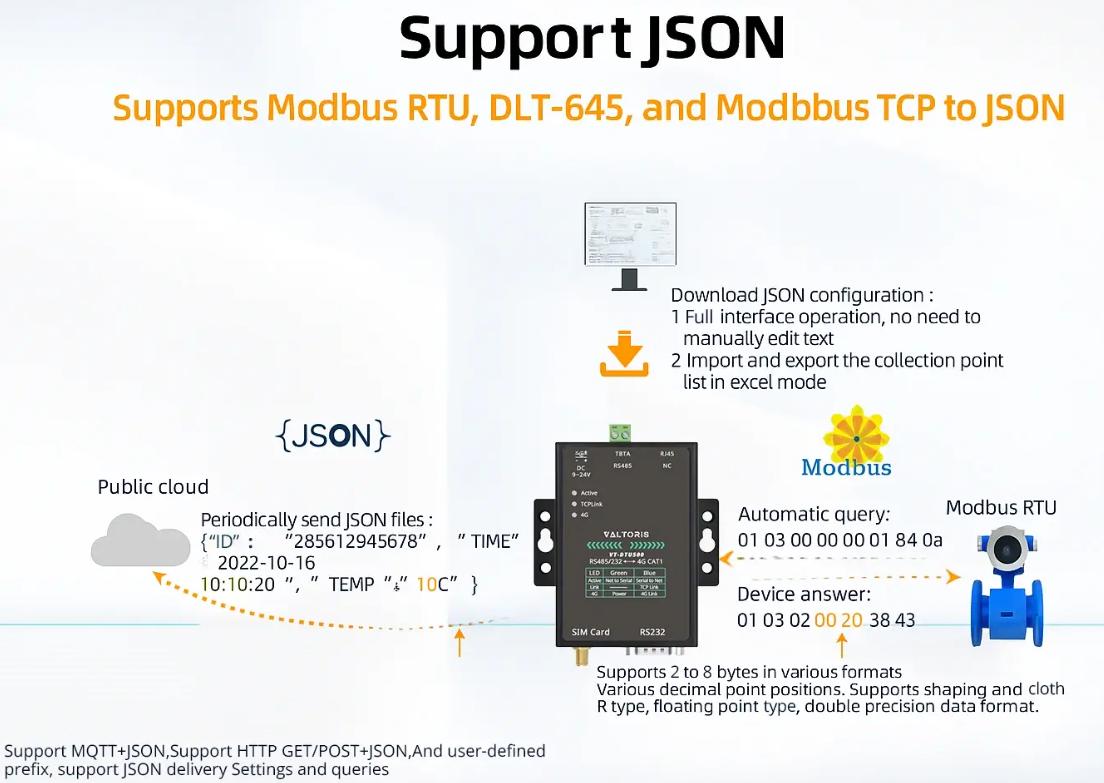
The gateway acts as an intelligent translator. It evaluates the local data, converts the raw serial hex registers into standardized, readable JSON payloads, and utilizes the cellular network only to publish data to the cloud when a value physically deviates beyond a configured deadband (Report by Exception). This architectural transition from Modbus TCP polling to edge-driven MQTT publishing routinely reduces cellular data consumption by over 90%, achieving massive OPEX savings across a wide deployment.
5 Must-Have Features When Choosing an Industrial Cellular Modem
Procuring cellular modems for SCADA is a strategic engineering decision that will dictate your operational expenditure and maintenance workflows for the next decade. Relying on basic “transparent” modems will leave your systems integrators writing complex, brittle software scripts to manage TCP connection drops and data buffering. To ensure absolute network resilience, your hardware specification must explicitly mandate these five distinct capabilities:
| Specification Category | Standard Commercial Modem | Valtoris Industrial Gateway (VT-DTU500) |
|---|---|---|
| Operating Temperature | 0°C to 40°C (Prone to thermal throttling) | -40°C to 85°C (Extreme environment rated) |
| Power Input | 5V DC (Requires stable AC adapter) | 9V to 48V DC (Wide-voltage for solar/battery arrays) |
| Housing & Mounting | Plastic desktop casing | SECC Metal Housing with DIN-rail/wall mounting |
| Network Resilience | Manual reboot required on freeze | Built-in Hardware Watchdog for autonomous recovery |
1. Internal Hardware Watchdog
Cellular networks periodically drop connections or reassign tower priority. When a remote modem locks up due to a carrier tower reset, the only way to recover a consumer-grade device is to dispatch a technician to physically cycle the power. An industrial router for scada must feature a dedicated hardware watchdog circuit. This specialized microcontroller autonomously monitors the internal operating system and network connection. If it detects a freeze or a persistent loss of cellular ping, it physically cuts power to the internal cellular module and reboots it automatically, ensuring maximum uptime without human intervention.
2. Edge Protocol Conversion (Modbus RTU to TCP/MQTT/JSON)
Your hardware needs to be inherently future-proof. Your legacy infrastructure may still be almost exclusively Modbus RTU-based today. But the global automation industry is rapidly moving to the cloud-native architecture. The best modem should be able to convert legacy serial telemetry (Modbus RTU as well as Modbus TCP) to structured JSON formats with no effort. It should have the firmware ability to send out this JSON data thru HTTP POST/GET or MQTT directly to the IoT platforms without the use of intermediate middleware at all.
3. Offline Data Caching & Storage Gateway
A normal clear-text modem simply passes data straight thru. If the 4G network delay is in the middle of the transmission, the packet is lost for ever. Premium Routers have a Storage Modbus Gateway architecture. The device then polls the downstream instruments itself and caches the latest register data in its internal RAM. Also the modem has to be able to cache data locally (eg. 256K cache) in case the cellular connection fails completely . When the network is restored, the saved data is automatically uploaded, ensuring no gaps in your regulatory compliance reporting.
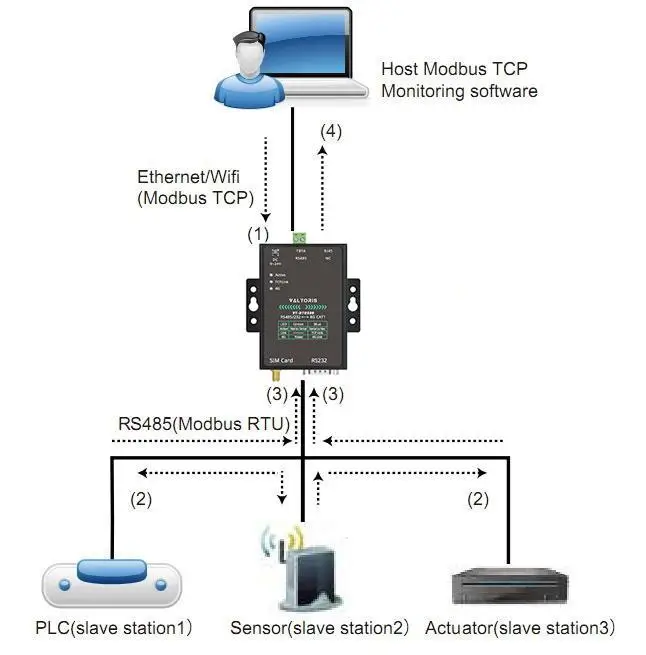
4. Wide-Voltage DC Inputs
Most remote sites have no reliable solar DC power or battery bank. True industrial routers are aware of this and support wide range DC input. Heavy duty models can operate on 9 to 48V DC (or 9 to 24V DC on some models). They can run directly from 12V, 24V or 48V battery banks, without the need for sensitive, failure-prone intermediate power step-down converters.
5. EMC Immunity and Extreme Temperature Ratings
It’s a tough environment for remote telemetry cabinets. Equipment must operate stably without thermal throttling over a demanding industrial temperature range of -40°C to 85°C (-40°F to 185°F). Beyond temperature, the hardware must be engineered with heavy Electromagnetic Compatibility (EMC) protection to survive the harsh electrical noise of industrial plants. This includes stringent test standards such as 15KV electrostatic discharge (ESD) protection, ±4KV Electrical Fast Transient (EFT/Burst) immunity for power supplies, and ±4KV Surge protection. This robust EMC immunity ensures the CPU and communication ports are protected from ground loops and voltage spikes generated by nearby heavy machinery.
Real-World Example: The $9,350 Cost of a Bad Selection
The true cost of a cellular modem is rarely the purchase price; it is the hidden operational expenditure of maintaining it. Consider a regional water utility that recently upgraded its infrastructure. They deployed 50 consumer-grade cellular routers at remote municipal pump stations to save on initial capital expenditure.
Within 18 months, 17 units failed completely. The root cause? Severe thermal throttling. During the summer, temperatures inside the unventilated metal control cabinets routinely reached 65°C (149°F), far exceeding the commercial plastic routers’ maximum rating of 40°C. Each failure caused a loss of critical telemetry data and required a senior technician to drive an average of 3 hours round trip to diagnose and replace the melted unit.
The financial breakdown was stark: The cost of the replacement hardware ($150) plus the labor and vehicle expenses for the “truck roll” ($400) totaled $550 per incident. For 17 failures, the utility suffered a hidden operational loss of $9,350, not including the incalculable risk of running municipal water pumps blind for weeks.
The utility subsequently replaced the entire fleet with industrial-grade units utilizing SECC metal housings and rated for -40°C to 85°C. Two years later, they have experienced zero thermal failures. The slight upfront cost difference was recovered during the very first heatwave.