
How to Enable Remote SSH Access for Industrial Shields RPi PLCs
Deploying Open-Source PLCs in off-grid agriculture or water management sites? Learn how to establish a secure 4G cellular backhaul and access your Raspberry Pi terminal remotely.
1. The Off-Grid Connectivity Challenge
Industrial Shields provides fantastic hardware flexibility by packaging Raspberry Pi and Arduino boards into rugged, industrial-grade PLCs. Typically system integrators use these devices in remote environments – such as smart irrigation systems, solar microgrids or wastewater lift stations.
Connectivity remains the main challenge of these deployments. There is rarely a fiber or broadband connection available in the middle of a field. If a logic error occurs or code needs updating, dispatching an engineer to manually plug into the PLC’s ethernet port is costly and inefficient. You need a reliable cellular tunnel.
2. Hardware Setup: Plug and Play
To provide cellular backhaul, we will pair the Industrial Shields PLC with a Valtoris 4G LTE Industrial Gateway.
- Power: Both devices accept standard 12V/24V DC DIN-rail power supplies.
- Network: Connect a standard RJ45 Ethernet cable from the ethernet port on the Raspberry Pi PLC to any of the LAN ports (LAN1-LAN4) on the Valtoris router.
DHCP Auto-Assignment
The Valtoris gateway runs a DHCP server by default on its LAN ports. Once connected, the PLC will automatically lease a local IP address (typically in the 192.168.8.x range). The PLC now has full outbound internet access.
3. Network Configuration: Setting Up Port Forwarding
The PLC can access the internet, but by default you cannot access the PLC from the outside because of the NAT firewall on the router. Port Forwarding must be setup to allow remote SSH access to get the install code.
Log into the Valtoris web interface (Default: 192.168.8.1) and go to Network > Firewall > Port Forwards. Create a new rule to forward incoming external traffic to the internal PLC.
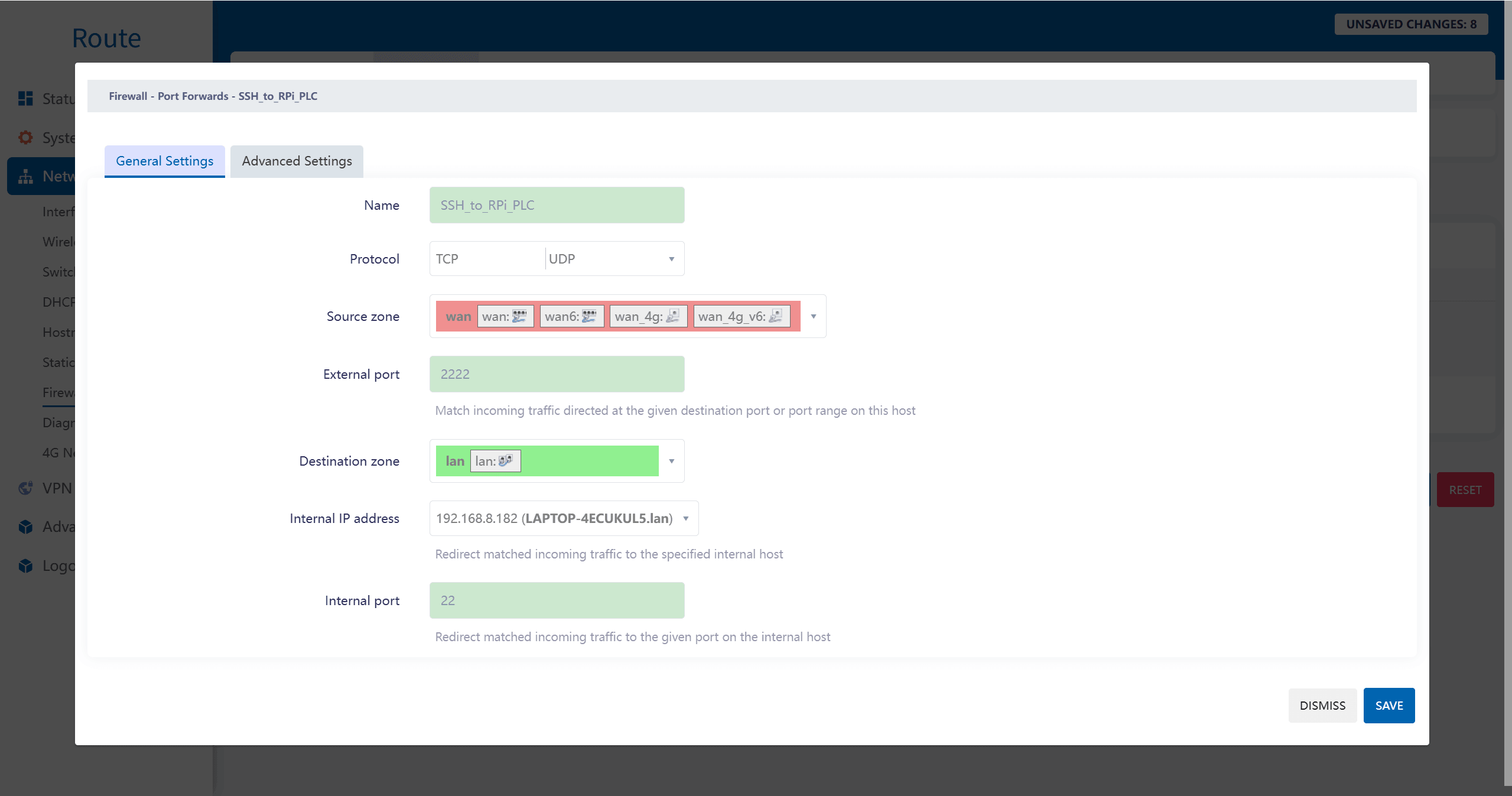
Configuration Parameters:
- Name:
SSH_to_RPi_PLC(or any identifiable name) - Protocol:
TCP - Source Zone:
wan(Incoming 4G cellular traffic) - External Port: Choose a custom port (e.g.,
2222) to obscure standard SSH ports from basic bot scans. - Destination Zone:
lan - Internal IP Address: Select the local IP assigned to your Industrial Shields PLC (e.g.,
192.168.8.182). - Internal Port:
22(Standard Linux SSH port)
4. The Result: Secure Remote Terminal Access
When you save and apply the rule, your remote infrastructure is ready to go. The system integrator can now start a terminal from their office anywhere in the world and run:
Traffic is transparently routed from the cellular network, through the Valtoris NAT firewall, straight into the Raspberry Pi logic controller – no costly site visits for software updates or diagnostic debugging.
Need reliable backhaul for your PLCs?
Provide industrial-grade 4G LTE connectivity to your open-source hardware deployments. Built for harsh environments and DIN-rail ready.
